web
You’re offline. This is a read only version of the page.
close
Skip to main content

Notifications

Announcements

No record found.

Community site session details

Community site session details

Session Id :
Microsoft Dynamics 365 | Integration, Dataverse...
Answered

Automatic transition to Unified Interface locked in T-2 Days. What does this imply?

(0) ShareShare
ReportReport
Posted on by 7,396 User Group Leader

Hi,

I received an email with the above heading today since my original Transition Date was 20th Nov 2020.

Is this a reminder that the transition date will be locked or is this the final transition date?

My portal details shows as below which I had set to 4th Dec-
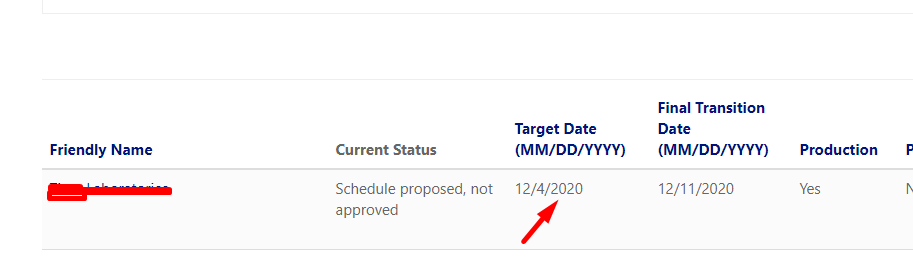
transitionDate.png

I have the same question (0)
  • Verified answer
    Henry J. Profile Picture
    5,237 on at

    Hello Priyesh,

    It looks like the transition date that we proposed was not formally opted in ("Schedule proposed, not approved").
    We won't force customers to transition unless they have approved the suggested date.
    If no approval is granted, the transition will be forced on the "Final Transition Date": December 11th 2020 in your case (it depends on the region).

    Henry

  • Priyesh Profile Picture
    7,396 User Group Leader on at

    Hi Henry,

    Thanks for the feedback. So, I can ignore the email I got yesterday that the transition is happening in T-2 days (Email subject which I entered in this post title)

    So, based on the screenshot I pasted for my environment, the Final Transition Date is 11th Dec 2020.

    Also, I am trying to approve the new date but it just doesn't take effect. That's why I fear that it has stopped accepting the new change we are trying to impose.

    Please advise.

  • Suggested answer
    Henry J. Profile Picture
    5,237 on at

    Hi Priyesh, can you confirm that the environment mentioned in the email is the same as the one you see on the portal?

    From the portal, I confirm that only opted-in environments will be transitioned to Unified Interface on the target date (until the mandatory cutover date that is mentioned in the "Final Transition Date" where it will be forced.

  • Priyesh Profile Picture
    7,396 User Group Leader on at

    Yes, the one mentioned in the email is the same in the screenshot.

    I see inside the below -

    oldApprovedDates.png

    But on the main Environments table, I see the updated Date and I can't even Approve it.

  • Priyesh Profile Picture
    7,396 User Group Leader on at

    Looks like it is approved now?

    0312.approved.png

  • Suggested answer
    Henry J. Profile Picture
    5,237 on at

    Hi Priyesh, as discussed I confirm your environment is setup to be transitioned on December 4th 2020.

Under review

Thank you for your reply! To ensure a great experience for everyone, your content is awaiting approval by our Community Managers. Please check back later.

Helpful resources

Quick Links

Responsible AI policies

As AI tools become more common, we’re introducing a Responsible AI Use…

Neeraj Kumar – Community Spotlight

We are honored to recognize Neeraj Kumar as our Community Spotlight honoree for…

Leaderboard > Microsoft Dynamics 365 | Integration, Dataverse, and general topics

#1
#ManoVerse Profile Picture

#ManoVerse 101

#2
Siv Sagar Profile Picture

Siv Sagar 93 Super User 2025 Season 2

#3
Martin Dráb Profile Picture

Martin Dráb 62 Most Valuable Professional

Last 30 days Overall leaderboard

Product updates

Dynamics 365 release plans
