web
You’re offline. This is a read only version of the page.
close
Skip to main content

Announcements

No record found.

News and Announcements icon
Community site session details

Community site session details

Session Id :
Microsoft Dynamics CRM (Archived)

Why did changing the Owner of an Account cause my Activities to change?

(0) ShareShare
ReportReport
Posted on by

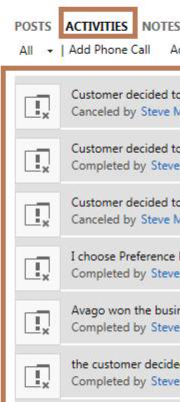
CRM 2013, on-premise. I changed the Owner of an Account today to me, when I did that I noticed later that all of the Activities had my name next to everything (Cancelled by and Completed by for instance) - See picture below for example. Is that because of what I did? If yes, is there a way to prevent that in the future....I just want to change the Account Owner to me (I am the only CRM user left, so many accounts need to have me as the Owner)?
72207.Capture.PNG

I changed the Owner to me on another account and it DID NOT change anything in the Activities (which is what I expected and wanted).....so now I am confused what caused the issue. Again, I am the only user.

*This post is locked for comments

I have the same question (0)
  • Community Member Profile Picture
    on at

    Also, I found this article that is similar to my issue.....but this was Cases. Also, it doesn't explain why it had the affect on one Account but not another.

    community.dynamics.com/.../137978

  • Suggested answer
    Abby Kong Profile Picture
    6 on at

    Hi Torerah,


    Check this.
    community.dynamics.com/.../when-you-reassign-accounts-and-contacts-all-activities-are-also-reassigned

    Looks like all the activities in your screenshot are tasks. Is the other account not having this issue also with activity Task?
    Dynamics would try to change the owner of the activities (even though they are cancelled or completed) when the account's owner is changed. This is the default behaviour. If you don't like the default behaviour, you need to change the Type of behaviour of the relationship.

    Regards,
    Abby

  • Verified answer
    Rawish Kumar Profile Picture
    13,758 on at

    This happens due to the cascading relationship behaviour.

    if you go to your customizations > customize the system > account > 1:N relationship > look for the relation to activties ( individual ones and activity) 

    on the relationship behaviour you will see something like below:
    4373247.1.png

  • Suggested answer
    Alok Singh Profile Picture
    910 on at

    Hi Toberah,

    As suggested by everyone, You need to change the behavior of existing 1:N relationship of account with related activities.

    Please note that each activity type (Task, Phone call, Email etc) has a separate relationship with Account and you have to make the similar change for each relationship.

    Kindly follow the below steps to update relationships

    1. The default 'Type of Behavior'  would be 'Parental'. First change it to 'Configurable Cascading'

    2. Change 'Assign' option from ' Cascade All' to 'Cascade None'

    After changing this behavior, on assignment of account there will no impact on related activities.

  • Suggested answer
    Community Member Profile Picture
    on at

    Thank you

Under review

Thank you for your reply! To ensure a great experience for everyone, your content is awaiting approval by our Community Managers. Please check back later.

Helpful resources

Quick Links

Introducing the 2026 Season 1 community Super Users

Congratulations to our 2026 Super Stars!

Meet the Microsoft Dynamics 365 Contact Center Champions

We are thrilled to have these Champions in our Community!

Congratulations to the March Top 10 Community Leaders

These are the community rock stars!

Leaderboard > 🔒一 Microsoft Dynamics CRM (Archived)

#1
JS-09031509-0 Profile Picture

JS-09031509-0 3

#2
AS-17030037-0 Profile Picture

AS-17030037-0 2

#2
Mark Eckert Profile Picture

Mark Eckert 2

Last 30 days Overall leaderboard

Featured topics

Product updates

Dynamics 365 release plans
