web
You’re offline. This is a read only version of the page.
close
Skip to main content

Notifications

Announcements

No record found.

Community site session details

Community site session details

Session Id :
Small and medium business | Business Central, N...
Answered

Need to change Location Code in Purchase Order Item lines all at once

(0) ShareShare
ReportReport
Posted on by 5

Hello,

When I post a Purchase Order on NAV, sometimes I need to change the location code depending on which warehouse the order is received.

My problem is that each Purchase Order has a lot of different items (lines) so I need to change the location code of each line one by one. See below image:
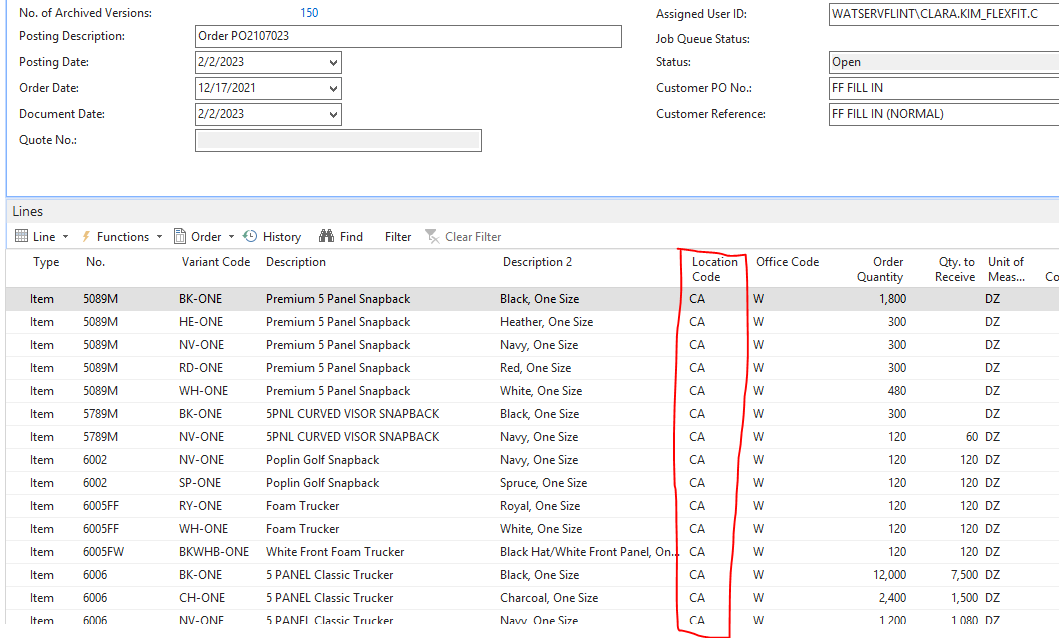
pastedimage1675362937594v1.png

The "Edit - Purchase Order" page has two more sections: "Invoicing" and "Shipping". See below:

pastedimage1675363197845v3.png

When I change the "Office Code" on the Invoicing section, this change can be populated to each item line.

But when I change the "Location Code" on the Shipping section, this change cannot be populated to each item line.

Is there any other way that I can change the Location Code in each item line with one step?

Thanks.

I have the same question (0)
  • Suggested answer
    Inge M. Bruvik Profile Picture
    1,111 Moderator on at

    Before you start posting something on a PO you should be able to change the location in the PO head.

    But after you have started posting you will have to do it line by line.

    So make sure the data is correct before you start posting.

  • Verified answer
    YUN ZHU Profile Picture
    95,681 Super User 2025 Season 2 on at

    Hi, as far as I know there is no standard way, I used to customize this functionality for a client.

    So you should contact your partner.

    Hope this helps.

    Thanks.

    ZHU

  • Suggested answer
    DAnny3211 Profile Picture
    11,397 on at

    hi

    look this

    community.dynamics.com/.../how-to-change-location-warehouse-for-multiple-po-lines

    DAniele

  • Suggested answer
    Nitin Verma Profile Picture
    21,708 Moderator on at

    This is the Stan behaviour of the system, you need to do customization to achieve that before posting

  • LuisK Profile Picture
    5 on at

    Thank you all for your answers.

Under review

Thank you for your reply! To ensure a great experience for everyone, your content is awaiting approval by our Community Managers. Please check back later.

Helpful resources

Quick Links

Responsible AI policies

As AI tools become more common, we’re introducing a Responsible AI Use…

Neeraj Kumar – Community Spotlight

We are honored to recognize Neeraj Kumar as our Community Spotlight honoree for…

Leaderboard > Small and medium business | Business Central, NAV, RMS

#1
OussamaSabbouh Profile Picture

OussamaSabbouh 2,606

#2
YUN ZHU Profile Picture

YUN ZHU 931 Super User 2025 Season 2

#3
Jainam M. Kothari Profile Picture

Jainam M. Kothari 773 Super User 2025 Season 2

Last 30 days Overall leaderboard

Featured topics

Product updates

Dynamics 365 release plans
