web
You’re offline. This is a read only version of the page.
close
Skip to main content

Announcements

No record found.

News and Announcements icon
Community site session details

Community site session details

Session Id :
Microsoft Dynamics CRM (Archived)

Quick Campaigns are not displayed on Marketing list form

(1) ShareShare
ReportReport
Posted on by 285

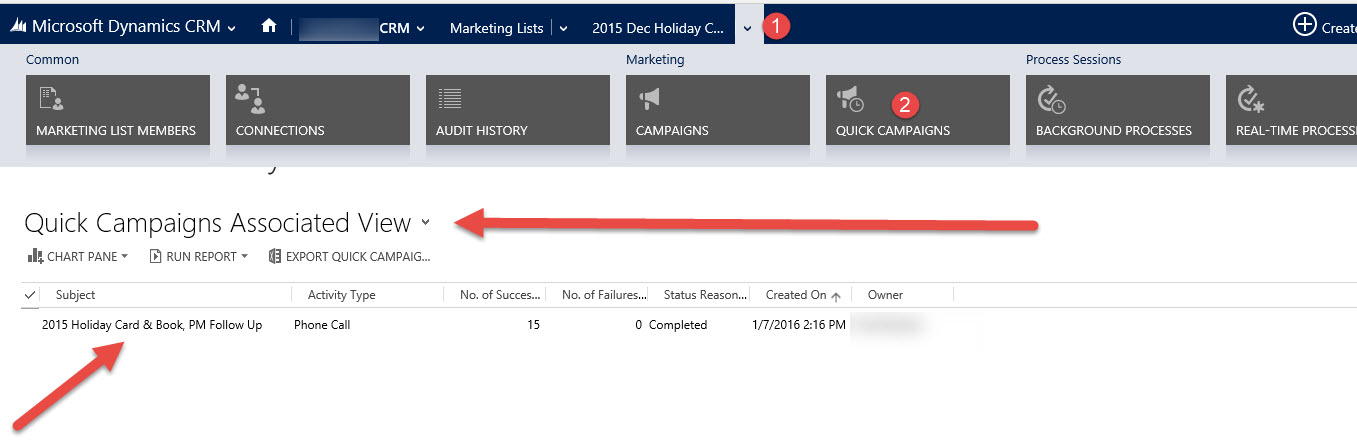
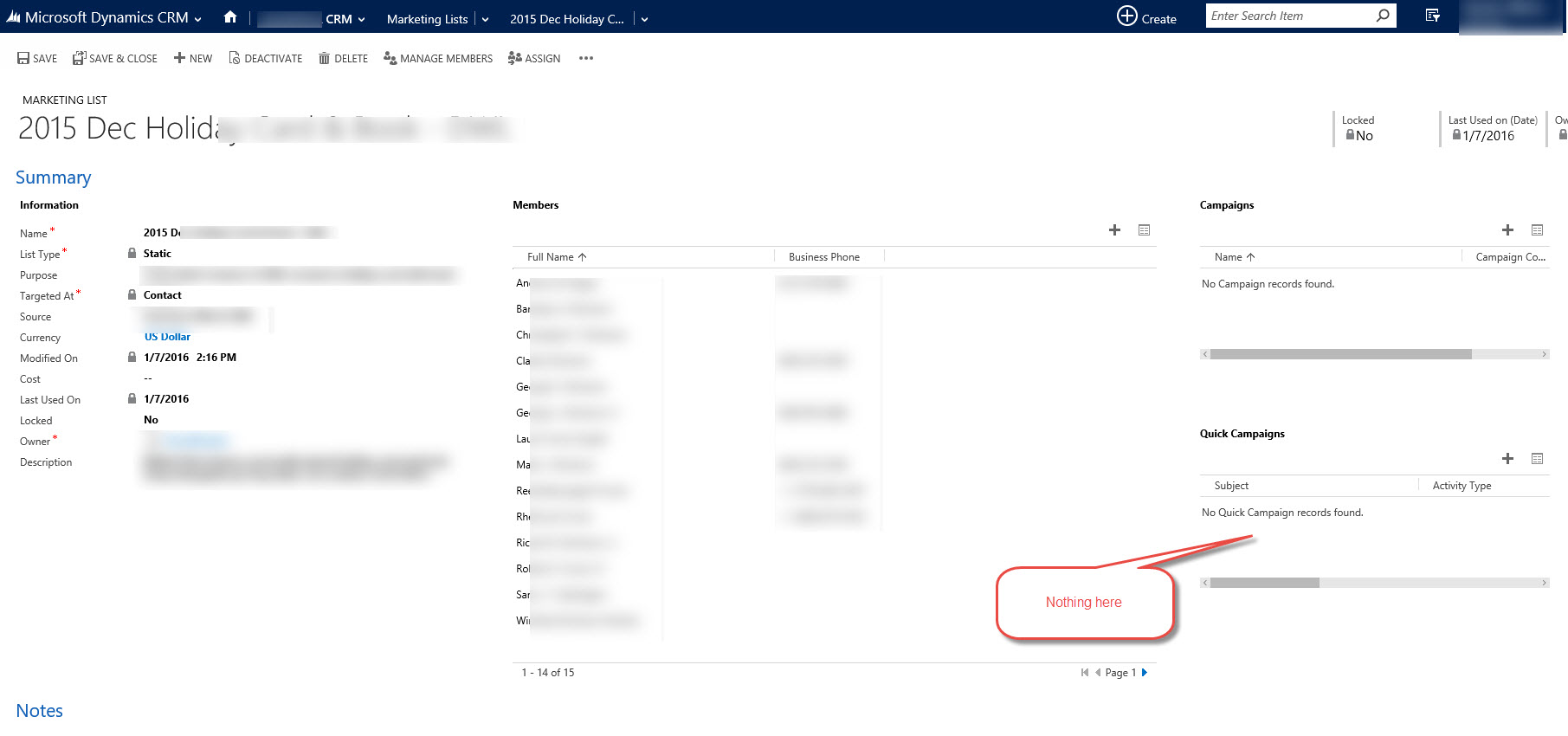
On a marketing list main form no quick campaigns are displayed but if I open the quick campaigns associated view, I can see the quick campaign. The associated view on Marketing list form cannot be edited. It's an out of the box view.

Any ideas?
2016_2D00_01_2D00_11_5F00_14_2D00_20_2D00_55.jpg

2016_2D00_01_2D00_11_5F00_14_2D00_22_2D00_52.jpg

*This post is locked for comments

I have the same question (0)
  • Suggested answer
    Alejandro Luis Profile Picture
    on at

    Hello Gabriel,

    The reason for that issue is by default it is taking "My Quick Campaigns" view, so it will only show related campaigns where the current user is the owner. On the other hand the associated view is using "All Quick Campaigns" view. Unfortunately this subgrid is not editable in the CRM Form designer.

    I fixed this downloading the entity in an unmanaged solution and modifying the xml subgrid view.

    First thing you have to do is to get your current "All Quick Campaigns" view id, Tip: try to create a new subgrid for all records using the "All quick campaigns" view to see the id. Then in you Customizations.xml file, you need to find the subgrid section and modify the view ids:

    Here it is an example, marked in red are the ids you need to modify:

    customization.jpg

    <section id="{EB92DCB9-5F45-4577-8A7E-5EB66001B627}" name="quickcampaigns" layout="varwidth" columns="1" showlabel="true" labelwidth="190" showbar="false" IsUserDefined="0" locklevel="0">
    <labels>
    <label description="Quick Campaigns" languagecode="1033" />
    </labels>
    <rows>
    <row>
    <cell id="{109db2cb-e256-ba7e-a213-1ac2075b0379}" showlabel="false" auto="false" rowspan="6" colspan="1">
    <labels>
    <label description="Quick Campaigns" languagecode="1033" />
    </labels>
    <control id="QuickCampaignsCustom" classid="{E7A81278-8635-4d9e-8D4D-59480B391C5B}" uniqueid="{2c152d8b-358c-3cc8-3b66-3cc18d0aee35}" indicationOfSubgrid="true">
    <parameters>
    <ViewId>{BA825777-1A7B-4837-8778-B86904D1115C}</ViewId>
    <IsUserView>false</IsUserView>
    <RelationshipName>List_BulkOperations</RelationshipName>
    <TargetEntityType>bulkoperation</TargetEntityType>
    <AutoExpand>Fixed</AutoExpand>
    <EnableQuickFind>false</EnableQuickFind>
    <EnableViewPicker>false</EnableViewPicker>
    <ViewIds>{BA825777-1A7B-4837-8778-B86904D1115C}</ViewIds>
    <EnableJumpBar>false</EnableJumpBar>
    <ChartGridMode>Grid</ChartGridMode>
    <VisualizationId></VisualizationId>
    <IsUserChart>false</IsUserChart>
    <EnableChartPicker>false</EnableChartPicker>
    <RecordsPerPage>4</RecordsPerPage>
    </parameters>
    </control>
    </cell>
    </row>

    Then copy the modified Customizations.xml file into your solution, import it and publish it.

    I hope this helps

  • Community Member Profile Picture
    on at

    Thanks Alejandro

    This worked for me

  • Viktorparada Profile Picture
    120 on at

    Thank you so much Alejandro, you make my day and save my time!

Under review

Thank you for your reply! To ensure a great experience for everyone, your content is awaiting approval by our Community Managers. Please check back later.

Helpful resources

Quick Links

Introducing the 2026 Season 1 community Super Users

Congratulations to our 2026 Super Stars!

Meet the Microsoft Dynamics 365 Contact Center Champions

We are thrilled to have these Champions in our Community!

Congratulations to the April Top 10 Community Leaders

These are the community rock stars!

Leaderboard > 🔒一 Microsoft Dynamics CRM (Archived)

Last 30 days Overall leaderboard

Featured topics

Product updates

Dynamics 365 release plans