web
You’re offline. This is a read only version of the page.
close
Skip to main content

Notifications

Announcements

No record found.

Community site session details

Community site session details

Session Id :
Microsoft Dynamics CRM (Archived)

Assign Privileges in Security Role not working properly

(0) ShareShare
ReportReport
Posted on by 6,211

Hi All,

I have 2 business unit B1 and B2, i have 2 user User1 and User2, User1 belongs to business unit B1 and User2 belongs to business unit B2. I have custom security role name SR1 and this SR1 role is assigned to Both user User1 and User2(Only SR1 security role is assign to both the user). For contact entity i have "Assign" privilege to User level. Now i have a contact name Contact1 with owner User1 and when i try to Assign that contact to User2 it allow me to assign it to User2 though in my secirty role i have "Assign" privilege to User level.

Does any one have idea how this works?

Any help would be appreciated.
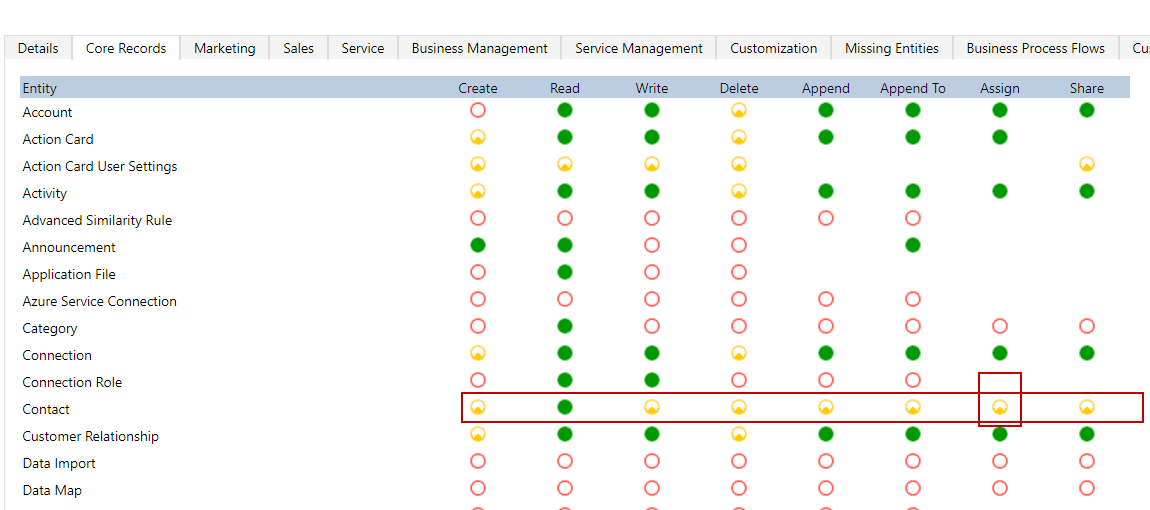
5466.Assign.png

Thanks,

Shahbaaz

*This post is locked for comments

I have the same question (0)
  • David Jennaway Profile Picture
    14,065 on at

    The level of the permission applies to the record on which the action applies (in this case the contact). User-level privilege on the contact means that the user can assign any records that they currently own; it does not restrict to whom the record can be assigned.

    You may be able to use the AppendTo privilege on the systemuser to restrict to whom records can be assigned, as the Assign message will also append the contact to the new owner

  • Shahbaaz Ansari Profile Picture
    6,211 on at

    Then what is the use of Assign privileged if we set it to BU level or organization level?

  • Suggested answer
    Community Member Profile Picture
    on at

    Assign privilege with user level access does not mean User1 can assign record to users within same business unit. It means User1 can assign records that are CURRENTLY OWNED by users from HIS business unit and not ASSIGN TO.

    Now in order to solve your issue, on USER RECORD access right, either change the READ privilege to Business Unit level (which would mean that he can only see users from his own BU)

    OR another option is :

    on the USER RECORD change the APPEND TO access level to Business unit level (which means that if he has organization level read, he could see all users but he cannot append users from other business units to any record.

    Hope this clarifies your question.

    Mark answer as verified if you find it helpful :)

  • Shahbaaz Ansari Profile Picture
    6,211 on at

    Thanks Brinda pabari for your reply, i want to know what is the use of Assign privileged if we set it to BU level or organization level? does it work along Read privilege? if yes than how?

  • Verified answer
    Community Member Profile Picture
    on at

    Hi Shahbaaz,

    Your question is valid. Let me explain this way: Your are trying to assign a record owned by User1 to another user who is in a different BU that of User1. This would not have been possible if User2 does not have read privilege of records other that his BU. Now, since read privilege is FULL, it is possible.

    Please note that Assign privilege is user level only - User1 will not be able to assign records owned by other users, but it will be able to assign record to any user.

    Does it justify your question?

  • Shahbaaz Ansari Profile Picture
    6,211 on at

    Thanks for the reply Brinda.

  • JandostKhoso Profile Picture
    266 on at

    Hello Brinda,

    Your explanation does not work in my scenario. For me both users1 and user2 have read access in their own BU but still I can assign records and user2 can see the record.

    This seems to be very confusing and nowhere explained.

Under review

Thank you for your reply! To ensure a great experience for everyone, your content is awaiting approval by our Community Managers. Please check back later.

Helpful resources

Quick Links

Responsible AI policies

As AI tools become more common, we’re introducing a Responsible AI Use…

Neeraj Kumar – Community Spotlight

We are honored to recognize Neeraj Kumar as our Community Spotlight honoree for…

Leaderboard > 🔒一 Microsoft Dynamics CRM (Archived)

#1
SA-08121319-0 Profile Picture

SA-08121319-0 4

#1
Calum MacFarlane Profile Picture

Calum MacFarlane 4

#3
Alex Fun Wei Jie Profile Picture

Alex Fun Wei Jie 2

Last 30 days Overall leaderboard

Featured topics

Product updates

Dynamics 365 release plans
