web
You’re offline. This is a read only version of the page.
close
Skip to main content

Notifications

Announcements

No record found.

Community site session details

Community site session details

Session Id :
Microsoft Dynamics CRM (Archived)

Appointment Script Error on Save Event: Mscrm.Form_onsave is not a function at eval

(0) ShareShare
ReportReport
Posted on by 1,549

We are getting a very weird error on the Save event on Appointment Form.

We have no script on the form.

But every time we hit the Save Button, we get this error:

TypeError: Mscrm.Form_onsave is not a function at eval...
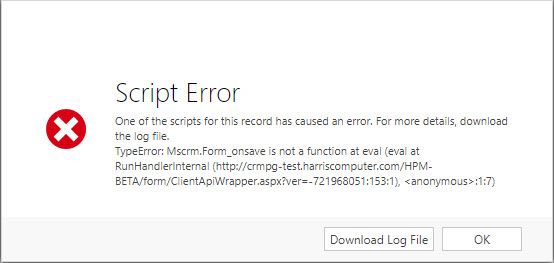
6428.2018_2D00_11_2D00_27_5F00_17_2D00_13_2D00_07.jpg

Log file:

TypeError: Mscrm.Form_onsave is not a function

   at eval (eval at RunHandlerInternal (crmpg-test.harriscomputer.com/.../ClientApiWrapper.aspx), <anonymous>:1:7)

   at RunHandlerInternal (crmpg-test.harriscomputer.com/.../ClientApiWrapper.aspx)

   at RunHandlers (crmpg-test.harriscomputer.com/.../ClientApiWrapper.aspx)

   at ExecuteHandler (crmpg-test.harriscomputer.com/.../ClientApiWrapper.aspx)

   at Mscrm.TurboForm.Control.CustomScriptsManager.$Cb_1 (crmpg-test.harriscomputer.com/.../formcontrols.js)

   at Mscrm.TurboForm.Control.CustomScriptsManager.executeHandler (crmpg-test.harriscomputer.com/.../formcontrols.js)

   at Mscrm.TurboForm.Control.CustomScriptsManager.executeHandlerByDescriptor (crmpg-test.harriscomputer.com/.../formcontrols.js)

   at crmpg-test.harriscomputer.com/.../formcontrols.js

   at crmpg-test.harriscomputer.com/.../global.ashx

   at Mscrm.TurboForm.Control.Data.DataEntity.$Dd_1 (crmpg-test.harriscomputer.com/.../formcontrols.js)

We are using CRM 8.2 on-premise.

Repl

*This post is locked for comments

I have the same question (0)
  • Verified answer
    a33ik Profile Picture
    84,331 Most Valuable Professional on at

    Yvan,

    I believe your instance was upgraded from earlier version. If you want to do everything supported way you should just recreate appointment form from a scratch (not using Save form as) and deactivate current one. If you're lazy (like me you can use following approach):

    1. Create solution with appointment form you have issues with only.

    2. Create new appointment form in this solution.

    3. Export solution and unpack it, open customizations.xml file.

    4. Look for <event name="onsave"... tag in it. For your old form it should contain <Handler functionName="Mscrm.Form_onsave"... tag or something similar - that will be setting that causes issue you experience.

    5. Look for the second <event name="onsave" ... tag - it should contain onsave handler as well but in updated version of CRM. Copy content of functionName to your handler from step 4.

    6. Save file and put it back to solution.

    7. Import solution to CRM.

  • Verified answer
    yleclerc Profile Picture
    1,549 on at

    Hi Andrew, Thanks so much, one more time!

    As you may know, we can not create new forms nor use the "Save as" button on the Appointment entity (Probably for Outlook integration purposes), but you still got me on the right track.

    What I ended up doing:

    1. Create a solution with problematic appointment form in it
    2. Export, unpack, and open the customization.xml file
    3. Remove entirely this tag
      <InternalHandlers>
      <Handler functionName="Mscrm.Form_onsave" libraryName="Appointment_main_system_library.js" handlerUniqueId="bd8e0272-4f6c-42e6-a51e-71e0fc627a5f" enabled="true" passExecutionContext="true" />
      </InternalHandlers>
    4. Save, Zip, Reimport

    And Boom, the problem is gone.

    Note: our instance was, indeed upgraded from another version. The weird thing is we only have this problem 1 one organization. Other 3 organizations did not have this problem.

    Yvan

Under review

Thank you for your reply! To ensure a great experience for everyone, your content is awaiting approval by our Community Managers. Please check back later.

Helpful resources

Quick Links

Responsible AI policies

As AI tools become more common, we’re introducing a Responsible AI Use…

Neeraj Kumar – Community Spotlight

We are honored to recognize Neeraj Kumar as our Community Spotlight honoree for…

Leaderboard > 🔒一 Microsoft Dynamics CRM (Archived)

#1
SA-08121319-0 Profile Picture

SA-08121319-0 4

#1
Calum MacFarlane Profile Picture

Calum MacFarlane 4

#3
Alex Fun Wei Jie Profile Picture

Alex Fun Wei Jie 2

Last 30 days Overall leaderboard

Featured topics

Product updates

Dynamics 365 release plans


