web
You’re offline. This is a read only version of the page.
close
Skip to main content

Announcements

No record found.

News and Announcements icon
Community site session details

Community site session details

Session Id :
Microsoft Dynamics CRM (Archived)

Data Fields Are Not Populated With Values In Email Template When Workflow Runs

(1) ShareShare
ReportReport
Posted on by 133

Hi Guys,

I am having problem populating data fields in email template when workflow runs. I tested it also running the workflow on demand.

"Hello" is the only value appeared in the email.

I cant find similar issue over the internet. You're input is high appreciated. Thanks in advance.

Email Template
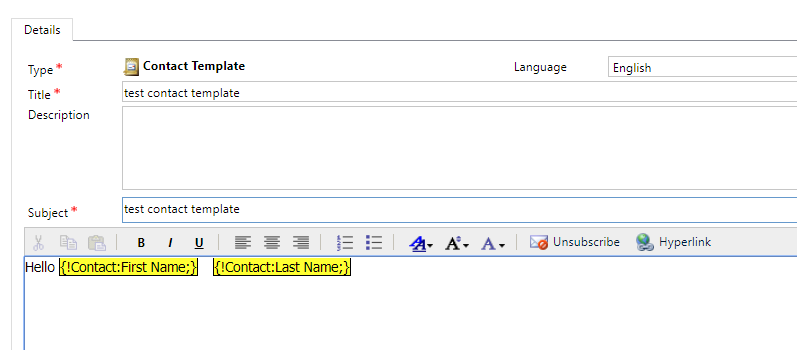
3348.email-template.png

Workflow

58143.Workflow.png

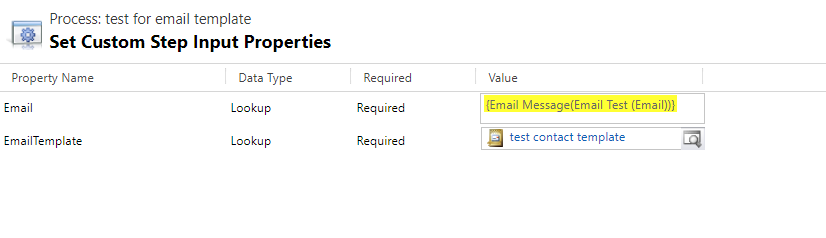
Properties

Custom-step.png


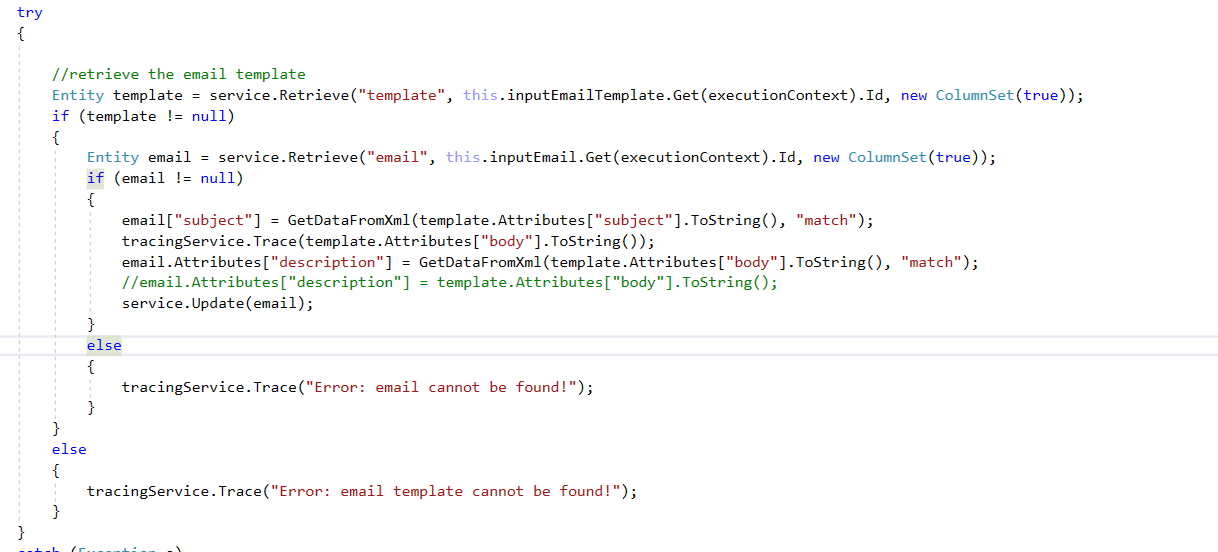
Code

1205.Code.png

*This post is locked for comments

I have the same question (0)
  • Suggested answer
    Alex Fun Wei Jie Profile Picture
    33,628 on at

    Hi,

    I will try to remove it and add again .  I recommend you to use IE to add the dynamics value.

  • Suggested answer
    Rawish Kumar Profile Picture
    13,758 on at

    Hi Euclides,

    to check this , i would first ask you try to simply go to the entity for whichh you have created this record and add an email from there and insert this template and see if you get the values.

    if you dont see values - try to create a fresh template or re-create the content as Alex suggested above.

  • Euclides Pelisco Jr Profile Picture
    133 on at

    I created a new email template and workflow in IE but data fields are still not populated.

    But when I manually inserted the email template in the email, data fields are populated.

    I cant trace what seem the problem is.

  • Suggested answer
    Alex Fun Wei Jie Profile Picture
    33,628 on at

    Hi,

    it seems something is wrong with your code. you are using different method to send the email with template. Refer below code on how to send email with template.

    docs.microsoft.com/.../sample-send-email-template

  • Suggested answer
    Alex Fun Wei Jie Profile Picture
    33,628 on at

    Hi,

    by the way you can use below method to send email with template, any reasons you want to send it with code?

    0647.15.PNG

  • Euclides Pelisco Jr Profile Picture
    133 on at

    It is part of the process to setup first the email before sending. That code used to be working. I did not change any in the code. But suddenly we encountered this issue.

  • talk2.gauravb Profile Picture
    120 on at

    Hi,

    I understand your process but there are couple of things which can cause this issue. In your workflow in first step you are creating an email and I trust you are creating email using the template itself. Here CRM creates email using "InstantiateEmailRequest" which replaces all dynamics value. If you are doing this then why you are updating the email's description field in workflow. As a debug process can you please remove your custom step and run the workflow to check the email is getting created correctly or not. 

  • Abby Kong Profile Picture
    6 on at

    Hi Euclides,

    The template is a contact template.

    This question may sound a bit unessary, can you please check the email in question has 'Regarding' field set to a contact record before above workflow step triggerd?

    Regards,

    Abby

  • Euclides Pelisco Jr Profile Picture
    133 on at

    5543.Create-email.png

    Our goal is to have the description filled up with the email template body that has data fields in it. 

    That is why description of the email is updated with the email template body in the code.


    I already run the workflow on demand. Email is created as expected.

    Note: This set up is working before. Then suddenly it is broken. Data fields are not populated with values. There were no updates in the code.

  • Verified answer
    Euclides Pelisco Jr Profile Picture
    133 on at

    The issue is now fixed. Thank you for this blog.

    www.daisychubb.com/.../creating-an-email-with-template-in-ms-dynamics-crm-2016.

    Thank you everyone for giving time answering my question. Cheers!

Under review

Thank you for your reply! To ensure a great experience for everyone, your content is awaiting approval by our Community Managers. Please check back later.

Helpful resources

Quick Links

Introducing the 2026 Season 1 community Super Users

Congratulations to our 2026 Super Stars!

Congratulations to our 2025 Community Spotlights

Thanks to all of our 2025 Community Spotlight stars!

Leaderboard > 🔒一 Microsoft Dynamics CRM (Archived)

#1
Varsha deshpande Profile Picture

Varsha deshpande 5

#2
NeerajPawar Profile Picture

NeerajPawar 2

#2
jlattimer Profile Picture

jlattimer 2

Last 30 days Overall leaderboard

Featured topics

Product updates

Dynamics 365 release plans