web
You’re offline. This is a read only version of the page.
close
Skip to main content

Announcements

No record found.

News and Announcements icon
Community site session details

Community site session details

Session Id :
Microsoft Dynamics GP (Archived)

inventory transfer log - why are the parts not moving?

(0) ShareShare
ReportReport
Posted on by

We are trying to transfer parts. The report shows no errors but the parts are not moving??  I checked under item history, normally it will show when an item has moved. These did not.
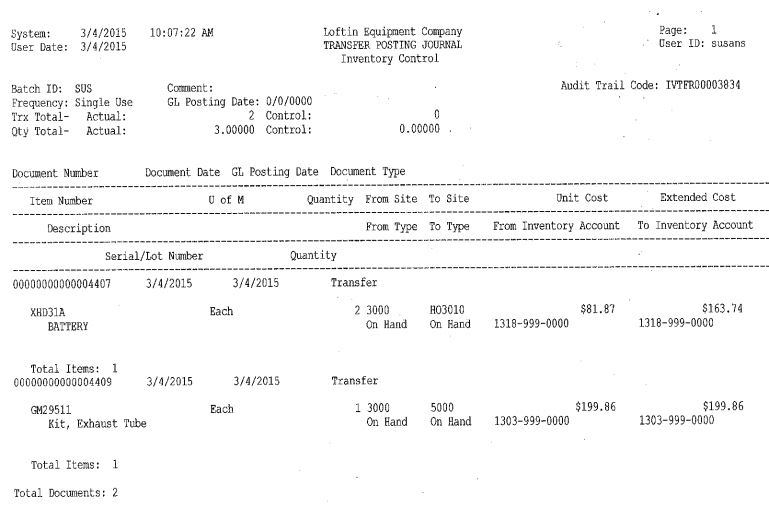
what can I do?

*This post is locked for comments

I have the same question (0)
  • Verified answer
    Mahmoud Saadi Profile Picture
    32,738 on at

    Hello again WennSoft

    Initially, the report shows the "Transfer Posting Journal", which means you have already posted the transaction, right ? If not, the edit list report will definitely shows any associated errors that are preventing the transfer from being posted.

    Otherwise, if it was already posted. Let's check a bunch of inventory tables, maybe the transfer got corrupted while posting affecting specific tables and leaving others blank;

    DECLARE @DocumentNumber AS NVARCHAR(MAX)
    SET @DocumentNumber = 'Transfer Number'
    
    SELECT  *
    FROM    dbo.IV30300
    WHERE   DOCNUMBR = @DocumentNumber 
    SELECT  *
    FROM    dbo.IV10200
    WHERE   RCPTNMBR = @DocumentNumber 
    SELECT  *
    FROM    dbo.IV10201
    WHERE   ORIGINDOCID = @DocumentNumber 
    SELECT  *
    FROM    dbo.SEE30303
    WHERE   DOCNUMBR = @DocumentNumber 
    SELECT  *
    FROM    dbo.GL20000
    WHERE   JRNENTRY IN ( SELECT DISTINCT
                                    JRNENTRY
                          FROM      dbo.SEE30303
                          WHERE     DOCNUMBR = @DocumentNumber )


    Your feedback is highly appreciated,

  • Suggested answer
    Frank Hamelly | MVP, MCP, CSA Profile Picture
    46,631 Moderator on at

    By Item History, you mean Item Transaction Inquiry?  It should show there.  Are you Inquiry parameters correct?  (Document Type & Date Range)

Under review

Thank you for your reply! To ensure a great experience for everyone, your content is awaiting approval by our Community Managers. Please check back later.

Helpful resources

Quick Links

Introducing the 2026 Season 1 community Super Users

Congratulations to our 2026 Super Stars!

Meet the Microsoft Dynamics 365 Contact Center Champions

We are thrilled to have these Champions in our Community!

Congratulations to the April Top 10 Community Leaders

These are the community rock stars!

Leaderboard > 🔒一 Microsoft Dynamics GP (Archived)

#1
talty09 Profile Picture

talty09 2

#1
Anthony Beatty Profile Picture

Anthony Beatty 2

#3
CP04-islander Profile Picture

CP04-islander 1

Last 30 days Overall leaderboard

Featured topics

Product updates

Dynamics 365 release plans
