web
You’re offline. This is a read only version of the page.
close
Skip to main content

Announcements

No record found.

News and Announcements icon
Community site session details

Community site session details

Session Id :
Microsoft Dynamics CRM (Archived)

Security Role Issues

(0) ShareShare
ReportReport
Posted on by 335

So I am trying to lock down some security roles in my org. I used the "Your User Security - Magnified" tool via XRM toolbox to figure out how a user is changing things he shouldn't have permission to do. I got the below image when I looked at his record.
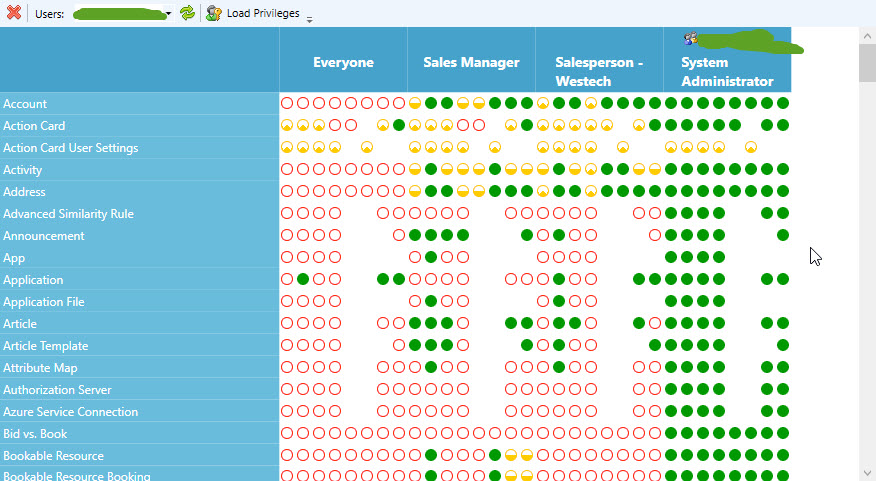
2017_2D00_11_2D00_21_5F00_9_2D00_06_2D00_38.jpg

But in CRM it shows he doesn't have admin access....
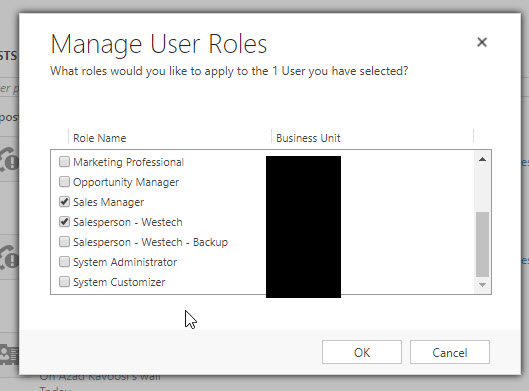
2017_2D00_11_2D00_21_5F00_9_2D00_07_2D00_26.jpg

I checked XRM ToolBox and it shows all my users as having admin access. Is this correct? And if so, how do I remedy it, if I can't "uncheck" that box in CRM?

*This post is locked for comments

I have the same question (0)
  • Verified answer
    ashlega Profile Picture
    34,477 on at

    See if you've accidentally granted system admin to one of the teams those users are members of (have a look at the default BU team, in particular)

  • LCRMAdminG Profile Picture
    335 on at

    Yes, I was thinking something like this. How do I check team roles?

  • LCRMAdminG Profile Picture
    335 on at

    Nevermind, I found it! YES THAT IS WHERE IT WAS! THANK YOU!

  • Verified answer
    Community Member Profile Picture
    on at

    Hi ToniG ,

    probably your user is a member of a Team which hold an administrative role.

    Check it and let me know.

    If you found the answer helpful, please mark as Verified 

    Join my network on LinkedIn      Follow me on Twitter 

    Thank You & Best Regards

    Francesco Picchi

    Microsoft Dynamics CRM Consultant, Bologna, ITALY

    Independent Contractor

    http://www.francescopicchi.com

  • LCRMAdminG Profile Picture
    335 on at

    So I did find that the only team we have, that was built by our former partner had system admin access. So I gave it base access assuming that other roles would build on top of that, but that does not seem to be the case. Unless the base role has the security right, I cannot do basic things (like create an opportunity) even if I have sysadmin rights. Does the team security role override individual roles? If so, how do I turn that off? (Does everyone need to be on a team at all?)

  • ashlega Profile Picture
    34,477 on at

    Hi Toni,

     Security roles are cumulative - so if you have a sys admin role you should've access to everything. There can be occasional quirks if the system has been customized, but, in general, sys admins don't really need any other roles. Are you certain your base roles has enough permissions to let non sys-admin users do what they need to do? If not, maybe you did not assign other roles to those users? As for the sys admin, could you post a screenshot and a bit more details about what's not working?

Under review

Thank you for your reply! To ensure a great experience for everyone, your content is awaiting approval by our Community Managers. Please check back later.

Helpful resources

Quick Links

Introducing the 2026 Season 1 community Super Users

Congratulations to our 2026 Super Stars!

Meet the Microsoft Dynamics 365 Contact Center Champions

We are thrilled to have these Champions in our Community!

Congratulations to the April Top 10 Community Leaders

These are the community rock stars!

Leaderboard > 🔒一 Microsoft Dynamics CRM (Archived)

#1
ScottDurow Profile Picture

ScottDurow 2

#2
GJones Profile Picture

GJones 1

Last 30 days Overall leaderboard

Featured topics

Product updates

Dynamics 365 release plans
