web
You’re offline. This is a read only version of the page.
close
Skip to main content

Notifications

Announcements

No record found.

Community site session details

Community site session details

Session Id :
Small and medium business | Business Central, N...
Answered

Assemble to Stock : create inventory movement "there is nothing to create"

(0) ShareShare
ReportReport
Posted on by

Hi , 

Important remarks :

  • All assembly items for the customer have assembly policy = Assemble-to-Stock.
  • I found how to generate new assembly orders via the planning worksheet (this is not a problem). 
  • I am able to post assembly orders without error.
  • (I read through the related MS Docs documentation, most is related to Assemble-to-ORDER.  What I need is information about Assemble-to-STOCK : 

Question :  Items with policy : "Assemble-to-stock" :

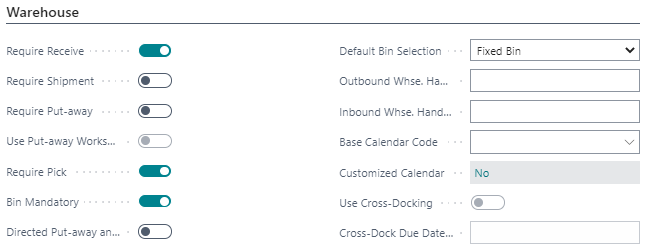
If my location setup works with only : 

  • Require receive = yes  (= warehouse receipt)
  • Require pick = yes (= inventory picks)
  • bin mandatory = yes

Before posting the assembly order ,

the warehouse worker needs to be able to first  "Take" the required components from the warehouse  & "Place" them 

on a BIN so that the components can be consumed in assembly. As I understand in standard BC this can be done via inventory movement only

--> Microsoft documentation : Components for assembly orders cannot be picked or posted with inventory picks. Instead, use the Inventory Movement page.

 Description of scenario : 

1) Assembly order > release

2) Assembly order > warehouse > create inventory movement

3) ERROR : "there is nothing to create"


I tried different things already , but I always get same error "there is nothing to create"...

Additional info:

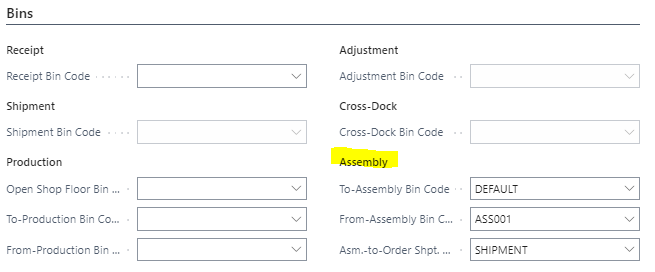
All of the available inventory (stock) is on the same Location & same BIN  ("DEFAULT")

For that location , I also have a BIN "ASS001"  where via inventory movement the component items should be placed. 

Location setup : (warehouse fasttab)

I am working with basic BC flow , tested & working. 

- Purchase orders : Warehouse receipt

- Sales orders : inventory pick 
pastedimage1649057059533v1.png

Location card > Bins (fasttab) 

pastedimage1649057118464v2.png

Kind regards, 

I have the same question (0)
  • Verified answer
    Alfredo_Iorio Profile Picture
    1,264 on at

    Hi

    Your location is set up with "Require Pick" therefore, you must use warehouse picks to post consumption of assembly orders

    This is the process in my Sandbox:

    Location is set up with "Require picks" and bins mandatory 

    0003.Location-setup.jpg

    I create an assembly order

    3173.Assembly-order.jpg

    I use "Create a Warehouse Pick" and I get the document with the take and place lines

    Whse-pick.jpg

  • PieterJanVL Profile Picture
    on at

    Hi Alfredo , this answered my question thanks. I retested in same sandbox environment , the warehouse pick does get created correctly now.

Under review

Thank you for your reply! To ensure a great experience for everyone, your content is awaiting approval by our Community Managers. Please check back later.

Helpful resources

Quick Links

Responsible AI policies

As AI tools become more common, we’re introducing a Responsible AI Use…

Neeraj Kumar – Community Spotlight

We are honored to recognize Neeraj Kumar as our Community Spotlight honoree for…

Leaderboard > Small and medium business | Business Central, NAV, RMS

#1
OussamaSabbouh Profile Picture

OussamaSabbouh 3,151

#2
Jainam M. Kothari Profile Picture

Jainam M. Kothari 1,443 Super User 2025 Season 2

#3
YUN ZHU Profile Picture

YUN ZHU 1,092 Super User 2025 Season 2

Last 30 days Overall leaderboard

Featured topics

Product updates

Dynamics 365 release plans