web
You’re offline. This is a read only version of the page.
close
Skip to main content

Announcements

No record found.

News and Announcements icon
Community site session details

Community site session details

Session Id :
Microsoft Dynamics GP (Archived)

Alternate/Modified Forms and Reports

(0) ShareShare
ReportReport
Posted on by 766

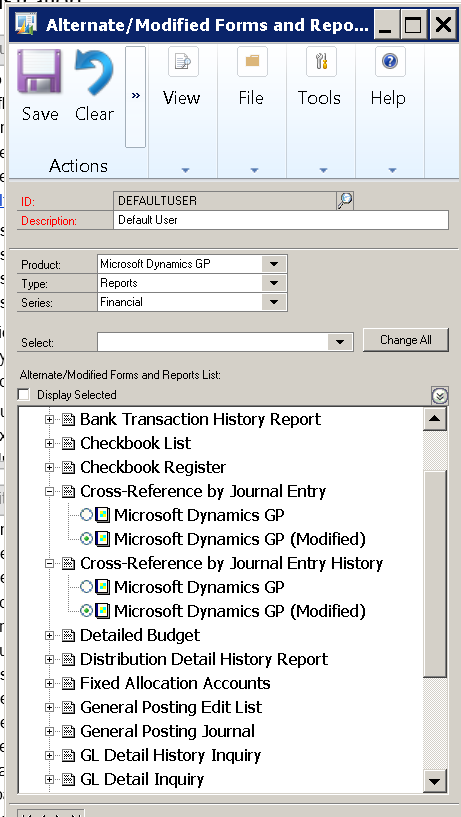
I am noticing that our alternate/modified forms are changing back to the canned GP reports or no longer have a selection, which prompts an error when trying to access a window or report.  It has happened a handful a of times over the years, but ever since we have launched GP to our new Azure servers (some still working on old servers, which is where SQL is still sitting) it has been happening quite frequently.

I have gone through every one of the below windows and reports for every series we use. I make sure I am logged in as "sa", but a week or so later, something changes my settings.

Anyone else experience this?
alt.png

*This post is locked for comments

I have the same question (0)
  • Lucas Miller Profile Picture
    Microsoft Employee on at

    Nicole,

    I can't recall having this exact issue reported to us in the past.

    There shouldn't be anything in core GP code that would perform the table update necessary to change a group's permission to a canned or modified version of a resource outside of using the user interface to manually make the change.  Perhaps you can check your environment for any SQL triggers that could be changing the SY10800 table that holds this information.  Typically we can't rule out another user changing some setting as a potential cause as well.  You could use GP Activity Tracking, or any other method of auditing table changes, to keep track of when this sort of change happens.

    As for instances where you look in this window and don't see the radio button selected for any objects that's going to be due to a situation where the user has access to a version of the form/report that no longer exists in the client.  For some background, when the Alternate/Modified Forms and Reports window loads for the specified filter it is looking at the dictionaries in your Dynamics.set file to check for alternate/modified objects and then list those.  So, if you give a user to a modified version of the Cross-Reference by Journal Entry report, but then delete or move the Reports.dic file from where your client can find it you will just see the single "Microsoft Dynamics GP" option under that report, but it will not show as marked.  When you try to print that report you will get an error that says you can't access the object because the dictionary containing it is not loaded.

    So, to summarize, if you're seeing that expected items are missing from this window it's probably because the Dynamics GP client did not load that item's dictionary.  If you have your modified forms and reports dictionaries located somewhere other than locally on the GP client machine it could be a communication issue between the client machine and the file server where GP is looking for them.  Moving those files locally and updating their paths in the Dynamics.set file is typically a good troubleshooting steps, even if it isn't always a long-term solution on the administrative size.

  • Suggested answer
    skpaul Profile Picture
    135 on at

    Nicole,

    To piggyback onto something Lucas said, I had a similar situation and it was caused by my  use of two report dictionaries.  There was the main dictionary that everyone uses and a second one that only I have access to.  I use this for modifying reports for import to the main dictionary.  The second was set up so I could work on reports while others are in the system without causing disruptions and other issues.

    This setup works great, except when I select a report in my private dictionary that is not already modified in the main dictionary, which happens when I want to test a layout.  Turns out that when  a modified report is selected in a one report directory and it is not modified in another report directory, you will get a report is unavailable message/dictionary not loaded error and the report will be unselected in the alternate/modified report window.

    This happens because, even though I was in a different dictionary, I was still the same instance of GP (we're on a terminal server), and so changing to a modified report to test my layout caused GP to look for the modified report in the reports.dic.  It's no longer an issue now that I'm aware of why it was happening in the first place.

    If you don't use a private dictionary, then I would think that you or another user who has access to modify reports is working in an old/different dictionary.

  • Napolo Profile Picture
    766 on at

    Thank you both.

    I am noticing a difference between servers..

    Left image is GP in our New Azure Servers.  It is not pulling the Modified reports.

    Right image is our current/old Servers. I see the modified selections.

    I have noticed when reassigning the settings, they save for a few days, something happens and everything goes haywire.

    set.png

    So, i located Dynamics.set file for both servers. I do notice that the new server that is giving us grief, is showing up with an unknown application.

    Do I need to delete the below file on the new server and copy over DYNAMICS.SET file?

    set.png

  • Richard Wheeler Profile Picture
    75,852 Moderator on at

    The unknown application means the OS does not know what application to use to read it. I often set mine to NotePad so I do not get prompted all the time. You don't have profiles that get confused and forget where the DYNAMICS.SET file is located do you? "C\MyApps\Microsoft Dynamics\GP2016\Dynamics.exe" Dynamics.set should be the property of your GP icon.  Please provide how yours reads.

  • Napolo Profile Picture
    766 on at

    Oh geesh. After I changed my APP selection, to notepad (looked a bit different on new server), the file now opens up.

    Both files are located at C:\GP2013 (one old and new servers)  

    Old server, my SET file name is "DYNAMICS.SET"

    New server, my SET file name is "DYNAMICS"

    So, I tried to rename the DYNAMICS file to DYNAMICS.SET on the new server, and when I launch GP, I get "This launch file is invalid".  GP does launch when I change it back to "DYNAMICS", however the modified settings are still missing.

  • Napolo Profile Picture
    766 on at

    When I close GP, I am getting "Unhandled object exception: The parameter is incorrect".

  • Richard Wheeler Profile Picture
    75,852 Moderator on at

    Do you have View File Extensions turned off? There will be several files with the base name of DYNAMICS. You need the one called DYNAMICS.SET.

  • TimDotNet Profile Picture
    95 on at

    You probably have file extensions hidden by default on that server so by naming it to DYNAMICS.SET you actually renamed it to DYNAMICS.SET.SET

    As for the general issue, it feels like the dictionaries between these two servers are out of sync with each other. 

    Are the paths for the reports dictionary pointing to the same file?

    In DYNAMICS.SET, I'm guessing these are local copies on the two servers, it it that after updating the reports on one server the dictionary has not been copied with those changes to the other server?

    :C:Program Files (x86)/Microsoft Dynamics/GP2015/Data/REPORTS.DIC

  • Napolo Profile Picture
    766 on at

    You are right. Some had them and some did not. After changing that setting, I can see it.  Looking at the contents of the file, it looks different than the one in production (old servers).

  • Napolo Profile Picture
    766 on at

    Thank you Tim. I am not seeing this file in my new server's C drive.

    I found the following DIC files, that I think need to be moved over.  

      EXP1493F.DIC,

      FORMS.DIC

      NCLF2429.DIC,

      R309.DIC,

    I moved these files over.   That didn't do the trick but, may have resolved a future issue.

Under review

Thank you for your reply! To ensure a great experience for everyone, your content is awaiting approval by our Community Managers. Please check back later.

Helpful resources

Quick Links

Introducing the 2026 Season 1 community Super Users

Congratulations to our 2026 Super Stars!

Meet the Microsoft Dynamics 365 Contact Center Champions

We are thrilled to have these Champions in our Community!

Congratulations to the April Top 10 Community Leaders

These are the community rock stars!

Leaderboard > 🔒一 Microsoft Dynamics GP (Archived)

#1
Shravan Attelli Profile Picture

Shravan Attelli 1

Last 30 days Overall leaderboard

Featured topics

Product updates

Dynamics 365 release plans
