web
You’re offline. This is a read only version of the page.
close
Skip to main content

Notifications

Announcements

No record found.

Community site session details

Community site session details

Session Id :
Microsoft Dynamics CRM (Archived)

CRM 2011, IE 10, multiple pop-up error windows

(0) ShareShare
ReportReport
Posted on by

Hello

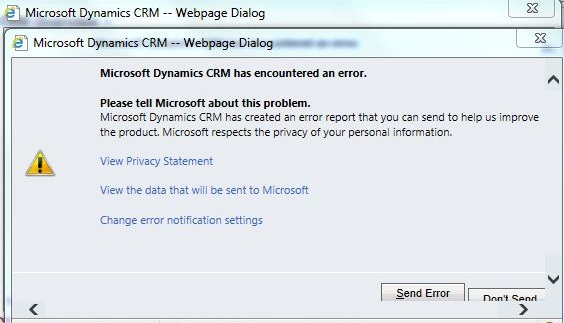
I have noticed something odd with CRM 2011 just recently and IE 10.  Any time a popup window tries to open (with Popup blocker turned off), it returns an error popup to the user.  Then when the user attempts to close the popup window, another error popup window opens.  This happens repeatedly until the user manually shuts down IE in task manager. 

I have seen a couple of solutions online, but they do not work for me, such as try InPrivate browsing, or compatibility view settings.  Also there is a setting to turn on automatic send errors, but I prefer not to do that if there is another way around this.

Has anyone else seen this issue?  Is there a resolution for this issue?

thanks,
Mark
 

*This post is locked for comments

I have the same question (0)
  • Verified answer
    jlattimer Profile Picture
    24,562 on at

    This does sound much like the issue having a pre-UR12 environment with IE10. The solution here was to add your domain to the list of sites running in compatibility view. So it might be worth your while to double check that (I did see you tried). 

    Are you Online or On Premise? If On Premise, updating to UR12 or 13 should resolve.

    Support with Microsoft Dynamics CRM 2011 and Internet Explorer 10

  • Community Member Profile Picture
    on at

    hi Jason - on premise, and UR6.  I was wondering if UR12 would address this, but I was waiting until it was completely stable, which I believe it is at this point since UR13 has already been released.  I already have UR13 in a DEV environment, and will install it in production soon.  

    Once I update production, I'll post an answer.

    thanks,

    Mark

  • HC Leong Profile Picture
    65 on at

    Hi Mark,

       Did you found any solution for the problem? One of our user suddenly facing the exactly same problem, and I yet to find a solution on it.

    HC Leong

  • Community Member Profile Picture
    on at

    Check 2 things:

    - Add the url to Combatibility Views Settings: in IE 10 - Tools - Combatibility Views Settings - add the CRM url

    - Add the url to Trusted Sites: Tools - Internet Options - Security - Trusted Sites - Sites - add the CRM url

    If that still doesn't do it:

    Enable Mixed Contect: Tools - Internet Options - Security - Trusted Sites - Custom Level - Search for Display Mixed content and set it to Enable.

    Clear temp files and restart the browser

Under review

Thank you for your reply! To ensure a great experience for everyone, your content is awaiting approval by our Community Managers. Please check back later.

Helpful resources

Quick Links

Responsible AI policies

As AI tools become more common, we’re introducing a Responsible AI Use…

Neeraj Kumar – Community Spotlight

We are honored to recognize Neeraj Kumar as our Community Spotlight honoree for…

Leaderboard > 🔒一 Microsoft Dynamics CRM (Archived)

#1
SA-08121319-0 Profile Picture

SA-08121319-0 4

#1
Calum MacFarlane Profile Picture

Calum MacFarlane 4

#3
Alex Fun Wei Jie Profile Picture

Alex Fun Wei Jie 2

Last 30 days Overall leaderboard

Featured topics

Product updates

Dynamics 365 release plans
