web
You’re offline. This is a read only version of the page.
close
Skip to main content

Announcements

No record found.

News and Announcements icon
Community site session details

Community site session details

Session Id :
Microsoft Dynamics CRM (Archived)

What's Your Preference On a CRM and Sharepoint Folder Structure?

(0) ShareShare
ReportReport
Posted on by

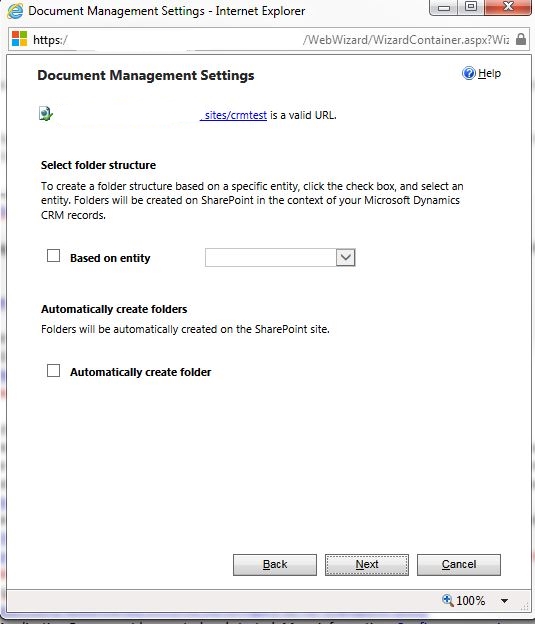
Setting up CRM and Sharepoint for the first time and I'm seeking everybody's preference on whether or not to set the folder structure based on an Entity. My first inclination was to yes nest it based on entity Account. After I started doing more research though, I learned about the Sharepoint 5000 item limit mentioned here. It also seemed silly to nest under Account let's say if you have several Incidents/Cases logged under an Account (with files uploaded), then a Sales person comes to that account and because Sharepoint "flattens" folder structures, that Sales person would have to sift through all sorts of Incident/Case uploads when they might be just looking for sales only related items. That issue would get more annoying if you hit that 5000 item limit and then couldn't sort right??? Not to mention you'd hit that 5000 item limit exponentially faster if their nested right?
0246.SP.JPG

*This post is locked for comments

I have the same question (0)
  • samalex Profile Picture
    355 on at

    Is this feature to auto create folders new with CRM 2016?  I don't see this in any of our CRM 2013 or 2015 environments. Just curious.  But as far as I know there's not a folder limit on what you can create but there is on what you can view.  We have all our Account folders in one SharePoint folder, and I get this when browsing to it in SharePoint:

    This view cannot be displayed because it exceeds the list view threshold (12000 items) enforced by the administrator.

    To view items, try selecting another view or creating a new view. If you do not have sufficient permissions to create views for this list, ask your administrator to modify the view so that it conforms to the list view threshold.

    I think 5000 is default but I guess our admin changed it to 12000... at any rate we have all of our account folders in the same SharePoint site path, and it's well over this limit and works well.

  • Community Member Profile Picture
    on at

    Think you might have misunderstood. Did you check out the link in that post? It isn't about necessarily viewing being a limitation, the limitation is around sorting columns when you have more than 5000 items. You can view all the items but you can't sort after 5000. I'm at a fairly small organization and am worried about quickly hitting the limit, I can't imagine what bigger organizations do.

    Again, circling back to my original question, does anybody do "nest under Account" or just don't nest period?

  • samalex Profile Picture
    355 on at

    To answer your question for us we don't nest.  We just have a folder for each entity regardless of how many records go into the entity.  We have LOTS of accounts and other than just not being able to browse in SharePoint I haven't seen any issues in CRM.  

  • Community Member Profile Picture
    on at

    I see, thank you!

Under review

Thank you for your reply! To ensure a great experience for everyone, your content is awaiting approval by our Community Managers. Please check back later.

Helpful resources

Quick Links

Introducing the 2026 Season 1 community Super Users

Congratulations to our 2026 Super Stars!

Congratulations to our 2025 Community Spotlights

Thanks to all of our 2025 Community Spotlight stars!

Leaderboard > 🔒一 Microsoft Dynamics CRM (Archived)

#1
Varsha deshpande Profile Picture

Varsha deshpande 5

#2
JS-09031509-0 Profile Picture

JS-09031509-0 3

#3
Ciprian  P Profile Picture

Ciprian P 2

Last 30 days Overall leaderboard

Featured topics

Product updates

Dynamics 365 release plans
