web
You’re offline. This is a read only version of the page.
close
Skip to main content

Announcements

No record found.

News and Announcements icon
Community site session details

Community site session details

Session Id :
Small and medium business | Business Central, N...
Answered

Assembly Posting error after BC 16.1 upgrade

(0) ShareShare
ReportReport
Posted on by 30

Hi,

we just upgraded a client from BC 15.2 to BC 16.1. After this upgrade we are getting an error when posting Assembly Orders that contains a line of type Resource. The error is about Read permission on tabledata 5832 Capacity Ledger Entry.
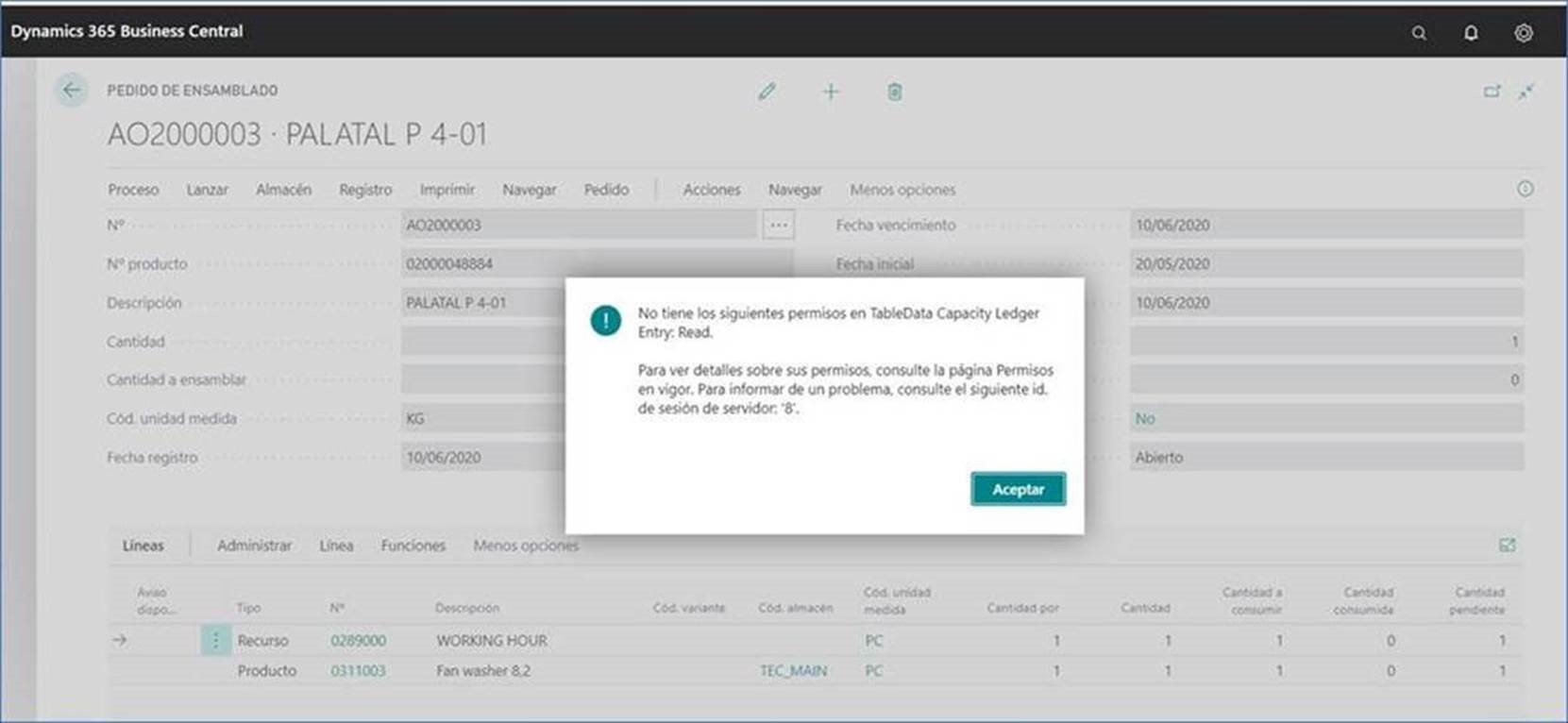
8838.error1.jpg

They were running fine with previous version they had (15.2), as we can check they have posted assembly orders from before the upgrade.

We are able to post assembly orders in other clients with BC 14 or BC 15 without any issues, so don't understand what happens with this version. Also checked with newer BC 16.2 and the error is the same.

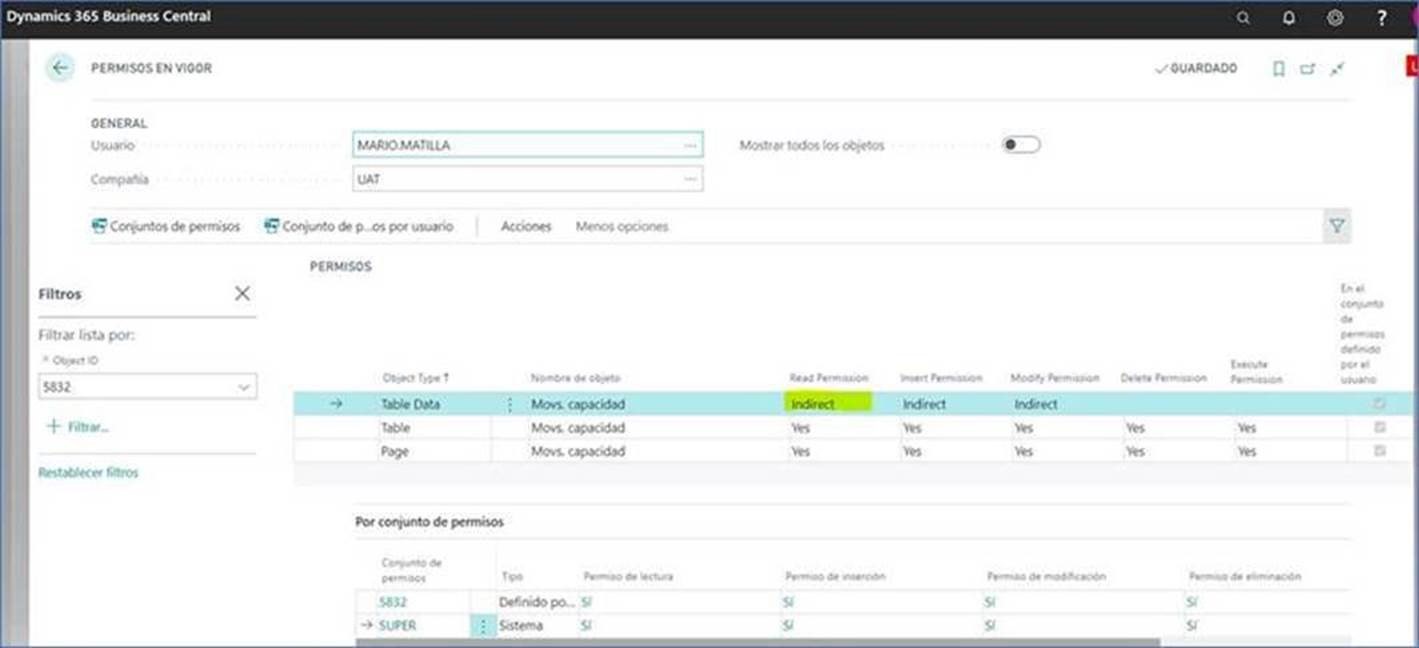
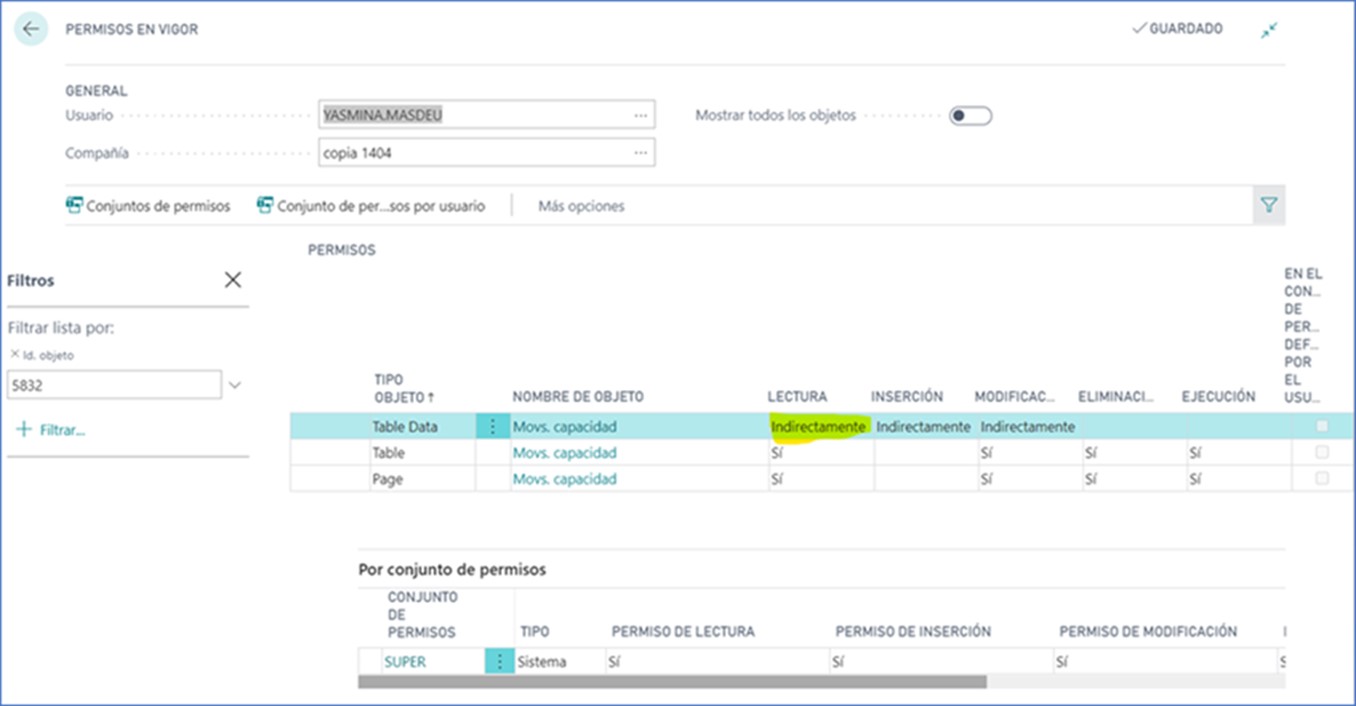
Regarding the Effective Permissions on these two environments (15.2 and 16.1) the setup is the same, but different results as I said:

- 15.2 (running as expected)
error2.jpg

- 16.1 (error above)

error3.jpg

Any help would be appreciated. Thanks in advance.

I have the same question (0)
  • Suggested answer
    Marco Mels Profile Picture
    Microsoft Employee on at

    Hello,

    Did you refresh the customer license? It is written on the CU page:

    support.microsoft.com/.../update-16-2-for-microsoft-dynamics-365-business-central-2020-release-w

    Thanks.

  • mariom Profile Picture
    30 on at

    Hi Marco,

    thanks for the answer. Yes, we upload customer's license (for BC16) again after upgrading as expected. Anyway, this table "Capacity Ledger Entry" is not a new object from BC16, customer was using it before the upgrade without any issue. So in theory they do have access to this object.

  • Suggested answer
    Marco Mels Profile Picture
    Microsoft Employee on at

    Hello,

    Does it work with the partner license and also in standard CRONUS company without any possible custom extensions? If it does, it must be the license and the correct first step would be to contact the Operations Center which do have access to the licensing tool (CSS doesn't have).

  • Suggested answer
    Jyotsna NAV Profile Picture
    585 on at

    Hello,

    Please check your Customer License and how many users can be given the Write permissions. If there are more users assigned to the write permission, the other users will get Indirect permission.

    Regards

    Jyotsna

    jyotsnanav.blogspot.com

  • mariom Profile Picture
    30 on at

    Hi,

    it's running fine with the partner license. I woldn't upgrade the database in that case. But it has appeared in customer's environment when it's done .

    As you can see in error message the permission that fails is tabledata 5832 "Capacity Ledger Entry (READ)", and it's the same setup that works on BC15 and BC14.

    The debugger stops at this point, where it's simply getting last record from that table by the typical GetLastEntryNo function, so no modify permission is needed.

    error4.jpg

    This is checked in a full standard database without any extensions, Cronus company, with customer's license. I'm the only user in this DB, so no user limit has exceeded.

  • Suggested answer
    Marco Mels Profile Picture
    Microsoft Employee on at

    Hello,

    Could you please verify in BaseApp if the following is present.

    codeunit 5896 "Calc. Inventory Adjmt. - Order"

    {

       Permissions = TableData "Capacity Ledger Entry" = r,

                     TableData "Inventory Adjmt. Entry (Order)" = imd;

    If it is missing, then that is the problem. This code adjustment was added to 16.2. 

    Thanks.

  • mariom Profile Picture
    30 on at

    Hi Marco,

    thanks a lot for your effort. This is the codeunit you talk about.

    error5.jpg

    This is from BC 16.1, that is the current version on customer's DB. I also tried 16.2 in our development server with same result. So in 16.2 the error is present too.

    Kind regards

  • Suggested answer
    Marco Mels Profile Picture
    Microsoft Employee on at

    Hello,

    At this time, I think you need a support request with the Operations Center to have them verify the license first. This can be done via:

    mbs.microsoft.com/.../ContactUs

    Thanks.

  • Suggested answer
    mariom Profile Picture
    30 on at

    Hi,

    from version 16.6 and newer is running as expected. Thanks a lot.

  • Verified answer
    Marco Mels Profile Picture
    Microsoft Employee on at

    Hi,

    Great to hear, thank you for confirming!

    Have a great day.

Under review

Thank you for your reply! To ensure a great experience for everyone, your content is awaiting approval by our Community Managers. Please check back later.

Helpful resources

Quick Links

Introducing the 2026 Season 1 community Super Users

Congratulations to our 2026 Super Stars!

Congratulations to our 2025 Community Spotlights

Thanks to all of our 2025 Community Spotlight stars!

Leaderboard > Small and medium business | Business Central, NAV, RMS

#1
OussamaSabbouh Profile Picture

OussamaSabbouh 1,821 Super User 2026 Season 1

#2
YUN ZHU Profile Picture

YUN ZHU 1,122 Super User 2026 Season 1

#3
Dhiren Nagar Profile Picture

Dhiren Nagar 959 Super User 2026 Season 1

Last 30 days Overall leaderboard

Featured topics

Product updates

Dynamics 365 release plans