web
You’re offline. This is a read only version of the page.
close
Skip to main content

Notifications

Announcements

No record found.

Community site session details

Community site session details

Session Id :
Small and medium business | Business Central, N...
Answered

Flow field value format anomaly

(5) ShareShare
ReportReport
Posted on by 67
Hi Everyone.

I am having a trouble customizing field on PageList and Listpart.
I want to create the same behavior for custom field in Listpart and pagelist.

This is in Job List (List), Flow Field value is not turing into dash when value is zero.


What I want is to turn value to dash when there's no value like in Job Task Lines Subform (Listpart)
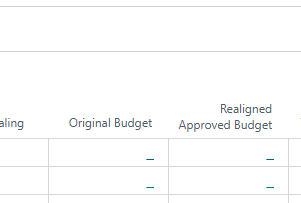
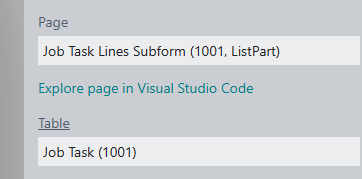
Both have same field property.
What did I do wrong?

Because of that , I tried to change the value following (https://answers.microsoft.com/en-us/msoffice/forum/all/replace-0-with-dash/5b7705cb-8def-4127-9040-7a1d70de2b06) using Autoformatexpression and it's not working.

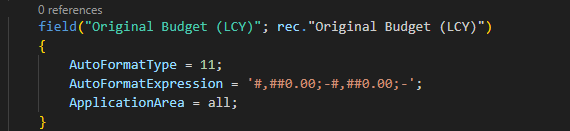
I tried combine AutoFormatExpression with AutoFormatType from 1 to 11 still not changing.
Is there any other way?
I have the same question (0)
  • Suggested answer
    Kamal Khakhkhar Profile Picture
    1,329 on at
    Hii there,
    as per requirement checked you can use as per below.
    as per microsoft documantation.


    AutoFormatType = 1;
    AutoFormatExpression =
    '<FormatString>#,##0.00;(#,##0.00);Zero';
     
     
    For this as per requirement you need V26 and later version . 

     Note

    APPLIES TO: Business Central 2025 release wave 1 (v26) and later.


    IF You found answer please mark it answered.


    Thank You,

    Kamal Khakhkhar

  • BilalFazrin Profile Picture
    67 on at
    Hi @Kamal Khakhkhar

    Thank for the reply.
    I've tried that but it's still not working.
    I also use version 26.0+ 
    Can you show me if it's working on your site?
  • Verified answer
    YUN ZHU Profile Picture
    95,741 Super User 2025 Season 2 on at
    Hi, try following
                AutoFormatType = 1;
                BlankZero = true;
     
    Thanks.
    ZHU
  • BilalFazrin Profile Picture
    67 on at
    Hi @YUN ZHU

    Thank you it's working.

    I tried testing it to non flowfield, it's not working.
    Among the other flow field, I tried to creaste non table field using procedure returned value.
    But it only shows blank.


    Is there any other way to do so?
  • Verified answer
    Sohail Ahmed Profile Picture
    11,150 Super User 2025 Season 2 on at
    Hi Bilal,
     
    This behavior occurs because flow fields (especially Sum, Lookup, or CalcFormula types) don't automatically show a dash (–) when their value is 0. In standard list pages, some Microsoft-designed fields have extra formatting or display logic added behind the scenes.
     
    To replicate the same behavior in your custom field on a ListPart or List page, you can use a calculated display field instead of showing the raw flow field directly. Here’s what you can do:
     
    1. Create a variable or a Text field in your page.
     
     
    2. In the OnAfterGetRecord() trigger, write logic like:
     
    if MyFlowField = 0 then
        MyTextDisplay := '-'
    else
        MyTextDisplay := Format(MyFlowField);
     
     
    3. Bind the new MyTextDisplay field to your column on the page.


    This way, the display behavior will match what you see in standard pages with the dash for zero values.
     
    ✅ Mark this answer as verified if it helps you.
     
     
  • Suggested answer
    YUN ZHU Profile Picture
    95,741 Super User 2025 Season 2 on at
    This method is limited to Flowfield. The actual field has only the following effects.
    Dynamics 365 Business Central mini tips: How to display zeros (0) on the Sales Order Subform page when the quantity is 0 (BlankNumbers Property and BlankNumbers Property)
     
    So although it is not recommended, it can only be done using Sohail's method...
     
    Thanks
    ZHU
  • Verified answer
    BilalFazrin Profile Picture
    67 on at
    Hi @Sohail Ahmed @YUN ZHU

    Thank you for the help.
    I found out another way to make variable field to 'Dash' by adding onlookup trigger.
    I just realize Lot No in Item Ledger Entries have similar behavior so i recreate it .


Under review

Thank you for your reply! To ensure a great experience for everyone, your content is awaiting approval by our Community Managers. Please check back later.

Helpful resources

Quick Links

Responsible AI policies

As AI tools become more common, we’re introducing a Responsible AI Use…

Neeraj Kumar – Community Spotlight

We are honored to recognize Neeraj Kumar as our Community Spotlight honoree for…

Leaderboard > Small and medium business | Business Central, NAV, RMS

#1
OussamaSabbouh Profile Picture

OussamaSabbouh 2,066

#2
YUN ZHU Profile Picture

YUN ZHU 658 Super User 2025 Season 2

#3
Sumit Singh Profile Picture

Sumit Singh 595

Last 30 days Overall leaderboard

Featured topics

Product updates

Dynamics 365 release plans



