web
You’re offline. This is a read only version of the page.
close
Skip to main content

Notifications

Announcements

No record found.

Community site session details

Community site session details

Session Id :
Supply chain | Supply Chain Management, Commerce
Answered

Minimum Stock Level

(0) ShareShare
ReportReport
Posted on by 425

Dear DFO Experts:

I have set Min and Max Qty in Item Coverage. 

Scenario:  Stock is 15 but sold 2 pcs which makes Current Avail Qty is 13.  I did not define any quantity under Default Order Settings.   There is no open orders to fulfill.

In this case is it correct that the system should suggest a PO Qty of 37  (max 50 - 13 = 37)?

1.)  Which function should I access for the system to suggest a Planned Order (Purchase Order) to bring the qty to maximum stock level?  
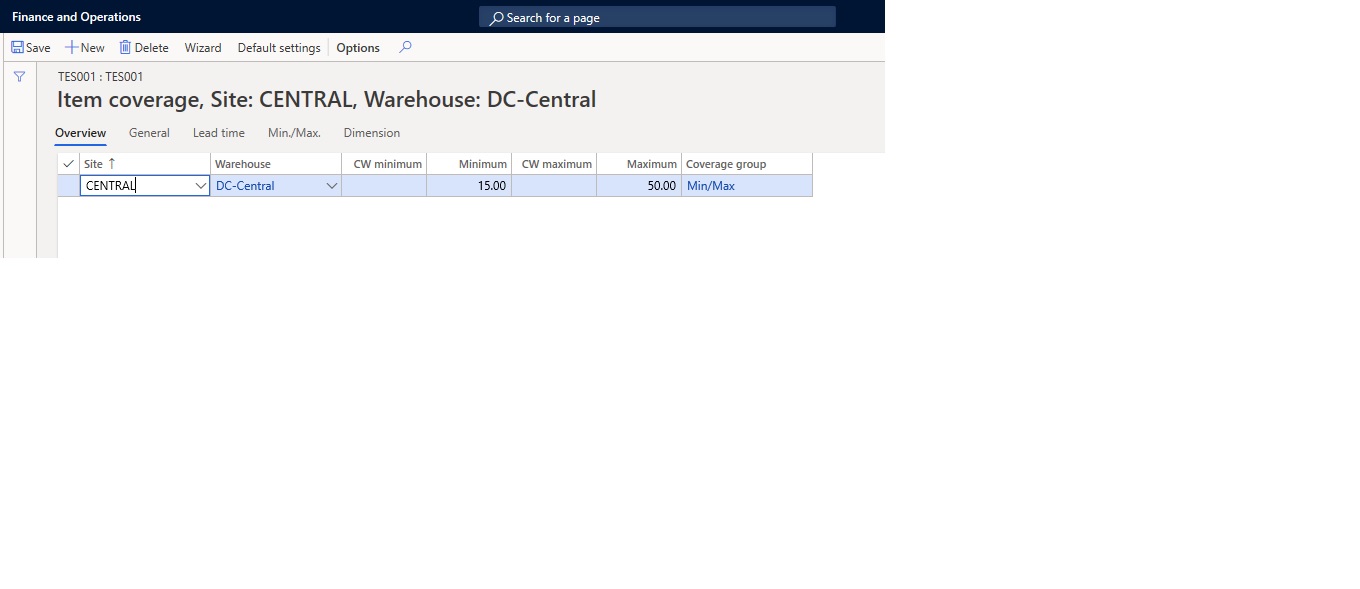
MinMax.jpg

2.)  Where I can define a min/max quantity per product which is per Site only and not per warehouse? 

I have the same question (0)
  • Suggested answer
    Christoph Thaler Profile Picture
    5,442 on at

    Hi Pamski,

    to get the planned purchase order you have to run the MRP. The easiest way from the item is using the "Update" feature in "Net requirements".

    To your second question regarding the minimum stock per site: In D365 you have to enter the minimum stock per site and warehouse as warehouse is mandatory. Unfortunately I do not know any form or report where you have it available. Do you really need it per site? Usually it is important per warehouse because you have to do some transfers.

  • Verified answer
    MATTGUO Profile Picture
    22,349 Moderator on at

    Hi Pamski,

    The planned purchase order is correct.

    1. When the coverage group is Min./Max., system will generate max stock level.

    2. That is controlled by the Coverage plan by dimension in Storage dimension groups.

    2577.png

  • pams.basilio Profile Picture
    425 on at

    Hi Christoph

    Many thanks for your reply.

    I tried the Net Requirements and choose Update and it works and system suggested a Planned PO for 37 pcs.  Thanks for this.

    You mentioned the other form to run planned PO is MRP.  Where to run MRP?  I tried running Planned Orders under Master Planning however it gives me a message to input a positive requirement quantity?  I should not be entering any quantity as the system should suggest based on requirement and min/max settings, right?  Why is it a required field?

    Master-Planning.jpg

    For my 2nd question, yes a min and max per site only.  I think it is not also viable to just set a generic warehouse for this purpose since Orders will be transacted in the real warehouses.   What would be the other option to set Min/Max if Orders (PO,SO,Inventories) are transacted in same site but different warehouses?  How can I consolidate the requirement so system suggests panned order/s based on consolidated requirement?

  • Suggested answer
    Christoph Thaler Profile Picture
    5,442 on at

    Hi Pamski,

    If you want to run the MRP you have to use this menu item.

    pastedimage1587111266008v2.png

    in here you can use the "Filter" to run the MRP for a specific item. It the field "item number" is empty the MRP will run for all items inside the system.

    pastedimage1587111221520v1.png

    regarding you second question: 

    we had a similar topic in the past and it was solved by having one warehouse responsible for the purchasing process (main warehouse). If the item is located / transferred to any other warehouse it is not available any more because it is already in production for example. So in our case it was enough to just check one warehouse and all the planned purchase orders where generated for this warehouse.

  • pams.basilio Profile Picture
    425 on at

    Hi Christoph

    Many thanks for your reply.

    I tried the Net Requirements and choose Update and it works and system suggested a Planned PO for 37 pcs.  Thanks for this.

    Where to run MRP?  I tried running Planned Orders under Master Planning however it gives me a message to input a positive requirement quantity?  I should not be entering any quantity as the system should suggest based on requirement and min/max settings, right?  Why is it a required field and I tried entering a required qty but the system just use the qty I entered for the planned order.

    pastedimage1587111761139v1.jpeg

    Noted, that warehouse is mandatory in Min/Max setting. Thanks!

    How to go about setting the Min/Max per product and per site?  There are multiple warehouses per site where both incoming and outgoing orders are transacted?  Perhaps need to restructure Site & Warehouse?

  • Suggested answer
    Christoph Thaler Profile Picture
    5,442 on at

    HI Pamski,

    if you open the "planned orders" form in master planning you are checking the results of MRP. This is not the way how to start it. Within this form you can add additional planned orders (purchase or production) manually. If you do so you have to enter a quantity of course. See my last post to know how to start the MRP.

    regarding the warehouse topic. It`s hard to say without knowing your structure and needs.

  • pams.basilio Profile Picture
    425 on at

    Hi Christoph,

    Noted that Planned Order in Master Planning is for checking results of MRP and add additional planned orders.

    Thank you.

Under review

Thank you for your reply! To ensure a great experience for everyone, your content is awaiting approval by our Community Managers. Please check back later.

Helpful resources

Quick Links

Responsible AI policies

As AI tools become more common, we’re introducing a Responsible AI Use…

Neeraj Kumar – Community Spotlight

We are honored to recognize Neeraj Kumar as our Community Spotlight honoree for…

Leaderboard > Supply chain | Supply Chain Management, Commerce

#1
Siv Sagar Profile Picture

Siv Sagar 266 Super User 2025 Season 2

#2
Laurens vd Tang Profile Picture

Laurens vd Tang 213 Super User 2025 Season 2

#3
André Arnaud de Calavon Profile Picture

André Arnaud de Cal... 140 Super User 2025 Season 2

Last 30 days Overall leaderboard

Featured topics

Product updates

Dynamics 365 release plans
