web
You’re offline. This is a read only version of the page.
close
Skip to main content

Notifications

Announcements

No record found.

Community site session details

Community site session details

Session Id :
Small and medium business | Business Central, N...
Suggested Answer

Job Number on Posted Sales Invoice

(0) ShareShare
ReportReport
Posted on by 224

Hello All,

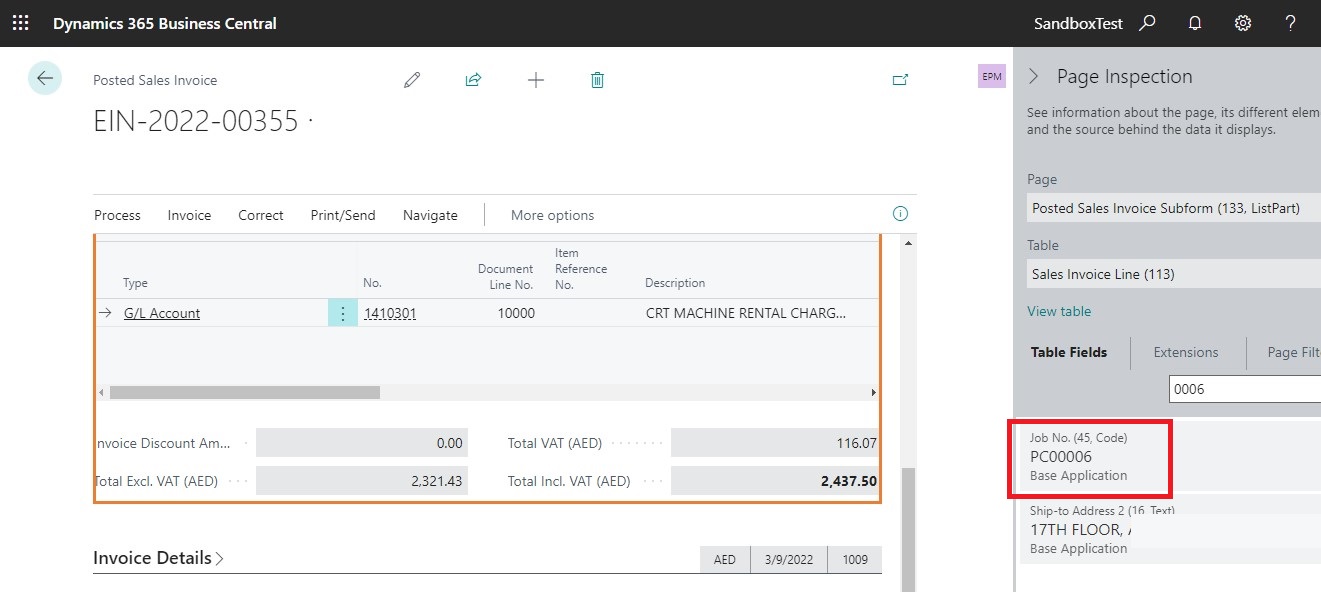
am trying to bring Job Number Field in Posted Sales Invoice Print out. But values is not coming over the print out.

pls let me know what is the issue
posted-job.jpg

reportextension 60003 PostedSalesInvoiceExt extends "Sales - Invoice EMP"
{

    RDLCLayout = './ReportLayouts/PostedSalesInvoice.rdl';
    dataset
    {
        add("Sales Invoice Line")
        {
            column(JobNo_SalesInvoiceLine; "Job No.")
            {
            }

        }
    }

}


Compile Messages
warning AL0432: Report 'Sales - Invoice EMP' is marked for removal. Reason: Replaced with report 1306 Standard Sales - Invoice. Tag: 15.2.

Compilation ended at '17:10:28.840'.

Success: The package is created.
I have the same question (0)
  • Suggested answer
    JAngle Profile Picture
    131 on at

    Once the extension is installed are you able to create a report layout? Adding the field will make it available within the schema for a layout to be generated. They are two separate tasks. As the compiler message suggests you should probably do this with report 1306 instead of the one you have selected

  • LearnBC Profile Picture
    224 on at

    Thankyou..

    Actually it was working fine before. but dont know why it is not working after the 20th Update

  • LearnBC Profile Picture
    224 on at

    after downloading the latest extension and changing the report to 1306 standard sales then  also am getting the same

    pos-job.jpg

    reportextension 60003 PostedSalesInvoiceExt extends 1306
    {
    
        RDLCLayout = './ReportLayouts/PostedSalesInvoice.rdl';
        dataset
        {
            add("Sales Invoice Line")
            {
                column(JobNo_SalesInvoiceLine; "Job No.")
                {
                }
    
            }
        }
    
    }

  • Suggested answer
    JAngle Profile Picture
    131 on at

    I believe the dataitem in the report is like this:

    dataitem(Line; "Sales Invoice Line")

    Which would mean you reference it with Line in a report extension. Try using ctrl+spacebar in vs code. That gives you suggestions on what to use table and field wise

  • LearnBC Profile Picture
    224 on at

    is it like this..but there is no result as expected

    reportextension 60003 PostedSalesInvoiceExt extends 1306
    {
    
        RDLCLayout = './ReportLayouts/PostedSalesInvoice.rdl';
        dataset
        {
            addbefore(Line)
            {
                
                dataitem("Sales Line"; "Sales Line")
    
                //add("Sales Invoice Line")
                {
    
                    
                    column(JobNo_SalesLine; "Job No.")
                    {
                    }
    
                }
            }
    
        }
    }

  • LearnBC Profile Picture
    224 on at

    Could you pls anyone suggest me what may be the issue in this.

  • LearnBC Profile Picture
    224 on at

    Could you pls anyone guide me what may be the issue in this.

  • Suggested answer
    JAngle Profile Picture
    131 on at

    For report 1306 the field is already part of the sales line data item. Just add it through a report layout

  • LearnBC Profile Picture
    224 on at

    Yes, i already added in the report but it is not coming over there. thatz why am confused is there any mistakes in code or not

  • LearnBC Profile Picture
    224 on at

    in Lines also it is there or in find entries- job ledger entries also the job field is there

    posted-sales-in.jpg

    led-entry.jpg

    reportextension 60003 PostedSalesInvoiceExt extends 1306
    {
    
        RDLCLayout = './ReportLayouts/PostedSalesInvoice.rdl';
        dataset
        {
            addbefore(Line)
            {
                
                dataitem("Sales Line"; "Sales Line")
    
                //add("Sales Invoice Line")
                {
    
                    
                    column(JobNo_SalesLine; "Job No.")
                    {
                    }
    
                }
            }
    
        }
    }

Under review

Thank you for your reply! To ensure a great experience for everyone, your content is awaiting approval by our Community Managers. Please check back later.

Helpful resources

Quick Links

Responsible AI policies

As AI tools become more common, we’re introducing a Responsible AI Use…

Neeraj Kumar – Community Spotlight

We are honored to recognize Neeraj Kumar as our Community Spotlight honoree for…

Leaderboard > Small and medium business | Business Central, NAV, RMS

#1
OussamaSabbouh Profile Picture

OussamaSabbouh 3,329

#2
Jainam M. Kothari Profile Picture

Jainam M. Kothari 2,250 Super User 2025 Season 2

#3
YUN ZHU Profile Picture

YUN ZHU 1,365 Super User 2025 Season 2

Last 30 days Overall leaderboard

Featured topics

Product updates

Dynamics 365 release plans
