web
You’re offline. This is a read only version of the page.
close
Skip to main content

Announcements

No record found.

News and Announcements icon
Community site session details

Community site session details

Session Id :
Microsoft Dynamics CRM (Archived)

How to close opportunity via SDK and update all of the fields

(0) ShareShare
ReportReport
Posted on by

I'd like to know how to close an opportunity via the SDK and update all of the fields that are shown in the UI screen for closing the opportunity.  I have seen this article which I understand how to use https://ssharmacrm.wordpress.com/2015/10/05/how-to-close-an-opportunity-as-lost-using-ms-dynamics-crm-sdk/.

However, in the UI when closing the opportunity, there are multiple fields to set: Status Reason, Actual Revenue, Close Date, Competitor, and Description.  
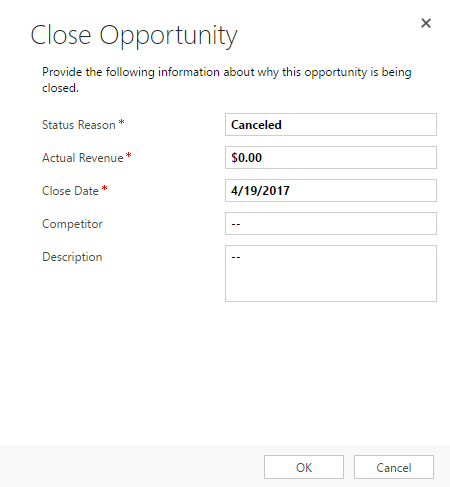
oppu.png

The SDK mentions using LoseOpportunityRequest or WinOpportunityRequest for which you can specify "Status Reason".  Ok, fine, that works.  But how do I update the other fields in the SDK request?

Thank you.

*This post is locked for comments

I have the same question (0)
  • Suggested answer
    ashlega Profile Picture
    34,477 on at

    Hi,

     all those attributes are defined in the OpportunityClose entity, so you need to set related property of the WinOpportunityRequest:

    msdn.microsoft.com/.../microsoft.crm.sdk.messages.winopportunityrequest.aspx

     Look for the "OpportunityClose" property there

     In that post you are referring to, just add the attributes you need to the opportunityClose - it's being created in that example, but they are not setting any of the attributes really  (have a look at the OpportunityClose entity metadata in the default solution to find out attribute names)

  • Suggested answer
    Nithya Gopinath Profile Picture
    17,078 on at

    Hi Jose,

    You could set the other fields similar to the code below.

            Entity opportunityClose = new Entity("opportunityclose");
    
            opportunityClose.Attributes.Add("opportunityid", new EntityReference("opportunity", new Guid(entityGuid)));
            opportunityClose.Attributes.Add("statuscode", 1);
            opportunityClose.Attributes.Add("actualrevenue", 100.00);

    Hope this helps.

  • Emre GULCAN Profile Picture
    2,379 on at

    Hi,

    As Nithya told you use "OpporttunityClose" entity in your request. 

    I've published a helper library (XrmLibrary) and you can do it easy by calling Win or Lose methods. 

Under review

Thank you for your reply! To ensure a great experience for everyone, your content is awaiting approval by our Community Managers. Please check back later.

Helpful resources

Quick Links

Introducing the 2026 Season 1 community Super Users

Congratulations to our 2026 Super Stars!

Congratulations to our 2025 Community Spotlights

Thanks to all of our 2025 Community Spotlight stars!

Leaderboard > 🔒一 Microsoft Dynamics CRM (Archived)

#1
JS-09031509-0 Profile Picture

JS-09031509-0 3

#2
AS-17030037-0 Profile Picture

AS-17030037-0 2

#2
Mark Eckert Profile Picture

Mark Eckert 2

Last 30 days Overall leaderboard

Featured topics

Product updates

Dynamics 365 release plans
