web
You’re offline. This is a read only version of the page.
close
Skip to main content

Notifications

Announcements

No record found.

Community site session details

Community site session details

Session Id :
Microsoft Dynamics CRM (Archived)

Microsoft Dynamics 365 Reporting Extensions must be installed on SQL Server Reporting Services for reports to work.

(0) ShareShare
ReportReport
Posted on by 422

I have installed SQL server 2016 and I'm trying to import an organization from the database but I get this error message : Microsoft Dynamics 365 Reporting Extensions must be installed on SQL Server Reporting Services for reports to work.
The thing is, it is installed, here's the screenshots. Anyone knows how to fix this?

Updates
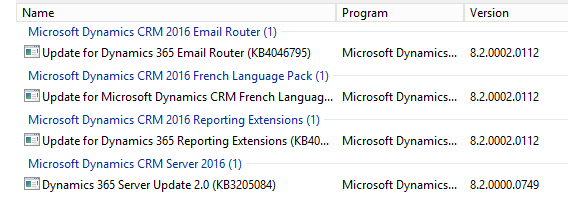

instals.PNG


Programs


3302.2.PNG

*This post is locked for comments

I have the same question (0)
  • Suggested answer
    Alex Fun Wei Jie Profile Picture
    33,628 on at

    have you install the SetupSrsDataConnector?

    alexmscrm.blogspot.my/.../dynamics-365-report-wizard-is-not.html

  • anonsgate Profile Picture
    422 on at

    Yes, when I doubleclic SetupSrsDataConnector it says repair/uninstall. If I do repair though, it gives me a path that doesn't exist (D:\Server\amd64\SrsDataConnector\) I don't even have any of these folders anywhere. Also, I get these errors in event viewer : 
    Report Server (MSSQLSERVER) cannot load the MSCRM extension.
    Report Server (MSSQLSERVER) cannot load the MSCRMFETCH extension.
    Report Server (MSSQLSERVER) cannot load the TERADATA extension.
    Report Server (MSSQLSERVER) cannot load the ORACLE extension.

    Report Server (MSSQLSERVER) cannot load the SQLPDW extension.

  • anonsgate Profile Picture
    422 on at

    The report server service log says :

    System.IO.FileNotFoundException: Could not load file or assembly 'Microsoft.Crm.Reporting.DataExtensionShim.Server.Sql' or one of its dependencies.

    System.IO.FileNotFoundException: Could not load file or assembly 'Microsoft.Crm.Reporting.DataExtensionShim.Server.Fetch' or one of its dependencies

    Exception caught instantiating TERADATA report server extension: System.Reflection.TargetInvocationException: Exception has been thrown by the target of an invocation. ---> System.IO.FileNotFoundException: Could not load file or assembly 'Teradata.Client.Provider, Version=12.0.0.0, Culture=neutral, PublicKeyToken=76b417ee2e04956b' or one of its dependencies. The system cannot find the file specified.

  • Suggested answer
    Alex Fun Wei Jie Profile Picture
    33,628 on at

    Hi,

    Now let's try to check is the report working in your current organization or not.

    Steps to verify

    1. Go into your newly created organization.

    2. Create a report

    3. Run the report and see if you able to generate the report or not.

    if you are unable to generate the report, open your report manager and check the status.

  • anonsgate Profile Picture
    422 on at

    When I try to create a report I have this message. Report Wizard reports are not available because the Microsoft Dynamics 365 Reporting Extensions component is not installed.

    If I try to open http://org/reports from the server where crm is installed it works, if from my computer it didnt work until i tried to access it on the server, now it works from my pc too.

  • jdalske Profile Picture
    547 on at

    I am experiencing the exact same thing. Did you find a solution?

  • jdalske Profile Picture
    547 on at

    I am experiencing the exact same thing. Did you find a solution?  I have it installed as well and get a prompt for a disk when I try to run the repair.

Under review

Thank you for your reply! To ensure a great experience for everyone, your content is awaiting approval by our Community Managers. Please check back later.

Helpful resources

Quick Links

Responsible AI policies

As AI tools become more common, we’re introducing a Responsible AI Use…

Neeraj Kumar – Community Spotlight

We are honored to recognize Neeraj Kumar as our Community Spotlight honoree for…

Leaderboard > 🔒一 Microsoft Dynamics CRM (Archived)

#1
SA-08121319-0 Profile Picture

SA-08121319-0 4

#1
Calum MacFarlane Profile Picture

Calum MacFarlane 4

#3
Alex Fun Wei Jie Profile Picture

Alex Fun Wei Jie 2

Last 30 days Overall leaderboard

Featured topics

Product updates

Dynamics 365 release plans

