Hi
i have Microsoft Dynamics 365 update 2.2
and Microsoft Dynamics 365 for Outlook
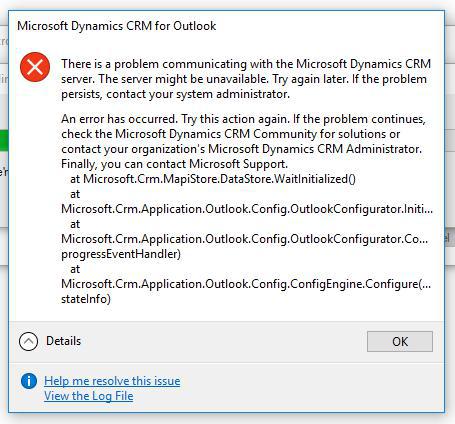
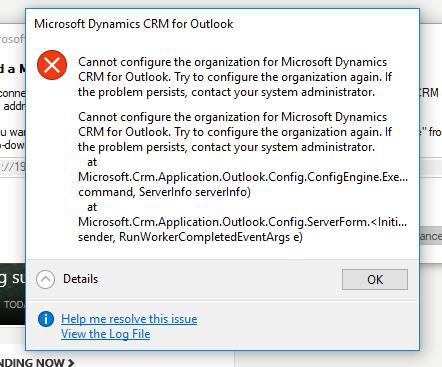
error When I want to configure the client computers with the microsoft Dynamics 365 for Outlook , But there is no problem with the CRM server.
Error message :
17:28:17| Info| === Microsoft Dynamics 365 for Outlook Configuration Wizard logging started: 12/19/2017 5:28:17 PM ===
17:28:17|Verbose| Method entry: Microsoft.Crm.Application.Outlook.Config.ClientConfig.Initialize
17:28:17| Info| Client Configuration Wizard Version : 8.2.0002.0112
17:28:17| Info| Client Configuration Wizard LanguageID : 1033
17:28:17|Verbose| Method entry: Microsoft.Crm.Application.Outlook.Config.Validator.IsOutlookInitialized
17:28:17| Info| Query all rows in profile table
17:28:17| Info| Outlook is initialized
17:28:17|Verbose| Method exit: Microsoft.Crm.Application.Outlook.Config.Validator.IsOutlookInitialized
17:28:17| Info| Client Configuration Wizard Running Mode : Normal
17:28:18| Info| Configuration file Type : OnPremise.
17:28:18|Verbose| Method entry: Microsoft.Crm.Application.Outlook.Config.MainForm..ctor
17:28:18|Verbose| Method entry: Microsoft.Crm.Application.Outlook.Config.ConfigInfo.ConfigInfo
17:28:18|Verbose| Method entry: Microsoft.Crm.Application.Outlook.Config.OutlookCRMDatastoreInstaller.GetAllCRMOrgsInOutlookProfile
17:28:18| Info| Logon mapi store
17:28:18| Info| Logon admin service
17:28:18|Verbose| Method entry: Microsoft.Crm.Application.Outlook.Config.OutlookCRMDatastoreInstaller.GetServiceIds
17:28:18| Info| Query all rows in msg service table
17:28:18|Verbose| Method exit: Microsoft.Crm.Application.Outlook.Config.OutlookCRMDatastoreInstaller.GetServiceIds
17:28:19|Verbose| Method entry: Microsoft.Crm.Application.Outlook.Config.ConfigInfo.CleanUpDatastoreIfNeeded
17:28:19|Verbose| Method exit: Microsoft.Crm.Application.Outlook.Config.ConfigInfo.CleanUpDatastoreIfNeeded
17:28:19|Verbose| Method exit: Microsoft.Crm.Application.Outlook.Config.ConfigInfo.ConfigInfo
17:28:19|Verbose| Method exit: Microsoft.Crm.Application.Outlook.Config.MainForm..ctor
17:28:19|Verbose| Method entry: Microsoft.Crm.Application.Outlook.Config.MainForm.MainForm_Shown
17:28:19|Verbose| Method entry: Microsoft.Crm.Application.Outlook.Config.MainForm.AddServer
17:28:19|Verbose| Method entry: Microsoft.Crm.Application.Outlook.Config.ServerForm..ctor
17:28:19|Verbose| Method exit: Microsoft.Crm.Application.Outlook.Config.ServerForm..ctor
17:28:19|Verbose| Method entry: Microsoft.Crm.Application.Outlook.Config.ServerForm.SetUIData
17:28:19|Verbose| Method entry: Microsoft.Crm.Application.Outlook.Config.ServerForm.LoadAvailableUrls
17:28:19|Verbose| Method exit: Microsoft.Crm.Application.Outlook.Config.ServerForm.LoadAvailableUrls
17:28:19|Verbose| Method entry: Microsoft.Crm.Application.Outlook.Config.ServerForm.SetUIData
17:28:31|Verbose| Method entry: Microsoft.Crm.Application.Outlook.Config.ServerForm._serverUrlConnectButton_Click
17:28:31|Verbose| Method entry: Microsoft.Crm.Application.Outlook.Config.ServerForm.TestConnection
17:28:31|Verbose| Method exit: Microsoft.Crm.Application.Outlook.Config.ServerForm.TestConnection
17:28:31|Verbose| Method exit: Microsoft.Crm.Application.Outlook.Config.ServerForm._serverUrlConnectButton_Click
17:28:31|Verbose| Method entry: Microsoft.Crm.Application.Outlook.Config.ServerForm.RunEnvironmentDiagnostics
17:28:31|Verbose| Method entry: Microsoft.Crm.Application.Outlook.ConfigDiagnostics.DiagnosticEngine.Run(Environment)
17:28:31|Verbose| Method entry: Microsoft.Crm.Application.Outlook.ConfigDiagnostics.LocalTimeDiagnostic.ExecuteInternal
17:28:31| Info| Current UTC date/time from green.local: 12/19/2017 13:59:10
17:28:31| Info| NetApiStatus for NetApiBufferFree: 0
17:28:31| Info| Client UTC Date/Time: 12/19/2017 13:58:31
17:28:31| Info| Difference (in minutes) between client time and actual time: 0.647685048333333
17:28:31|Verbose| Method exit: Microsoft.Crm.Application.Outlook.ConfigDiagnostics.LocalTimeDiagnostic.ExecuteInternal
17:28:31|Verbose| Method exit: Microsoft.Crm.Application.Outlook.ConfigDiagnostics.DiagnosticEngine.Run(Environment)
17:28:31|Verbose| Method exit: Microsoft.Crm.Application.Outlook.Config.ServerForm.RunEnvironmentDiagnostics
17:28:31| Info| Attempting AD (http) org service connection.
17:28:32| Info| Fill organization comboBox with server information.
17:28:32|Verbose| Method entry: Microsoft.Crm.Application.Outlook.Config.ServerForm._selectOrganizationButton_Click
17:28:32|Verbose| Method exit: Microsoft.Crm.Application.Outlook.Config.ServerForm._selectOrganizationButton_Click
17:28:32|Verbose| Method entry: Microsoft.Crm.Application.Outlook.Config.ServerInfo.RunServerDiagnostics
17:28:32|Verbose| Method entry: Microsoft.Crm.Application.Outlook.ConfigDiagnostics.DiagnosticEngine.Run(CrmServer)
17:28:32|Verbose| Method entry: Microsoft.Crm.Application.Outlook.ConfigDiagnostics.UserLicenseDiagnostic.ExecuteInternal
17:28:32|Verbose| Method exit: Microsoft.Crm.Application.Outlook.ConfigDiagnostics.UserLicenseDiagnostic.ExecuteInternal
17:28:32|Verbose| Method entry: Microsoft.Crm.Application.Outlook.ConfigDiagnostics.ClientCompatibilityDiagnostic.ExecuteInternal
17:28:33| Info| Client Compatibility result: 0
17:28:33| Info| Client is compatible with the server
17:28:33|Verbose| Method exit: Microsoft.Crm.Application.Outlook.ConfigDiagnostics.ClientCompatibilityDiagnostic.ExecuteInternal
17:28:33|Verbose| Method exit: Microsoft.Crm.Application.Outlook.ConfigDiagnostics.DiagnosticEngine.Run(CrmServer)
17:28:33|Verbose| Method exit: Microsoft.Crm.Application.Outlook.Config.ServerInfo.RunServerDiagnostics
17:28:33|Verbose| Method entry: Microsoft.Crm.Application.Outlook.Config.ConfigEngine.Execute
17:28:33|Verbose| Method entry: Microsoft.Crm.Application.Outlook.Config.ConfigEngine.GetActionList
17:28:33| Info| Action type : Add.
17:28:33| Info| Add GlobalRepositoryConfigurator.
17:28:33| Info| Add AddinConfigurator.
17:28:33| Info| Add OrganizationRepositoryConfigurator.
17:28:33| Info| Add PrimaryConfigurator.
17:28:33| Info| Add OutlookConfigurator.
17:28:33| Info| Add FinalConfiguratorConfigurator.
17:28:33|Verbose| Method exit: Microsoft.Crm.Application.Outlook.Config.ConfigEngine.GetActionList
17:28:33| Info| Get action list.
17:28:33| Info| Get action total progress : 55.
17:28:33|Verbose| Method entry: Microsoft.Crm.Application.Outlook.Config.ConfigEngine.GetActionEntry
17:28:33| Info| Action command type : Add.
17:28:33|Verbose| Method entry: Microsoft.Crm.Application.Outlook.Config.ConfigEngine.Configure
17:28:33|Verbose| Method entry: Microsoft.Crm.Application.Outlook.Config.GlobalRepositoryConfigurator.Configure
17:28:33|Verbose| Method entry: Microsoft.Crm.Application.Outlook.Config.GlobalRepositoryConfigurator+DeleteUserApplicationFilesAction.Delete
17:28:33|Verbose| Method exit: Microsoft.Crm.Application.Outlook.Config.GlobalRepositoryConfigurator+DeleteUserApplicationFilesAction.Delete
17:28:33| Info| Deleted user application files.
17:28:33|Verbose| Method entry: Microsoft.Crm.Application.Outlook.Config.GlobalRepositoryConfigurator.SetConfigurationRegistryValuesAction
17:28:33|Verbose| Method entry: Microsoft.Crm.Application.Outlook.Config.GlobalRepositoryConfigurator.SetClientRegistryDefaultSettings
17:28:33| Info| Copied registry values created by setup in HKLM to HKCU on configuration
17:28:33|Verbose| Method exit: Microsoft.Crm.Application.Outlook.Config.GlobalRepositoryConfigurator.SetClientRegistryDefaultSettings
17:28:33| Info| Set default settings to client configuration.
17:28:33|Verbose| Method entry: Microsoft.Crm.Application.Outlook.Config.GlobalRepositoryConfigurator.SetLaptopClientRegistryValues
17:28:33|Verbose| Method entry: Microsoft.Crm.Application.Outlook.Config.ConfigInfo.GetAspDotNetPath
17:28:33| Info| ASP Net version key name : Software\Microsoft\ASP.NET\4.7.2556.0
17:28:33| Info| ASP Net install path : C:\Windows\Microsoft.NET\Framework64\v4.7.2556
17:28:33|Verbose| Method exit: Microsoft.Crm.Application.Outlook.Config.ConfigInfo.GetAspDotNetPath
17:28:33| Info| Created Crm allow list key.
17:28:33|Verbose| Method exit: Microsoft.Crm.Application.Outlook.Config.GlobalRepositoryConfigurator.SetLaptopClientRegistryValues
17:28:33| Info| Set laptop client registry key values.
17:28:33|Verbose| Method entry: Microsoft.Crm.Application.Outlook.Config.GlobalRepositoryConfigurator.SetPlatformRootAction
17:28:33| Info| No extended chars in srv-crm/.../Organization.svc were found. No need for short naming.
17:28:33| Info| Set platform root registry keys.
17:28:33|Verbose| Method exit: Microsoft.Crm.Application.Outlook.Config.GlobalRepositoryConfigurator.SetPlatformRootAction
17:28:33| Info| Set platform root key value.
17:28:33| Info| Set user id registry key.
17:28:33|Verbose| Method exit: Microsoft.Crm.Application.Outlook.Config.GlobalRepositoryConfigurator.SetConfigurationRegistryValuesAction
17:28:33| Info| Set configuration registry key values.
17:28:33|Verbose| Method entry: Microsoft.Crm.Application.Outlook.Config.GlobalRepositoryConfigurator.AddSQMRegkeysAndDirectory
17:28:33| Info| Added SQM registry keys.
17:28:33| Info| Added SQM queue directory.
17:28:33|Verbose| Method exit: Microsoft.Crm.Application.Outlook.Config.GlobalRepositoryConfigurator.AddSQMRegkeysAndDirectory
17:28:33| Info| Added SQM registry key values and directory.
17:28:33|Verbose| Method exit: Microsoft.Crm.Application.Outlook.Config.GlobalRepositoryConfigurator.Configure
17:28:33|Verbose| Method entry: Microsoft.Crm.Application.Outlook.Config.AddinConfigurator.Configure
17:28:33|Verbose| Method entry: Microsoft.Crm.Application.Outlook.Config.AddinConfigurator.SetCrmRibbonAddinRegistryValuesAction
17:28:33| Info| Enabled the crm ribbon addin keys under Software\Microsoft\Office\Outlook\Addins\crmaddin.RibbonAddin
17:28:33|Verbose| Method entry: Microsoft.Crm.Application.Outlook.Config.AddinConfigurator.RemoveCrmAddinOfficeResiliencyRegValuesAction
17:28:33| Info| Deleted the resiliency keys under Software\Microsoft\Office
17:28:33| Info| Deleted the resiliency keys under Software\Microsoft\Office
17:28:33| Info| Deleted the resiliency keys under Software\Microsoft\Office
17:28:33|Verbose| Method exit: Microsoft.Crm.Application.Outlook.Config.AddinConfigurator.RemoveCrmAddinOfficeResiliencyRegValuesAction
17:28:33|Verbose| Method exit: Microsoft.Crm.Application.Outlook.Config.AddinConfigurator.SetCrmRibbonAddinRegistryValuesAction
17:28:33|Verbose| Method entry: Microsoft.Crm.Application.Outlook.Config.AddinConfigurator.SetFixedRegistryValuesAction
17:28:33| Info| Registered the form region for IPM.Note in Office registry hive.
17:28:33| Info| Registered the form region for IPM.Appointment in Office registry hive.
17:28:33| Info| Registered the form region for CRM.Task in Office registry hive.
17:28:33| Info| Registered the form region for CRM.Contact in Office registry hive.
17:28:33|Verbose| Method exit: Microsoft.Crm.Application.Outlook.Config.AddinConfigurator.SetFixedRegistryValuesAction
17:28:33|Verbose| Method entry: Microsoft.Crm.Application.Outlook.Config.AddinConfigurator.CreateIntegrationKey
17:28:33| Info| Created Crm integrate key.
17:28:33|Verbose| Method exit: Microsoft.Crm.Application.Outlook.Config.AddinConfigurator.CreateIntegrationKey
17:28:33|Verbose| Method exit: Microsoft.Crm.Application.Outlook.Config.AddinConfigurator.Configure
17:28:33|Verbose| Method entry: Microsoft.Crm.Application.Outlook.Config.OrganizationRepositoryConfigurator.Configure
17:28:33|Verbose| Method entry: Microsoft.Crm.Application.Outlook.Config.OrganizationRepositoryConfigurator.SetContextValues
17:28:33|Verbose| Method exit: Microsoft.Crm.Application.Outlook.Config.OrganizationRepositoryConfigurator.SetContextValues
17:28:33| Info| Set org-based registry values.
17:28:33|Verbose| Method exit: Microsoft.Crm.Application.Outlook.Config.OrganizationRepositoryConfigurator.Configure
17:28:33|Verbose| Method entry: Microsoft.Crm.Application.Outlook.Config.PrimaryConfigurator.Configure
17:28:33|Verbose| Method entry: Microsoft.Crm.Application.Outlook.Config.PrimaryConfigurator.SetPrimaryContextValues
17:28:33|Verbose| Method entry: Microsoft.Crm.Application.Outlook.Config.PrimaryConfigurator.SetPrimaryOrg
17:28:33|Verbose| Method entry: Microsoft.Crm.Application.SMWrappers.MapiConfigHelper.UpdateMailboxConfigFolder
17:28:33|Verbose| Method entry: Microsoft.Crm.Application.SMWrappers.MapiConfigHelper.OpenMapiSession
17:28:33|Verbose| Method entry: Microsoft.Crm.Application.SMWrappers.MapiConfigHelper.GetCrmOrgMailboxConfigFolder
17:28:33|Verbose| Method entry: Microsoft.Crm.Application.SMWrappers.MapiConfigHelper.OpenTaskFolder
17:28:33| Info| A default mailbox is found and opened.
17:28:33| Info| Found and opened the default inbox.
17:28:33|Verbose| Method exit: Microsoft.Crm.Application.SMWrappers.MapiConfigHelper.OpenTaskFolder
17:28:33|Verbose| Method entry: Microsoft.Crm.Application.SMWrappers.MapiConfigHelper.SetConfigFolderProps
17:28:33|Verbose| Method exit: Microsoft.Crm.Application.SMWrappers.MapiConfigHelper.SetConfigFolderProps
17:28:33|Verbose| Method exit: Microsoft.Crm.Application.SMWrappers.MapiConfigHelper.GetCrmOrgMailboxConfigFolder
17:28:33|Verbose| Method entry: Microsoft.Crm.Application.SMWrappers.MapiConfigHelper.SetConfigFolderProps
17:28:33|Verbose| Method exit: Microsoft.Crm.Application.SMWrappers.MapiConfigHelper.SetConfigFolderProps
17:28:36|Verbose| Method exit: Microsoft.Crm.Application.SMWrappers.MapiConfigHelper.OpenMapiSession
17:28:36|Verbose| Method exit: Microsoft.Crm.Application.SMWrappers.MapiConfigHelper.UpdateMailboxConfigFolder
17:28:36|Verbose| Method exit: Microsoft.Crm.Application.Outlook.Config.PrimaryConfigurator.SetPrimaryOrg
17:28:36|Verbose| Method exit: Microsoft.Crm.Application.Outlook.Config.PrimaryConfigurator.SetPrimaryContextValues
17:28:36| Info| Set Primary Org values.
17:28:36|Verbose| Method exit: Microsoft.Crm.Application.Outlook.Config.PrimaryConfigurator.Configure
17:28:36|Verbose| Method entry: Microsoft.Crm.Application.Outlook.Config.OutlookConfigurator.Configure
17:28:36|Verbose| Method entry: Microsoft.Crm.Application.Outlook.Config.OutlookCRMDatastoreInstaller.DeleteV4CrmDatastore
17:28:36| Info| Logon mapi store
17:28:36| Info| Logon admin service
17:28:36|Verbose| Method entry: Microsoft.Crm.Application.Outlook.Config.OutlookCRMDatastoreInstaller.GetCrmStoreServiceId
17:28:36|Verbose| Method entry: Microsoft.Crm.Application.Outlook.Config.OutlookCRMDatastoreInstaller.GetServiceIds
17:28:36| Info| Query all rows in msg service table
17:28:36|Verbose| Method exit: Microsoft.Crm.Application.Outlook.Config.OutlookCRMDatastoreInstaller.GetServiceIds
17:28:36|Verbose| Method exit: Microsoft.Crm.Application.Outlook.Config.OutlookCRMDatastoreInstaller.GetCrmStoreServiceId
17:28:50|Verbose| Method exit: Microsoft.Crm.Application.Outlook.Config.OutlookCRMDatastoreInstaller.DeleteV4CrmDatastore
17:28:50|Verbose| Method entry: Microsoft.Crm.Application.Outlook.Config.OutlookConfigurator.InitializeMapiStoreForFirstTime
17:30:55| Error| Exception : An error has occurred. Try this action again. If the problem continues, check the Microsoft Dynamics 365 Community for solutions or contact your organization's Microsoft Dynamics 365 Administrator. Finally, you can contact Microsoft Support. at Microsoft.Crm.MapiStore.DataStore.WaitInitialized()
at Microsoft.Crm.Application.Outlook.Config.OutlookConfigurator.InitializeMapiStoreForFirstTime()
at Microsoft.Crm.Application.Outlook.Config.OutlookConfigurator.Configure(IProgressEventHandler progressEventHandler)
at Microsoft.Crm.Application.Outlook.Config.ConfigEngine.Configure(Object stateInfo)
17:30:55| Error| Exception : Server was unable to process request.
17:30:55| Error| Dynamic Help Link: go.microsoft.com/fwlink;lcid=409&cv=8.2.2.112&sv=8.2.2.112&opsys=10.0.16299.0&cid=e69769f8-05a4-4b9e-81a9-6c4ff7015349&client=Outlook&error=Microsoft.Crm.MapiStore.CrmServiceOtherException%3a8004011b%26Microsoft.Crm.CrmException%3a8004011b%26System.Net.WebException%3a80131509%26System.ComponentModel.Win32Exception%3a80004005&method=WaitInitialized%26GetResponse%26GetOutgoingBlob&st= at Microsoft.Crm.MapiStore.DataStore.WaitInitialized()
at Microsoft.Crm.Application.Outlook.Config.OutlookConfigurator.InitializeMapiStoreForFirstTime()
at Microsoft.Crm.Application.Outlook.Config.OutlookConfigurator.Configure(IProgressEventHandler progressEventHandler)
at Microsoft.Crm.Application.Outlook.Config.ConfigEngine.Configure(Object stateInfo)&orgType=CRM On-Premise
17:30:59|Verbose| Method entry: Microsoft.Crm.Application.Outlook.Config.OutlookConfigurator.Unconfigure
17:30:59|Verbose| Method exit: Microsoft.Crm.Application.Outlook.Config.OutlookConfigurator.Unconfigure
17:30:59|Verbose| Method entry: Microsoft.Crm.Application.Outlook.Config.OrganizationRepositoryConfigurator.Unconfigure
17:30:59|Warning| Error deleting file C:\Users\test.crm\AppData\Local\Microsoft\MSCRM\Client\f5ea1b5a-5616-4578-87d5-950f979efe79False.sdf: The process cannot access the file 'C:\Users\test.crm\AppData\Local\Microsoft\MSCRM\Client\f5ea1b5a-5616-4578-87d5-950f979efe79False.sdf' because it is being used by another process.. Marking it for the deletion upon the reboot.
17:30:59|Warning| Error deleting file C:\Users\test.crm\AppData\Local\Microsoft\MSCRM\Client\MetadataCache-f5ea1b5a-5616-4578-87d5-950f979efe79.sdf: The process cannot access the file 'C:\Users\test.crm\AppData\Local\Microsoft\MSCRM\Client\MetadataCache-f5ea1b5a-5616-4578-87d5-950f979efe79.sdf' because it is being used by another process.. Marking it for the deletion upon the reboot.
17:30:59|Verbose| Method entry: Microsoft.Crm.Application.Outlook.Config.OrganizationRepositoryConfigurator.RemoveContextValues
17:30:59| Info| Delete org-based registry keys.
17:30:59|Verbose| Method exit: Microsoft.Crm.Application.Outlook.Config.OrganizationRepositoryConfigurator.RemoveContextValues
17:30:59| Info| Remove org-based registry values.
17:30:59|Verbose| Method exit: Microsoft.Crm.Application.Outlook.Config.OrganizationRepositoryConfigurator.Unconfigure
17:30:59|Verbose| Method entry: Microsoft.Crm.Application.Outlook.Config.AddinConfigurator.Unconfigure
17:30:59|Verbose| Method entry: Microsoft.Crm.Application.Outlook.Config.AddinConfigurator.RemoveFixedRegistryValuesAction
17:30:59| Info| Removed the form region for IPM.Note in Office registry hive.
17:30:59| Info| Removed the form region for IPM.Appointment in Office registry hive.
17:30:59| Info| Removed the form region for CRM.Task in Office registry hive.
17:30:59| Info| Removed the form region for CRM.Contact in Office registry hive.
17:30:59|Verbose| Method exit: Microsoft.Crm.Application.Outlook.Config.AddinConfigurator.RemoveFixedRegistryValuesAction
17:30:59|Verbose| Method entry: Microsoft.Crm.Application.Outlook.Config.AddinConfigurator.RemoveIntegrationKey
17:30:59|Verbose| Method exit: Microsoft.Crm.Application.Outlook.Config.AddinConfigurator.RemoveIntegrationKey
17:30:59|Verbose| Method entry: Microsoft.Crm.Application.Outlook.Config.AddinConfigurator.RemoveCrmRibbonAddinRegistryValuesAction
17:30:59| Info| Removed the crm ribbon addin keys under Software\Microsoft\Office\Outlook\Addins\crmaddin.RibbonAddin
17:30:59|Verbose| Method entry: Microsoft.Crm.Application.Outlook.Config.AddinConfigurator.RemoveCrmAddinOfficeResiliencyRegValuesAction
17:30:59| Info| Deleted the resiliency keys under Software\Microsoft\Office
17:30:59| Info| Deleted the resiliency keys under Software\Microsoft\Office
17:30:59| Info| Deleted the resiliency keys under Software\Microsoft\Office
17:30:59|Verbose| Method exit: Microsoft.Crm.Application.Outlook.Config.AddinConfigurator.RemoveCrmAddinOfficeResiliencyRegValuesAction
17:30:59|Verbose| Method exit: Microsoft.Crm.Application.Outlook.Config.AddinConfigurator.RemoveCrmRibbonAddinRegistryValuesAction
17:30:59|Verbose| Method exit: Microsoft.Crm.Application.Outlook.Config.AddinConfigurator.Unconfigure
17:30:59|Verbose| Method entry: Microsoft.Crm.Application.Outlook.Config.GlobalRepositoryConfigurator.Unconfigure
17:30:59|Verbose| Method entry: Microsoft.Crm.Application.Outlook.Config.GlobalRepositoryConfigurator.StopApplicationHosterAction
17:30:59|Verbose| Method exit: Microsoft.Crm.Application.Outlook.Config.GlobalRepositoryConfigurator.StopApplicationHosterAction
17:30:59| Info| Stopped application hoster.
17:30:59|Verbose| Method entry: Microsoft.Crm.Application.Outlook.Config.GlobalRepositoryConfigurator.RemoveApplicationhosterSettings
17:30:59| Info| Deleted Application hoster registry value.
17:30:59|Verbose| Method exit: Microsoft.Crm.Application.Outlook.Config.GlobalRepositoryConfigurator.RemoveApplicationhosterSettings
17:30:59| Info| Removed application hoster settings.
17:30:59|Verbose| Method entry: Microsoft.Crm.Application.Outlook.Config.GlobalRepositoryConfigurator+DeleteUserApplicationFilesAction.Delete
17:30:59|Warning| Error deleting file C:\Users\test.crm\AppData\Local\Microsoft\MSCRM\Client\CrmCache.sdf: The process cannot access the file 'C:\Users\test.crm\AppData\Local\Microsoft\MSCRM\Client\CrmCache.sdf' because it is being used by another process.. Marking it for the deletion upon the reboot.
17:30:59|Verbose| Method exit: Microsoft.Crm.Application.Outlook.Config.GlobalRepositoryConfigurator+DeleteUserApplicationFilesAction.Delete
17:30:59| Info| Deleted user application files.
17:30:59|Verbose| Method entry: Microsoft.Crm.Application.Outlook.Config.GlobalRepositoryConfigurator.RemoveSQMRegkeysAndDirectory
17:30:59| Info| Removed SQM registry keys.
17:30:59| Info| Removed SQM queue directory.
17:30:59|Verbose| Method exit: Microsoft.Crm.Application.Outlook.Config.GlobalRepositoryConfigurator.RemoveSQMRegkeysAndDirectory
17:30:59| Info| Removed SQM registry key values and directory.
17:30:59|Verbose| Method entry: Microsoft.Crm.Application.Outlook.Config.GlobalRepositoryConfigurator.RemoveConfigurationRegistryValuesAction
17:30:59|Verbose| Method entry: Microsoft.Crm.Application.Outlook.Config.GlobalRepositoryConfigurator.RemoveLaptopClientRegistryValues
17:30:59| Info| Deleted Crm allow list key.
17:30:59|Verbose| Method exit: Microsoft.Crm.Application.Outlook.Config.GlobalRepositoryConfigurator.RemoveLaptopClientRegistryValues
17:30:59| Info| Removed Laptop client registry keys.
17:30:59|Verbose| Method exit: Microsoft.Crm.Application.Outlook.Config.GlobalRepositoryConfigurator.RemoveConfigurationRegistryValuesAction
17:30:59| Info| Removed Crm client registry keys.
17:30:59|Verbose| Method exit: Microsoft.Crm.Application.Outlook.Config.GlobalRepositoryConfigurator.Unconfigure
17:30:59| Error| Failed to configure Microsoft Dynamics 365 for Outlook with Demo.
17:30:59|Verbose| Method exit: Microsoft.Crm.Application.Outlook.Config.ConfigEngine.Configure
17:30:59| Error| Exception : Cannot configure the organization for Microsoft Dynamics 365 for Outlook. Try to configure the organization again. If the problem persists, contact your system administrator. at Microsoft.Crm.Application.Outlook.Config.ConfigEngine.Execute(ActionCommand command, ServerInfo serverInfo)
at Microsoft.Crm.Application.Outlook.Config.ServerForm.<InitializeBackgroundWorkers>b__4(Object sender, RunWorkerCompletedEventArgs e)
17:30:59| Error| Exception : Server was unable to process request. at Microsoft.Crm.MapiStore.DataStore.WaitInitialized()
at Microsoft.Crm.Application.Outlook.Config.OutlookConfigurator.InitializeMapiStoreForFirstTime()
at Microsoft.Crm.Application.Outlook.Config.OutlookConfigurator.Configure(IProgressEventHandler progressEventHandler)
at Microsoft.Crm.Application.Outlook.Config.ConfigEngine.Configure(Object stateInfo)
17:30:59| Error| Dynamic Help Link: go.microsoft.com/fwlink;lcid=409&cv=8.2.2.112&sv=8.2.2.112&opsys=10.0.16299.0&cid=e69769f8-05a4-4b9e-81a9-6c4ff7015349&client=Outlook&error=Microsoft.Crm.Application.Outlook.Config.ConfigException%3a80044509%26Microsoft.Crm.MapiStore.CrmServiceOtherException%3a8004011b%26Microsoft.Crm.CrmException%3a8004011b%26System.Net.WebException%3a80131509%26System.ComponentModel.Win32Exception%3a80004005&method=Execute%26WaitInitialized%26GetResponse%26GetOutgoingBlob&st= at Microsoft.Crm.Application.Outlook.Config.ConfigEngine.Execute(ActionCommand command, ServerInfo serverInfo)
at Microsoft.Crm.Application.Outlook.Config.ServerForm.<InitializeBackgroundWorkers>b__4(Object sender, RunWorkerCompletedEventArgs e)&orgType=CRM On-Premise
17:31:00|Verbose| Method entry: Microsoft.Crm.Application.Outlook.Config.ConfigInfo.ConfigInfo
17:31:00|Verbose| Method entry: Microsoft.Crm.Application.Outlook.Config.OutlookCRMDatastoreInstaller.GetAllCRMOrgsInOutlookProfile
17:31:00| Info| Logon mapi store
17:31:00| Info| Logon admin service
17:31:00|Verbose| Method entry: Microsoft.Crm.Application.Outlook.Config.OutlookCRMDatastoreInstaller.GetServiceIds
17:31:00| Info| Query all rows in msg service table
17:31:00|Verbose| Method exit: Microsoft.Crm.Application.Outlook.Config.OutlookCRMDatastoreInstaller.GetServiceIds
17:31:00|Verbose| Method entry: Microsoft.Crm.Application.Outlook.Config.ConfigInfo.CleanUpDatastoreIfNeeded
17:31:00|Verbose| Method exit: Microsoft.Crm.Application.Outlook.Config.ConfigInfo.CleanUpDatastoreIfNeeded
17:31:00|Verbose| Method exit: Microsoft.Crm.Application.Outlook.Config.ConfigInfo.ConfigInfo
17:31:01|Verbose| Method exit: Microsoft.Crm.Application.Outlook.Config.MainForm.AddServer
17:31:01|Verbose| Method exit: Microsoft.Crm.Application.Outlook.Config.MainForm.MainForm_Shown
17:31:03|Verbose| Method entry: Microsoft.Crm.Application.Outlook.Config.ClientConfig.Terminate
17:31:03| Info| Exit code: Default
17:31:03|Verbose| Method exit: Microsoft.Crm.Application.Outlook.Config.ClientConfig.Terminate
17:31:03| Info| === Microsoft Dynamics 365 for Outlook Configuration Wizard logging stopped: 12/19/2017 5:31:03 PM ===
08:08:18| Info| === Microsoft Dynamics 365 for Outlook Configuration Wizard logging started: 12/20/2017 8:08:18 AM ===
08:08:18|Verbose| Method entry: Microsoft.Crm.Application.Outlook.Config.ClientConfig.Initialize
08:08:18| Info| Client Configuration Wizard Version : 8.2.0002.0112
08:08:18| Info| Client Configuration Wizard LanguageID : 1033
08:08:18|Verbose| Method entry: Microsoft.Crm.Application.Outlook.Config.Validator.IsOutlookInitialized
08:08:18| Info| Query all rows in profile table
08:08:18| Info| Outlook is initialized
08:08:18|Verbose| Method exit: Microsoft.Crm.Application.Outlook.Config.Validator.IsOutlookInitialized
08:08:18| Info| Client Configuration Wizard Running Mode : ReducedUI
08:08:18|Warning| Client configuration failed with the exception : Cannot start the Microsoft Dynamics 365 for Outlook Configuration Wizard because the configuration file C:\Program Files\Microsoft Dynamics CRM\Default_Client_Config.xml is not valid. Contact your system administrator. at Microsoft.Crm.Application.Outlook.Config.CommandLineArgs.ParseConfigFile(String configFileName, Deployments& deployments)
at Microsoft.Crm.Application.Outlook.Config.ClientConfig.AddDeployment_ReducedUI()
at Microsoft.Crm.Application.Outlook.Config.ClientConfig.Run(Boolean runInsideOutlook)
08:08:18| Info| Configuration file Type : OnPremise.
08:08:18|Verbose| Method entry: Microsoft.Crm.Application.Outlook.Config.ConfigInfo.ConfigInfo
08:08:18|Verbose| Method entry: Microsoft.Crm.Application.Outlook.Config.OutlookCRMDatastoreInstaller.GetAllCRMOrgsInOutlookProfile
08:08:18| Info| Logon mapi store
08:08:18| Info| Logon admin service
08:08:18|Verbose| Method entry: Microsoft.Crm.Application.Outlook.Config.OutlookCRMDatastoreInstaller.GetServiceIds
08:08:18| Info| Query all rows in msg service table
08:08:18|Verbose| Method exit: Microsoft.Crm.Application.Outlook.Config.OutlookCRMDatastoreInstaller.GetServiceIds
08:08:18|Verbose| Method entry: Microsoft.Crm.Application.Outlook.Config.ConfigInfo.CleanUpDatastoreIfNeeded
08:08:18|Verbose| Method exit: Microsoft.Crm.Application.Outlook.Config.ConfigInfo.CleanUpDatastoreIfNeeded
08:08:18|Verbose| Method exit: Microsoft.Crm.Application.Outlook.Config.ConfigInfo.ConfigInfo
08:08:18|Verbose| Method entry: Microsoft.Crm.Application.Outlook.Config.ServerForm..ctor
08:08:19|Verbose| Method exit: Microsoft.Crm.Application.Outlook.Config.ServerForm..ctor
08:08:19|Verbose| Method entry: Microsoft.Crm.Application.Outlook.Config.ServerForm.SetUIData
08:08:19|Verbose| Method entry: Microsoft.Crm.Application.Outlook.Config.ServerForm.LoadAvailableUrls
08:08:19|Verbose| Method exit: Microsoft.Crm.Application.Outlook.Config.ServerForm.LoadAvailableUrls
08:08:19|Verbose| Method entry: Microsoft.Crm.Application.Outlook.Config.ServerForm.SetUIData
08:08:23|Verbose| Method entry: Microsoft.Crm.Application.Outlook.Config.ClientConfig.Terminate
08:08:23| Info| Exit code: Default
08:08:23|Verbose| Method exit: Microsoft.Crm.Application.Outlook.Config.ClientConfig.Terminate
08:08:23| Info| === Microsoft Dynamics 365 for Outlook Configuration Wizard logging stopped: 12/20/2017 8:08:23 AM ===
08:12:05| Info| === Microsoft Dynamics 365 for Outlook Configuration Wizard logging started: 12/20/2017 8:12:05 AM ===
08:12:05|Verbose| Method entry: Microsoft.Crm.Application.Outlook.Config.ClientConfig.Initialize
08:12:05| Info| Client Configuration Wizard Version : 8.2.0002.0112
08:12:05| Info| Client Configuration Wizard LanguageID : 1033
08:12:05|Verbose| Method entry: Microsoft.Crm.Application.Outlook.Config.Validator.IsOutlookInitialized
08:12:05| Info| Query all rows in profile table
08:12:05| Info| Outlook is initialized
08:12:05|Verbose| Method exit: Microsoft.Crm.Application.Outlook.Config.Validator.IsOutlookInitialized
08:12:05| Info| Client Configuration Wizard Running Mode : Normal
08:12:05| Info| Configuration file Type : OnPremise.
08:12:05|Verbose| Method entry: Microsoft.Crm.Application.Outlook.Config.ConfigInfo.ConfigInfo
08:12:05|Verbose| Method entry: Microsoft.Crm.Application.Outlook.Config.OutlookCRMDatastoreInstaller.GetAllCRMOrgsInOutlookProfile
08:12:05| Info| Logon mapi store
08:12:05| Info| Logon admin service
08:12:05|Verbose| Method entry: Microsoft.Crm.Application.Outlook.Config.OutlookCRMDatastoreInstaller.GetServiceIds
08:12:05| Info| Query all rows in msg service table
08:12:05|Verbose| Method exit: Microsoft.Crm.Application.Outlook.Config.OutlookCRMDatastoreInstaller.GetServiceIds
08:12:05|Verbose| Method entry: Microsoft.Crm.Application.Outlook.Config.ConfigInfo.CleanUpDatastoreIfNeeded
08:12:05|Verbose| Method exit: Microsoft.Crm.Application.Outlook.Config.ConfigInfo.CleanUpDatastoreIfNeeded
08:12:05|Verbose| Method exit: Microsoft.Crm.Application.Outlook.Config.ConfigInfo.ConfigInfo
08:12:05|Verbose| Method entry: Microsoft.Crm.Application.Outlook.Config.ServerForm..ctor
08:12:06|Verbose| Method exit: Microsoft.Crm.Application.Outlook.Config.ServerForm..ctor
08:12:06|Verbose| Method entry: Microsoft.Crm.Application.Outlook.Config.ServerForm.SetUIData
08:12:06|Verbose| Method entry: Microsoft.Crm.Application.Outlook.Config.ServerForm.LoadAvailableUrls
08:12:06|Verbose| Method exit: Microsoft.Crm.Application.Outlook.Config.ServerForm.LoadAvailableUrls
08:12:06|Verbose| Method entry: Microsoft.Crm.Application.Outlook.Config.ServerForm.SetUIData
08:15:22|Verbose| Method entry: Microsoft.Crm.Application.Outlook.Config.ClientConfig.Terminate
08:15:22| Info| Exit code: Default
08:15:22|Verbose| Method exit: Microsoft.Crm.Application.Outlook.Config.ClientConfig.Terminate
08:15:22| Info| === Microsoft Dynamics 365 for Outlook Configuration Wizard logging stopped: 12/20/2017 8:15:22 AM ===
*This post is locked for comments
I have the same question (0)


