Hi Everyone,
We were able to resolve email addresses in Outlook for Contacts that existed in CRM. It hasn’t worked since, and any time that my supervisor tried to re-enable it (below is It believe where this is done), His getting this error.
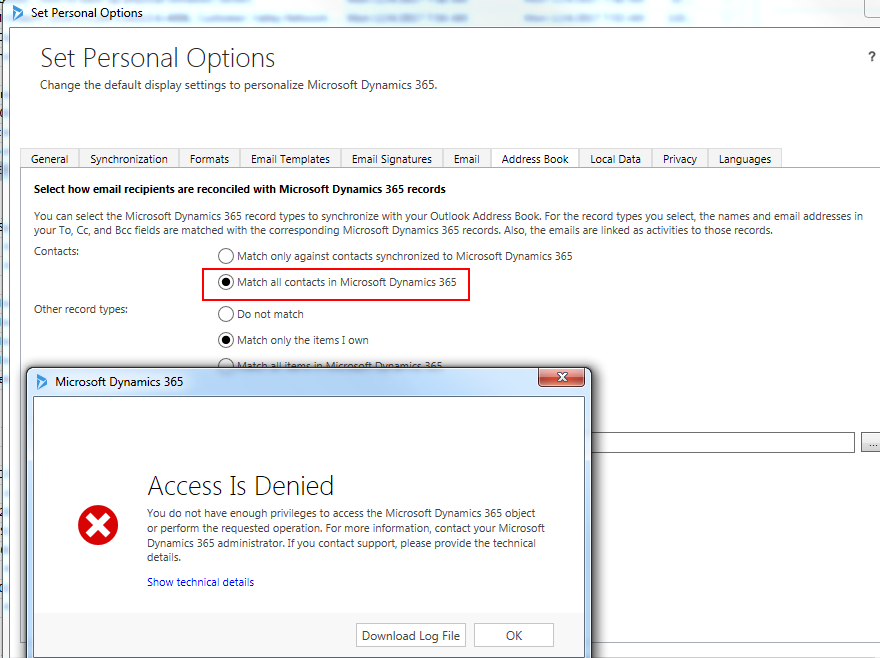
But this user is Global Admin & has all right to make changes
Error Details -
Unhandled Exception: System.ServiceModel.FaultException`1[[Microsoft.Xrm.Sdk.OrganizationServiceFault, Microsoft.Xrm.Sdk, Version=8.0.0.0, Culture=neutral, PublicKeyToken=31bf3856ad364e35]]: System.Web.HttpUnhandledException: Microsoft Dynamics CRM has experienced an error. Reference number for administrators or support: #5EF9EEFADetail:
<OrganizationServiceFault xmlns:i="www.w3.org/.../XMLSchema-instance" xmlns="schemas.microsoft.com/.../Contracts">
<ActivityId>87015f6b-8408-44c4-be9e-797059285480</ActivityId>
<ErrorCode>-2147220970</ErrorCode>
<ErrorDetails xmlns:d2p1="schemas.datacontract.org/.../System.Collections.Generic">
<KeyValuePairOfstringanyType>
<d2p1:key>CallStack</d2p1:key>
<d2p1:value xmlns:d4p1="www.w3.org/.../XMLSchema" i:type="d4p1:string"> at System.Web.UI.Page.HandleError(Exception e)
at System.Web.UI.Page.ProcessRequestMain(Boolean includeStagesBeforeAsyncPoint, Boolean includeStagesAfterAsyncPoint)
at System.Web.UI.Page.ProcessRequest(Boolean includeStagesBeforeAsyncPoint, Boolean includeStagesAfterAsyncPoint)
at System.Web.UI.Page.ProcessRequest()
at System.Web.UI.Page.ProcessRequest(HttpContext context)
at System.Web.HttpApplication.CallHandlerExecutionStep.System.Web.HttpApplication.IExecutionStep.Execute()
at System.Web.HttpApplication.ExecuteStep(IExecutionStep step, Boolean& completedSynchronously)</d2p1:value>
</KeyValuePairOfstringanyType>
</ErrorDetails>
<Message>System.Web.HttpUnhandledException: Microsoft Dynamics CRM has experienced an error. Reference number for administrators or support: #5EF9EEFA</Message>
<Timestamp>2017-12-04T19:43:20.8589087Z</Timestamp>
<ExceptionRetriable>false</ExceptionRetriable>
<ExceptionSource i:nil="true" />
<InnerFault>
<ActivityId>87015f6b-8408-44c4-be9e-797059285480</ActivityId>
<ErrorCode>-2147187962</ErrorCode>
<ErrorDetails xmlns:d3p1="schemas.datacontract.org/.../System.Collections.Generic">
<KeyValuePairOfstringanyType>
<d3p1:key>CallStack</d3p1:key>
<d3p1:value xmlns:d5p1="www.w3.org/.../XMLSchema" i:type="d5p1:string"> at Microsoft.Crm.Application.Pages.Tools.PersonalSettings.UpdateOutlookSyncFilters.ConfigurePage()
at Microsoft.Crm.Application.Controls.AppUIPage.OnPreRender(EventArgs e)
at Microsoft.Crm.Application.Controls.AppPage.OnPreRender(EventArgs e)
at System.Web.UI.Control.PreRenderRecursiveInternal()
at System.Web.UI.Page.ProcessRequestMain(Boolean includeStagesBeforeAsyncPoint, Boolean includeStagesAfterAsyncPoint)</d3p1:value>
</KeyValuePairOfstringanyType>
</ErrorDetails>
<Message>SecLib::AccessCheckEx failed. Returned hr = -2147187962, ObjectID: 491d5e16-8957-4cbe-a441-feb3b7b15313, OwnerId: ff040213-0004-e511-b122-005056901134, OwnerIdType: 8 and CallingUser: 4d9f08fa-be11-e111-8837-00155d4f350a. ObjectTypeCode: 4230, objectBusinessUnitId: 813d8608-c711-e111-8837-00155d4f350a, AccessRights: WriteAccess </Message>
<Timestamp>2017-12-04T19:43:20.8589087Z</Timestamp>
<ExceptionRetriable>false</ExceptionRetriable>
<ExceptionSource i:nil="true" />
<InnerFault i:nil="true" />
<OriginalException i:nil="true" />
<TraceText i:nil="true" />
</InnerFault>
<OriginalException i:nil="true" />
<TraceText i:nil="true" />
</OrganizationServiceFault>
Version - CRM 2016 Dynamics 365 (8.2.2+) On premise
Let me know if any can help me in this situation?
*This post is locked for comments
I have the same question (0)


