web
You’re offline. This is a read only version of the page.
close
Skip to main content

Announcements

No record found.

News and Announcements icon
Community site session details

Community site session details

Session Id :
Microsoft Dynamics CRM (Archived)

Deletion Service is not cleaning the PrincipalObjectAccess table

(0) ShareShare
ReportReport
Posted on by 89

Hi there,  I have read that the deletion service is supposed to clean up the POA table for everything that is 90 days old.

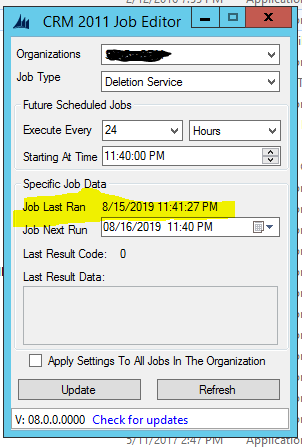
I have this service running every 24 hours and verified that it is still running using the CRM Job Editor - see screen shot below.
pastedimage1565978280858v1.png

My POA table has about 2.5 million rows, I don't know how to look under the hood for what the Deletion Service actually is doing, so I can't verify why it's not cleaning the table very well.   There is only one date column in the table, so I assumed it was going off of this date column but I have no way to verify it.  

2 things stand out examining this table.

1. I have records where the ChangedOn date is older than 90 days.  (about 750,000 records)

2. I have records where the ChangedOn date is NULL  (about 1.2 million records)

Can anyone shed some light on what this Deletion Service is actually doing?   Why isn't it cleaning up some of these older records?  

Thank You,

Coty

*This post is locked for comments

I have the same question (0)
  • Suggested answer
    gdas Profile Picture
    50,091 Moderator on at

    Hi,

    If I am not wrong may be some on going  process hold that record,  you can clean up the system jobs first. If this not helps try to run scripts if you have database access.

    You can refer below post -

    blogs.msdn.microsoft.com/.../

  • Coty Profile Picture
    89 on at

    Hi Goutam, thank you for the response.  I have actually already implemented the above system job to remove process session.  (I found the same article you have)  This runs weekly now, but even the initial run only cleaned up approximately ~25,000 records.

    Right now I have a job that cleans up the AsyncOperations table and the WorkflowLog Base.  And a system job that cleans out the System Jobs.  All of these tables are fine.

    After all of these jobs run, the POA table still has the 2.5 million rows.

    Thanks!

    Coty

  • Coty Profile Picture
    89 on at

    I found this article:

    blogs.msdn.microsoft.com/.../

    I tried this approach and it does not work, unless I am doing something wrong.  The POA table entries remain the same after switching the owner back and forth.

    Coty

  • Suggested answer
    Coty Profile Picture
    89 on at

    Update - this approach does work.  I was doing something wrong.

    In the POA table, it maps to another entity record through the ObjectId field.  You need to pull this related record, and then get the Parent record of it.  If you update the owner of the parent it will update the record in the POA to Access From:

    The parent record could be different types, particularly if the record is an ActivityPointer, but for a lot of record types the parent is the Account.

    InheritedAccessRightsMask = 135069719 and AccessRightsMask = 0

    To

    InheritedAccessRightsMask = 0 and AccessRightsMask = 0

    and then the Deletion service will pick it up.

Under review

Thank you for your reply! To ensure a great experience for everyone, your content is awaiting approval by our Community Managers. Please check back later.

Helpful resources

Quick Links

Introducing the 2026 Season 1 community Super Users

Congratulations to our 2026 Super Stars!

Meet the Microsoft Dynamics 365 Contact Center Champions

We are thrilled to have these Champions in our Community!

Congratulations to the April Top 10 Community Leaders

These are the community rock stars!

Leaderboard > 🔒一 Microsoft Dynamics CRM (Archived)

Last 30 days Overall leaderboard

Featured topics

Product updates

Dynamics 365 release plans
