
web
You’re offline. This is a read only version of the page.
close
Skip to main content

Notifications

Announcements

No record found.

Community site session details

Community site session details

Session Id :
Small and medium business | Business Central, N...
Answered

Comments on Purchase Invoice and Flow it to G/L Entry

(0) ShareShare
ReportReport
Posted on by

cm1.JPGcm2.JPG

Hello Experts,

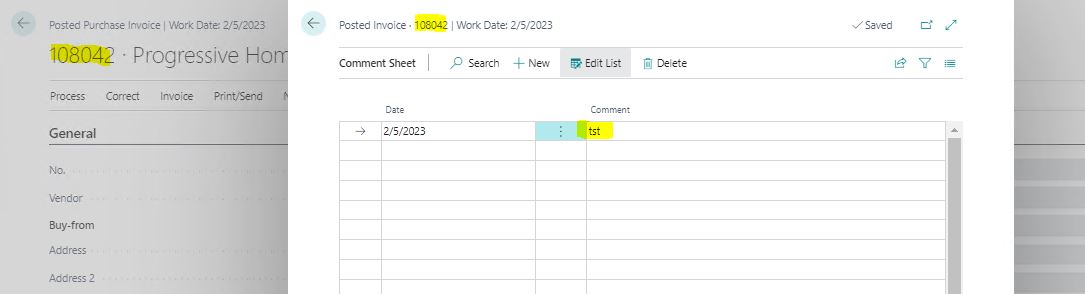
I have used "Comments" option in Purchase Invoice as a Narration. I could to see this comment in Posted Purchase Invoice. But it is not flows into General Ledger Entries, the comment field is blank in the corresponding General Ledger Entry. See the attached screen shots. 

Thanks in advance for sharing your thoughts...

Regards,

Ranjith

I have the same question (0)
  • Suggested answer
    Vaishnavi J Profile Picture
    3,062 on at

    Hi Ranjith,

    The comment field present in general ledger entries gets filled only when you add comments trough journal and post it and not by Purchase Invoice.

    pastedimage1644482824740v1.png

    If my answer was helpful to you, please verify it so that other users know it worked. Thank you very much.

  • Community Member Profile Picture
    on at

    Okay. Any other option to get it from Purchase Invoice as comment or narration?

    Regards,

    Ranjith

  • Suggested answer
    Vaishnavi J Profile Picture
    3,062 on at

    Hi Ranjith,

    There is no standard process to copy comments from Purchase invoice to General ledger entries.

    You can go for customization.

    You can use event subscriber which hits trough Post action.

    If my answer was helpful to you, please verify it so that other users know it worked. Thank you very much.

  • Suggested answer
    MahGah Profile Picture
    15,529 on at

    Hi

    As Vaishnavi mentioned no out of the box method and you need customization for that. We also use comments a lot. We trained our team to go to Entry -> Find related entries then open the posted invoice to see the comments. This is the only method without development.

  • CU09050705-0 Profile Picture
    on at
    If there are any special instructions related to the purchase, such as delivery instructions or specific requirements, include them in the comments section. This helps in ensuring smooth processing of the transaction.

Under review

Thank you for your reply! To ensure a great experience for everyone, your content is awaiting approval by our Community Managers. Please check back later.

Helpful resources

Quick Links

Responsible AI policies

As AI tools become more common, we’re introducing a Responsible AI Use…

Neeraj Kumar – Community Spotlight

We are honored to recognize Neeraj Kumar as our Community Spotlight honoree for…

Leaderboard > Small and medium business | Business Central, NAV, RMS

#1
OussamaSabbouh Profile Picture

OussamaSabbouh 2,135

#2
YUN ZHU Profile Picture

YUN ZHU 733 Super User 2025 Season 2

#3
Sumit Singh Profile Picture

Sumit Singh 612

Last 30 days Overall leaderboard

Featured topics

Product updates

Dynamics 365 release plans
