web
You’re offline. This is a read only version of the page.
close
Skip to main content

Notifications

Announcements

No record found.

Community site session details

Community site session details

Session Id :
Microsoft Dynamics CRM (Archived)

Post Configuration on Custom Entities - CRM-Online 2016

(0) ShareShare
ReportReport
Posted on by 245

Hello,

We set up our development environment to CRM 2016 and transferred the solution used in the production environment to the development environment.

In both the test and production environment we have activated some of our custom entities to include post by activating them in the Post Configuration.

This we are not able to do in the development environment as we do not see our custom entities in the Post configurations.

- I have ensured that notes and activities are active for the custom entity.
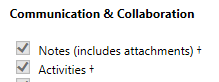
4152.Capture.PNG

- Republished and still no Post Configuration.

If I customize the form and change properties for the activity tab I do get the choice of picking Post, even without the configurations set in Post Configuration.
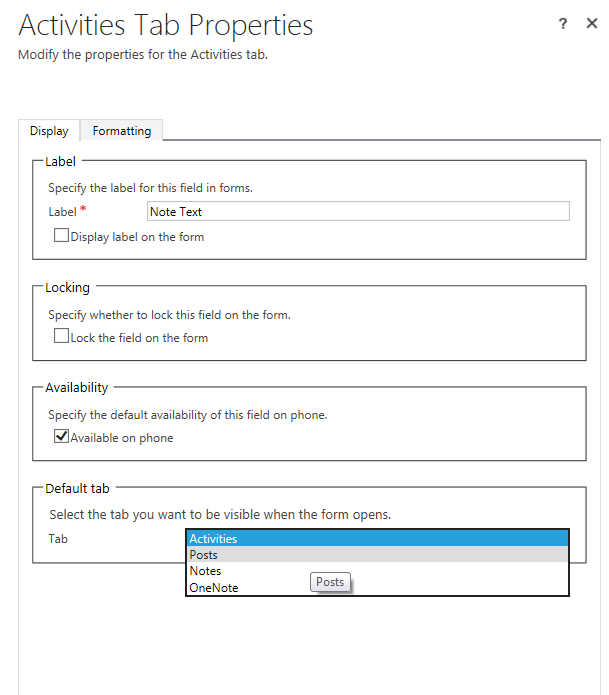
431374.Capture2.PNG

Do anyone have any experience with this problem before, or any ideas on how to solve it?

Best regards,

Bjørn

*This post is locked for comments

I have the same question (0)
  • Suggested answer
    razdynamics Profile Picture
    17,308 User Group Leader on at

    Hi Bjorn, so to confirm on your Custom Entity form, you are still unable to add the post activity feed to the form? or you simply just unable to see it?

  • Brackee Profile Picture
    245 on at

    Hi Raz,

    I have added the activity feed to the form, saved it and Published all customization. But I am not able to find and post record for any Custom Entities on the Post Configuration page.

    28606.Capture.PNG

    As you can see in the picture I am only able to see system entities and no custom entities.

    -Bjørn

  • Suggested answer
    razdynamics Profile Picture
    17,308 User Group Leader on at

    I see, your custom entities are not displaying in the Post Configuration rules, They should be displaying here so that you can enable Post feeds for your custom entities.

    It looks like your Dev CRM Server may need to to be refreshed, im not sure how u deployed...was it a database redeployment or just solution import?

  • Community Member Profile Picture
    on at

    i am having similar issues with the Post configurations.

    i am working on a CRM 2011 to 2016 migration, and followed the upgrade path on a new server. (2011 --> 2013 --> 2013Sp1 --> 2015 --> 2016 )

    everything is working, except, i only have 3 post configurations. (even less than you )

    so when doing an upgrade it isn't adding any post configuration apart from the incident, user, and contact entity.

    when adding a new entity it isn't adding it as well !

    ---edit---

    Sorry, just noticed the topic is about CRM Online... (my issue is in CRM On Premise)

  • Anna Zasadzka Profile Picture
    124 on at

    Hi,

    I have the same problem on Dynamics 365 trial - I can't see custom entity in Post Configuration and Post Rules Configuration.

  • Community Member Profile Picture
    on at

    Hi Bjorn

    I faced the same issue with the custom entities on activity feeds. After a few trials and errors, and reading MSDN article carefully, figured out that clicking"REFRESH" button on the activity feed configuration (Post configuration)  page is mandatory so that it can re-scan the entity metadata and load the new entities in the list.

  • Verified answer
    Keerti Kodali Profile Picture
    50 on at

    For custom entities to show up in the Activity Feeds Configuration Page you need to click on the Refresh button on the ribbon .

    7455.post.jpg

  • Ahmed Akl Profile Picture
    20 on at

    I faced this issue  and I solved it by following the below steps:

    1- open post configuration entity

    2- select inactive post configuration view the you will see all inactive records for the new custom entities.

    3. select your target custom entity , open the record and click activate button.

    Noted: make sure to publish the custom entity before activate the related record. for creating the relation between the post and custom entity smoothly

Under review

Thank you for your reply! To ensure a great experience for everyone, your content is awaiting approval by our Community Managers. Please check back later.

Helpful resources

Quick Links

Responsible AI policies

As AI tools become more common, we’re introducing a Responsible AI Use…

Neeraj Kumar – Community Spotlight

We are honored to recognize Neeraj Kumar as our Community Spotlight honoree for…

Leaderboard > 🔒一 Microsoft Dynamics CRM (Archived)

#1
SA-08121319-0 Profile Picture

SA-08121319-0 4

#1
Calum MacFarlane Profile Picture

Calum MacFarlane 4

#3
Alex Fun Wei Jie Profile Picture

Alex Fun Wei Jie 2

Last 30 days Overall leaderboard

Featured topics

Product updates

Dynamics 365 release plans
