web
You’re offline. This is a read only version of the page.
close
Skip to main content

Announcements

No record found.

News and Announcements icon
Community site session details

Community site session details

Session Id :
Microsoft Dynamics CRM (Archived)

Dynamic 365 Settings tab does not show Customization option

(0) ShareShare
ReportReport
Posted on by

Hi,

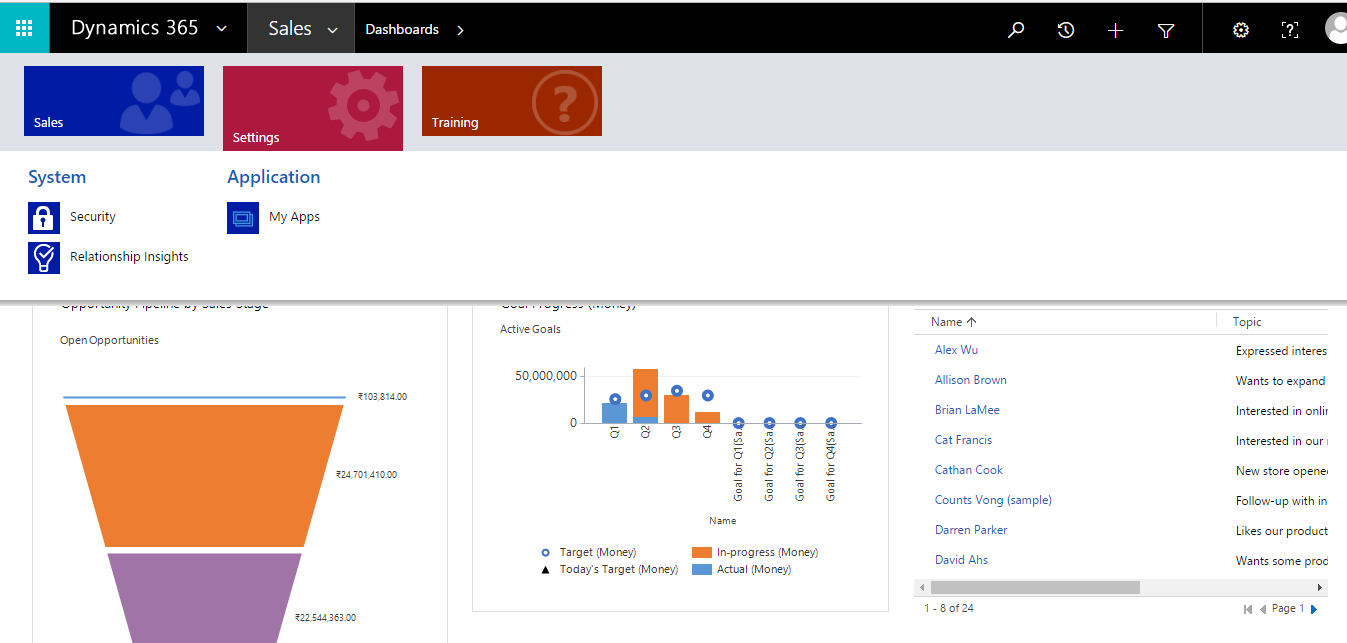
I am using Dynamic 365 Plan 1, Enterprise Edition Trial version. I am unable to find Customization option under the settings tabs. Is it not available in the free trial version or is it placed somewhere else? Please refer screenshot below .
ice_5F00_screenshot_5F00_20170322_2D00_152245.png

Also, i do not understand the need of buying minimum five licenses and why is it necessary to buy five license instead of just one as stated in the website

http://xrm.com/reference/microsoft-dynamics-crm-online/price-and-license-guide/

Microsoft Dynamics CRM Online is available at four different license levels: Enterprise ($200), Professional ($65), Basic ($30), and Essential ($15). All new Microsoft CRM Online subscriptions must have a minimum of five (5) licenses. The CRM licensing minimum can be met with a combination of Enterprise and Professional licenses. Once the five-license minimum has been met, you may mix and match any number of additional Enterprise, Professional, Basic, and Essential licenses. For example, you could subscribe to 1 Enterprise, 7 Professional, 10 Basic, and 3 Essential licenses. 

Thanks'

Avy

*This post is locked for comments

I have the same question (0)
  • Verified answer
    Ben John Profile Picture
    559 on at

    Hi Avy,

    I assume your are in sales app. Have a look at the menu behind "Dynamics 365". There should be an option called "Dynamics 365 - custom" with all sitemap elements.
    Details: https://www.microsoft.com/en-us/dynamics/crm-customer-center/business-apps-in-dynamics-365.aspx

    Regarding you license questions, you to differentiate between the old "Dynamics CRM Online" where you must have at least 5 Professional licenses and the new "Dynamics 365" licenses where this limitation has been removed.
    See here the new license guide: http://download.microsoft.com/documents/en-us/dynamics/pricing/Dynamics_365_Enterprise_edition_Licensing_Guide.pdf

    Regards,
    Ben

  • Community Member Profile Picture
    on at

    Hi Avy

    Tenfold can help in integrating MS Dynamics 365 and enabling click to dial in Outlook. Our click to dial also works on webpages opened in Chrome.  They also support MS Dynamics integration www.tenfold.com/.../dynamics

  • Community Member Profile Picture
    on at

    Hi John,

    Thanks for the answer. As soon  as i clicked on "Dynamics 365 - custom" and the customization tab was visible on Sales - Settings tab. However the Customization on click does not show any option apart from "Developer Resources".

    ice_5F00_screenshot_5F00_20170325_2D00_113651.png

    ice_5F00_screenshot_5F00_20170325_2D00_113651.png

    I want to work on creating and editing components but the "Solutions" tab is not there. Is it also hidden somewhere?

    Thanks 

    Avy

  • Verified answer
    Ben John Profile Picture
    559 on at

    Hi Avy,

    open the userlist and select your own user (not open it) and click "Promote to Admin" in the command bar.

    Best regards,

    Ben

  • Community Member Profile Picture
    on at

    Thanks again. You are genius.

  • Community Member Profile Picture
    on at

    Thanks again. You are genius. :)

Under review

Thank you for your reply! To ensure a great experience for everyone, your content is awaiting approval by our Community Managers. Please check back later.

Helpful resources

Quick Links

Introducing the 2026 Season 1 community Super Users

Congratulations to our 2026 Super Stars!

Meet the Microsoft Dynamics 365 Contact Center Champions

We are thrilled to have these Champions in our Community!

Congratulations to the April Top 10 Community Leaders

These are the community rock stars!

Leaderboard > 🔒一 Microsoft Dynamics CRM (Archived)

Last 30 days Overall leaderboard

Featured topics

Product updates

Dynamics 365 release plans
