web
You’re offline. This is a read only version of the page.
close
Skip to main content

Notifications

Announcements

No record found.

Community site session details

Community site session details

Session Id :
Microsoft Dynamics CRM (Archived)

All Quotes View in CRM

(0) ShareShare
ReportReport
Posted on by 44,524

Hi All,

I am not sure what filter criteria shown in All Quotes is exactly, maybe it's hidden.

I have managed the security role and assign the Quote entity level to 'user'

See this below:
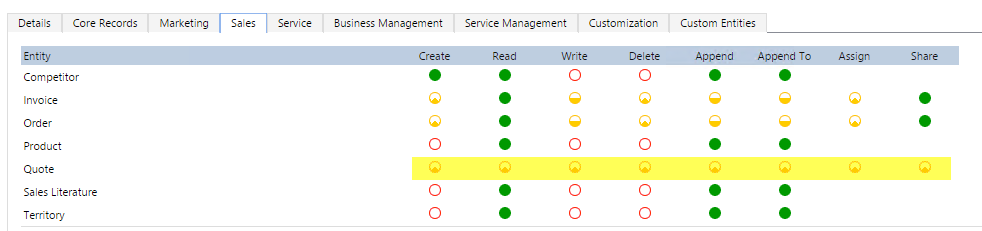
allquoteview2.png

But, the user can still see many quotes from different owner, and I take a look, they can see the quote records if:

1. Quote is owned by himself

2. Opportunity is owned by himself

3. Potential Customer is owned by himself

That is my first assumption after seeing the data (I give picture for clearer visualization, see picture after this)

And I can see if I go to All Quotes and Advanced Find, but not for Active Quotes view (Active Quotes view only shows my own Active Quotes, so far).

You can see here, the expanded All Quotes view using Adv Find.
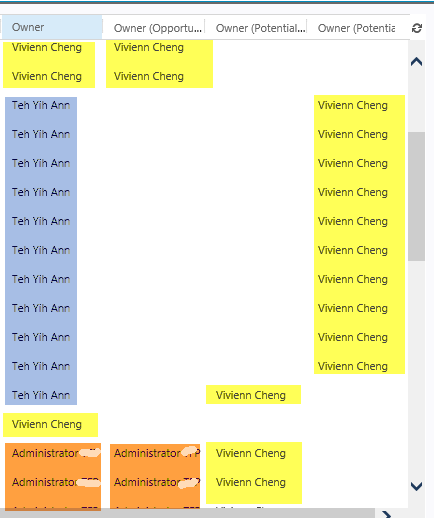
allquoteview4.png

And it is 76 records (total all records is 172 records if I am as Administrator)

But, when I logged in as Administrator, I can see all of the Quotes, correct.

Including the record owned by other Team and by the Administrator himself.
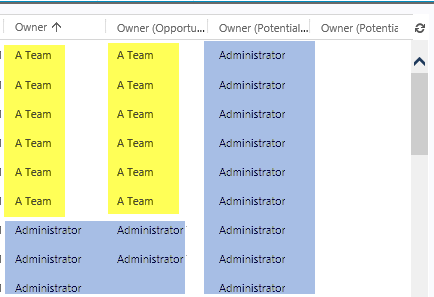
allquoteview3.png

However, I thought my assumption was right before (about 3 points), but I found that there are some quote records owned by 'Aileen Gusni', but the potential customer is another user, assumption User B, when I log in as User B, I could not see the record, which the Quote is using Potential Customer owned by User B, so my assumption's now becoming confusing.

See this:
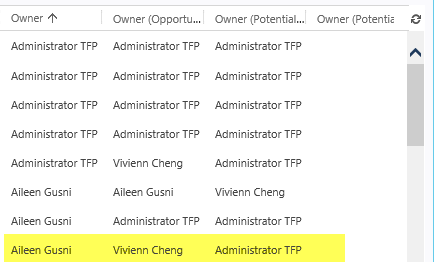
*I have checked any possibilities that I can assume, such as more than 1 assigned Security Role, Team, Business Unit, etc.

I have checked the fetch xml through database, no filter for this view, and as I thought, Security Role will beat any filter for view if this user cannot see according to security role, then will not see the records in the view as well.

Can anybody enlighten me? Thanks.

*This post is locked for comments

I have the same question (0)
  • Royal King Profile Picture
    27,686 on at

    Did you check relationship behavior between account and quote probably cascade sharing would have provided access to all the quote or in the system settings check the reassigned records are shared with original

    owner?. Your last option would be checking PrincipalObjectAccess table to see whether those quotes are shared or he gets access by security role.

    owner owner 

  • Community Member Profile Picture
    on at

    Hello Aileen:

    Do you have more than one business unit?

    _damon

  • Aileen Gusni Profile Picture
    44,524 on at

    Hi Damon,

    One User cannot have more than one Business Unit, the user can only have 1 BU + join multiple Teams. :)

  • Aileen Gusni Profile Picture
    44,524 on at

    Hi Chitra,

    Nice answer, but we never do any sharing before...

    because I create a new one quote from another user, the user can see, I set everything in the security role with no team and with only 1 security role with only user access level.

  • Verified answer
    Aileen Gusni Profile Picture
    44,524 on at

    Hi All,

    I have found the reason why.

    Well, basically CRM will show all of the quotes (especially for All Quotes View and Quote List in Advanced Find) that:

    1. Quotes owned by the current logged in user

    2. Quotes owned by other users but the Potential Customer is owned by the current logged in user

    It inherits from Account Ownership.

    But, not related to the Relationship Behavior, I have tried to make it as Configurable Cascading, it will still shows, the only want that changed is after I assign Account to other user, all of the Quotes are still owned by former user.

    So it beats the security role of Quote (user access) and Account (user access).

    But, when you double click the Quote, you will get 'Access Denied', it's the behavior that I found.

    Thank you.

  • Royal King Profile Picture
    27,686 on at

    That's what i explained to you. In the system settings if you look  at general tab there is a flag "Set Reassigned records are shared with former Owner" , check my screen shot.

    if it set to true, if you reassign account to someone former owner still get access through sharing. By relationship behavior between account and Quote Sharing cascades the access for Quote as well.

  • Verified answer
    Aileen Gusni Profile Picture
    44,524 on at

    I said to you before,

    the user didn't do reassign nor sharing.

    She created from NEW record, not the existing re-assigned record.

    (both Account and Quote)

    The issue is:

    Vivienn (normal User) has Account A with privilege only User level.

    Administrator (System admin) can see all of the Account since he is the System Admin with full access right organization.

    And of course Administrator can create a NEW QUOTE under ANY ACCOUNT, it doesn't matter who is the Account owner since he has full right. Then he create a Quote with Potential Customer owned by VIvienn.

    And Administrator NEVER Assigns any Account to himself and former owner is Vivien and current owner is still VIvienn, no re-assign function.

    Then Vivienn login, she is in User-level access, she is not supposed to  see Quote owned by Administrator, but she can see since the Potential Customer belongs to her.

    "Set Reassigned records are shared with former Owner" --> There is no Set Reassigned record and former Owner is still same current owner (since never change any Owner)

    So it is not related to your explanation in system setting.

    Maybe in another case from re-assigned Account Yes, but in this case it is not because of this.

    Thanks for your help.

  • Victor Parada Profile Picture
    201 on at

    Hi Aileen, could you be so kind to tell me what version of MS CRM do you have?

    I'm working with 2016 On Premises  and I have the same problem. For me this is a bug with the Security Roles. Even if you SR grant the access only to modify the Quotes for the Parent: Child BU of the user. The user are able to do changes on the Quotation, not only to see it.

    Do you find any solution to this issue? Do you get any feedback from Microsoft?

    I have other similar issue here: community.dynamics.com/.../294008. Could you be so kind to read it and let me know your feedback.

    Thanks.

  • Christina Vourexaki Profile Picture
    5 on at

    Hello,

    I face the same issue in dynamics 365 on premise v.9.

    have you found a solution to the issue?

    Thnk you

  • WayneM Profile Picture
    15 on at

    Hello,

    I have come across the same issue for opportunities - if a user creates an opportunity for an account owned by another user, the other user can view and edit that opportunity even though permissions are at BU level. It appears permissions are cascaded down from Parent account to account to transactional items like opportunities, quotes etc.

    Has anyone found a solution or workaround?

    Thanks

    Wayne

Under review

Thank you for your reply! To ensure a great experience for everyone, your content is awaiting approval by our Community Managers. Please check back later.

Helpful resources

Quick Links

Responsible AI policies

As AI tools become more common, we’re introducing a Responsible AI Use…

Neeraj Kumar – Community Spotlight

We are honored to recognize Neeraj Kumar as our Community Spotlight honoree for…

Leaderboard > 🔒一 Microsoft Dynamics CRM (Archived)

#1
SA-08121319-0 Profile Picture

SA-08121319-0 4

#1
Calum MacFarlane Profile Picture

Calum MacFarlane 4

#3
Alex Fun Wei Jie Profile Picture

Alex Fun Wei Jie 2

Last 30 days Overall leaderboard

Featured topics

Product updates

Dynamics 365 release plans
