web
You’re offline. This is a read only version of the page.
close
Skip to main content

Announcements

No record found.

News and Announcements icon
Community site session details

Community site session details

Session Id :
Small and medium business | Business Central, N...
Suggested Answer

Confusing Menus on ListPages by using Modern Action Bar

(0) ShareShare
ReportReport
Posted on by 144

Hi,

When list pages (e.g. the vendor list = "Kreditoren") are called up in the Role Center via the top main menu or the navigation menu below, the Modern Action Bar does not seem to work and only the Process menu (=Verarbeiten) is displayed. When I bring up the same page from the Role Center's action area, the home menu (=Start) comes up in pinned mode, which is how it's supposed to be. The different structure of the menus - depending on where they are called from - is very confusing for the user. Is there a solution for this?

HomeMenu.jpg

Best regards
Ralf

I have the same question (0)
  • Suggested answer
    YUN ZHU Profile Picture
    100,552 Super User 2026 Season 1 on at

    Hi, I'm sorry I didn't fully understand your question, if you're confused about the position of the action and it's a standard feature, you can use the Personalization feature to personalize your workspace to suit your work and preferences.

    More details: https://learn.microsoft.com/en-us/dynamics365/business-central/ui-personalization-user

    Hope this helps.

    Thanks.

    ZHU

  • neckit Profile Picture
    144 on at

    The BC standard demo shows the same problem! The structure of the menu differs depending on how the "Customer List" is called up. Because it's the exact same page, personalization can't fix this.
    It's not a problem with our environment, it's a problem with standard BC behavior.

    You can reproduce this yourself with the Standard-BC-Demo:

    Call 1 (= not desired display):
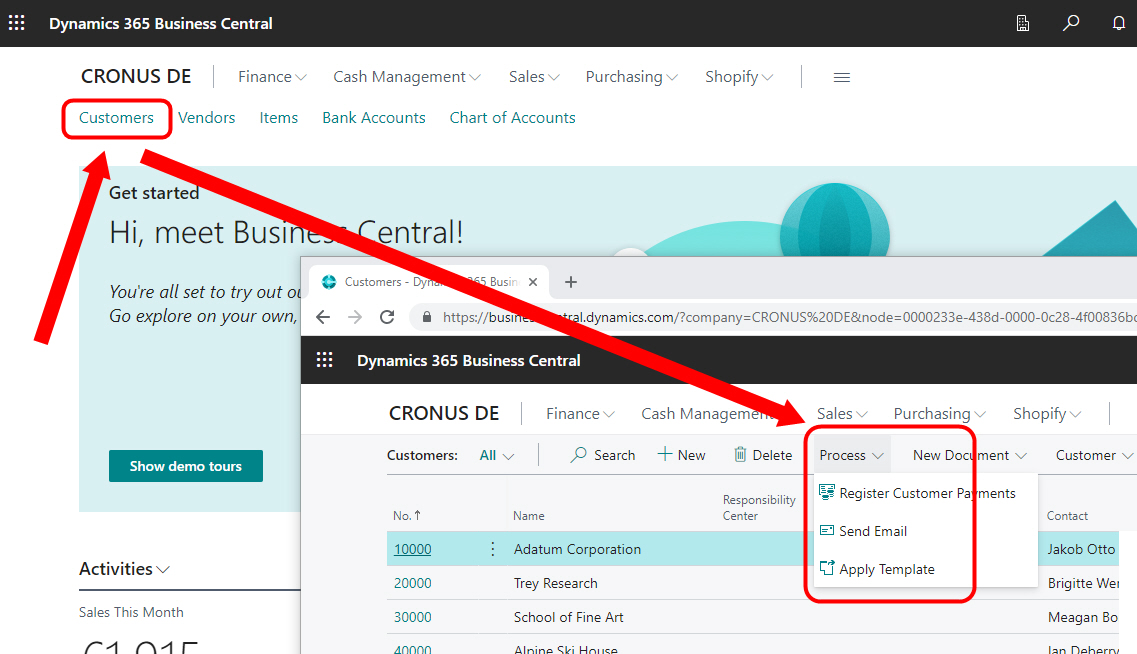
    Call1.jpg

    -----------------------------------------------------------------------------------------------------------------------------------------------------------------

    Call 2 - over the Explore-Menu (= desired display):
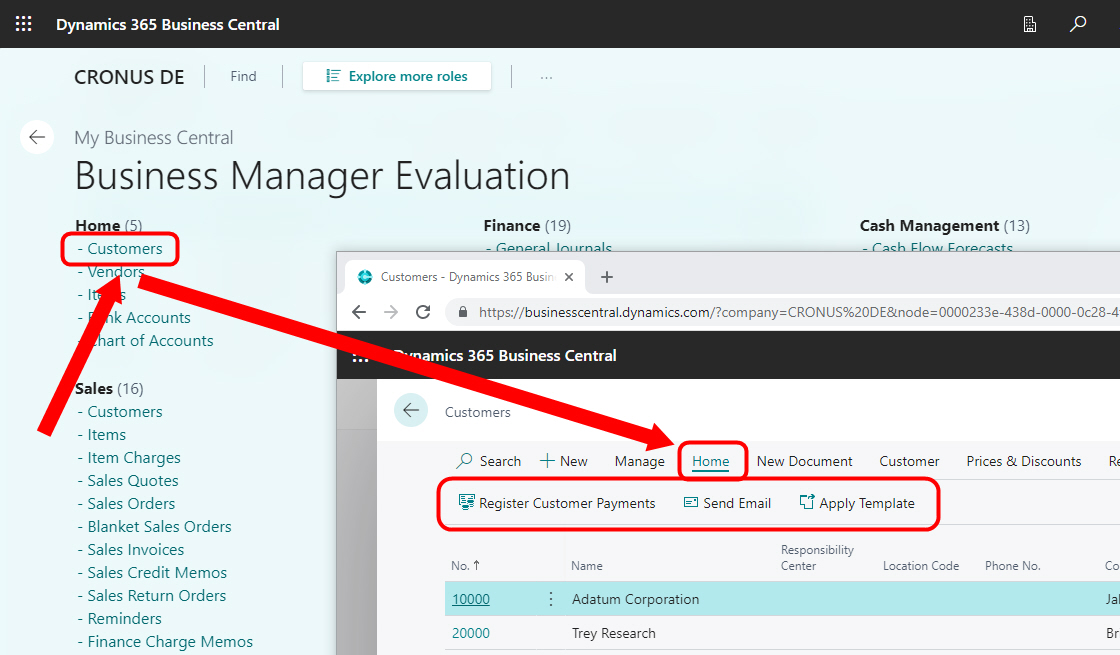
    call2.jpg


    You should then see the difference for yourself.

    greeting
    Ralf

  • Suggested answer
    YUN ZHU Profile Picture
    100,552 Super User 2026 Season 1 on at

    Hi, I created a new DE environment, and it seems that there is no problem as you said. Is there something I'm missing?

    Test Video:

    [View:/cfs-file/__key/communityserver-discussions-components-files/758/Test0217.mp4:1024:768]

  • neckit Profile Picture
    144 on at

    Thanks for your check und the video!

    The BC-Standard-Demo is still runnig under version 21.3 and not like your environment under 21.4.
    Apparently, with 21.4, at least the heading-Menu when called via the 1st variant the name of the "Process"-Menu was corrected on "Home-Menu. This helps ensure that the user is looking in the right place again.

    But even with your video you can see that the home menu is only displayed in pinned-up-mode when you call it up via the 2nd variant. When you call it up using the first variant, you get an even more confusing vertical home menu (not the wanted, pinned Menu)
    It would be nice if the menus were displayed identically (with the home menu pinned) in both cases.

  • Suggested answer
    YUN ZHU Profile Picture
    100,552 Super User 2026 Season 1 on at

    Hi, yes i totally agree with you. The pages that are accessed from the Role Center page open embedded within the Role Center framework. Pages may behave inconsistently with popup opening.

    And this has a bigger impact on the List page.

    More details: https://yzhums.com/27476/

Under review

Thank you for your reply! To ensure a great experience for everyone, your content is awaiting approval by our Community Managers. Please check back later.

Helpful resources

Quick Links

Introducing the 2026 Season 1 community Super Users

Congratulations to our 2026 Super Stars!

Meet the Microsoft Dynamics 365 Contact Center Champions

We are thrilled to have these Champions in our Community!

Congratulations to the April Top 10 Community Leaders

These are the community rock stars!

Leaderboard > Small and medium business | Business Central, NAV, RMS

#1
OussamaSabbouh Profile Picture

OussamaSabbouh 2,184 Super User 2026 Season 1

#2
YUN ZHU Profile Picture

YUN ZHU 1,148 Super User 2026 Season 1

#3
AndrewThomas81 Profile Picture

AndrewThomas81 677

Last 30 days Overall leaderboard

Featured topics

Product updates

Dynamics 365 release plans
