web
You’re offline. This is a read only version of the page.
close
Skip to main content

Announcements

No record found.

News and Announcements icon
Community site session details

Community site session details

Session Id :
Microsoft Dynamics CRM (Archived)

Duplicate button for CASE

(0) ShareShare
ReportReport
Posted on by

Hello Everyone:

I not sure what is going on here but I have a duplicated button (Cases) when I in the Account entity for a company. One button is darker than the other

Is this a bug within CRM Online. Any help would be great and thanks for the help you have provided for me in the past

Thanks

-damon

*This post is locked for comments

I have the same question (0)
  • Wayne Walton Profile Picture
    13,730 on at

    Did you add a second relationship for Cases to Accounts, perhaps for different types of Accounts on a Case?  If so, you will validly have both of those unless you turn off the relationship navigation for one of them.

  • Verified answer
    Aileen Gusni Profile Picture
    44,524 on at

    Hi Damon,

    I think it is not a bug, I think you have two different relationship 1:N from Account to Case.

    The CRM by default only have 1 I think.

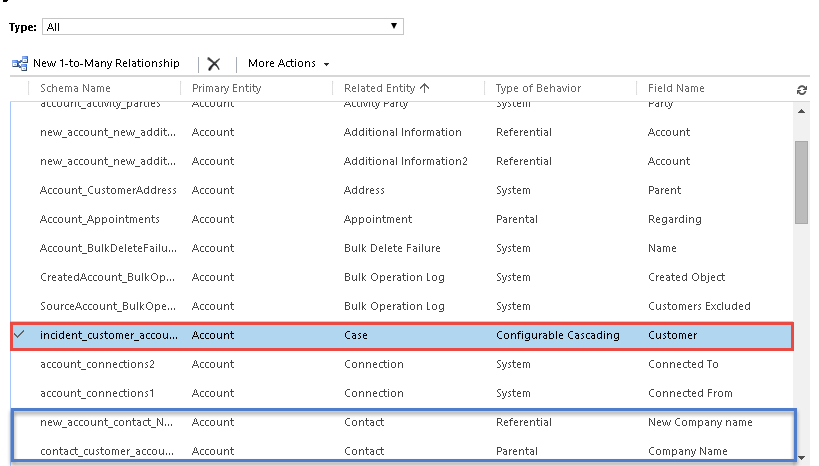
    To check, can you go to the Account, check the relationship, 1:N Relationship
    dupcase2.png

    If you see to different relationship, then it is different relationship actually, maybe one is Case to Account as Customer, another one is Case to Account as Vendor, both are using 1:N relationship from Account to Case, but they are different.

    If you notice in the first picture, there are 2 Contact and Account relationships, but they are two different relationship and different field as well.

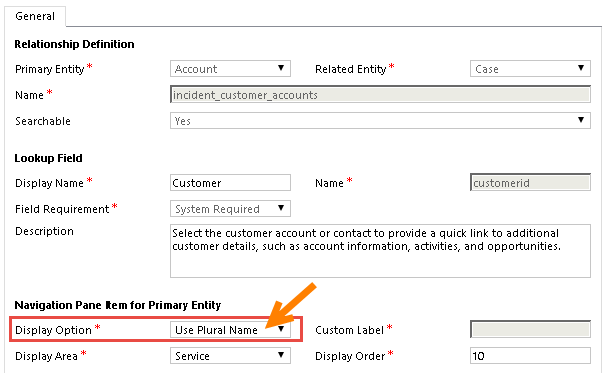
    If you want to hide one of them, you can go to the relationship you want to hide
    dupcase3.png

    and change the display setting to do not display (it will hide the navigation pane), or you can also change to custom label.


    dupcase4.png

    dupcase5.png

    By default, it uses Plural Names.

    Then, save and publish it.

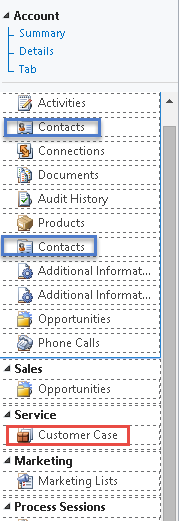
    Then, you can check in the Form Editor, the Navigation.

    You can see the Contact appears duplicate.

    And the Case is now using the Custom Label
    0361.dupcase6.png

    You can double click and see that the duplicate contact is actually two different relationship.

    You can also Hide it or Change the Custom Label as well.

    If you want to keep both different relationship in the Form Navigation but don't want to make your Customer confused, then better you change the Label.

    And here is the result if you change the Custom label.
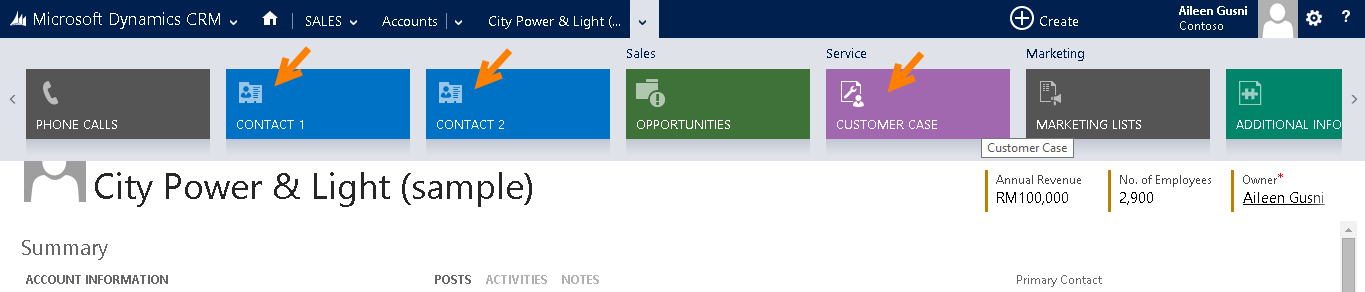
    So, this is not a bug :)

    And you can change your display properties.

    Hope this helps!

    Thank you.

  • Community Member Profile Picture
    on at

    Thanks Aileen that was it.

    -damon

Under review

Thank you for your reply! To ensure a great experience for everyone, your content is awaiting approval by our Community Managers. Please check back later.

Helpful resources

Quick Links

Introducing the 2026 Season 1 community Super Users

Congratulations to our 2026 Super Stars!

Meet the Microsoft Dynamics 365 Contact Center Champions

We are thrilled to have these Champions in our Community!

Congratulations to the March Top 10 Community Leaders

These are the community rock stars!

Leaderboard > 🔒一 Microsoft Dynamics CRM (Archived)

#1
JS-09031509-0 Profile Picture

JS-09031509-0 3

#2
AS-17030037-0 Profile Picture

AS-17030037-0 2

#2
Mark Eckert Profile Picture

Mark Eckert 2

Last 30 days Overall leaderboard

Featured topics

Product updates

Dynamics 365 release plans
