web
You’re offline. This is a read only version of the page.
close
Skip to main content

Announcements

No record found.

News and Announcements icon
Community site session details

Community site session details

Session Id :
Small and medium business | Business Central, N...
Suggested Answer

Align fields on page

(0) ShareShare
ReportReport
Posted on by 5

Dear all,

I'm new on business central and trying to make some pages. I'm struggling with the alignment of fields on pages.
Let me try to explain:

I've created a page of type card where i have three groups defined

group("Address & Contact")
            {
                Caption = 'Address & Contact';
                group(AddressDetails)
                {
                    Caption = 'Address';
                    field(Address; Address)
                    {
                        ToolTip = 'Specifies the location address.';
                    }
                    field("Address 2"; "Address 2")
                    {
                        ToolTip = 'Specifies additional address information.';
                    }
                    field("Post Code"; "Post Code")
                    {
                        ToolTip = 'Specifies the postal code.';
                    }
                    field(City; City)
                    {
                        ToolTip = 'Specifies the city of the location.';
                    }
                    field("Country/Region Code"; "Country/Region Code")
                    {
                        ToolTip = 'Specifies the country/region of the address.';
                    }
                }
                group(ContactDetails)
                {
                    Caption = 'Contact';
                    field("Contact Name"; "Contact Name")
                    {
                        ToolTip = 'Specifies the name of the contact person at the location';
                    }
                    field("Phone No."; "Phone No.")
                    {
                        Importance = Promoted;
                        ToolTip = 'Specifies the telephone number of the location.';
                    }
                    field("E-Mail"; "E-Mail")
                    {
                        ExtendedDatatype = EMail;
                        ToolTip = 'Specifies the email address of the location.';
                    }
ASISTOBE.png

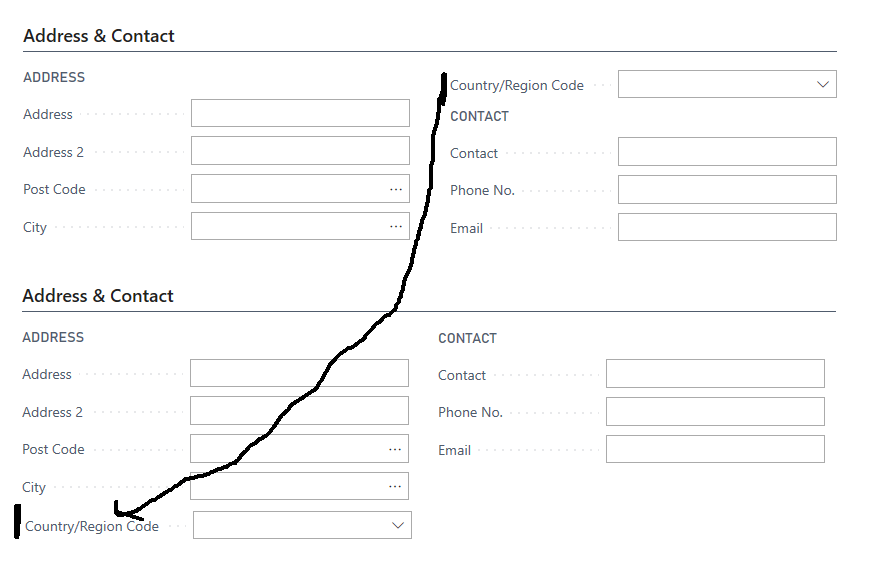
The field "Country/Region Code" switches to the right column while i want it to stay on the left under the Address group. I've added a screenshot of the as-is alignment and the request to-be situation.

Hope someone can help me.

Kind regards

Steve
I have the same question (0)
  • Suggested answer
    Marco Mels Profile Picture
    Microsoft Employee on at

    Hello,

    We currently do not have dedicated Dev support via the Dynamics 365 Business Central forums, but I wanted to provide you some additional resources to assist.  If you need assistance with debugging or coding I would recommend discussing this on one of our communities.

    www.yammer.com/dynamicsnavdev

    dynamicsuser.net/.../developers

    I will open this up to the community in case they have something to add.

    Thanks.

  • Suggested answer
    Steven Renders Profile Picture
    5,682 Moderator on at

    You can create two subgroups in your group(AddressDetails). Without subgroups, as in your example, the split is in the middle. With subgroups, the fields in the first subgroup become the left column and the fields in the second subgroup become the right column.

Under review

Thank you for your reply! To ensure a great experience for everyone, your content is awaiting approval by our Community Managers. Please check back later.

Helpful resources

Quick Links

Introducing the 2026 Season 1 community Super Users

Congratulations to our 2026 Super Stars!

Congratulations to our 2025 Community Spotlights

Thanks to all of our 2025 Community Spotlight stars!

Leaderboard > Small and medium business | Business Central, NAV, RMS

#1
OussamaSabbouh Profile Picture

OussamaSabbouh 1,870 Super User 2026 Season 1

#2
YUN ZHU Profile Picture

YUN ZHU 1,138 Super User 2026 Season 1

#3
Dhiren Nagar Profile Picture

Dhiren Nagar 915 Super User 2026 Season 1

Last 30 days Overall leaderboard

Featured topics

Product updates

Dynamics 365 release plans
