web
You’re offline. This is a read only version of the page.
close
Skip to main content

Announcements

No record found.

News and Announcements icon
Community site session details

Community site session details

Session Id :
Microsoft Dynamics CRM (Archived)

how to automatically update rollup fields in CRM 2015

(0) ShareShare
ReportReport
Posted on by

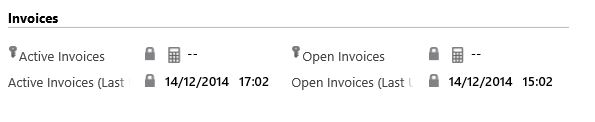
I was wounding if there a why that I can update the rollup fields atomically with out going into the recorder and click on refresh.  also if this can be done every time a new amount is added.
*This post is locked for comments

I have the same question (0)
  • Suggested answer
    Deepesh161 Profile Picture
    6,317 on at

    Rollup fields are calculated via an Async Process and that's run every so often though I'm not sure how frequently it runs. The async process that updates the rollup fields can be manually triggered.

    Rollups are scheduled each 24 hours and this cannot be changed.

  • Community Member Profile Picture
    on at

    is there any work  around this?   it would be great if a new opportunity or invoices is added it will recalculate the rollup as some much can happen within 24 hours

  • Suggested answer
    Deepesh161 Profile Picture
    6,317 on at

    The way its structured is for performance reasons. If you still want live data, can hit refresh. I am not aware of any workarounds at the moment.

  • Suggested answer
    Guido Preite Profile Picture
    54,086 Moderator on at

    roll-up updates are performed every hour

  • Verified answer
    JukkaNiiranen Profile Picture
    2,609 on at

    There is a CalculateRollupField message that you could call in your code to force the rollup field to be recalculated on demand. More information can be found from the CRM 2015 SDK: msdn.microsoft.com/.../dn817863.aspx

  • Deepesh161 Profile Picture
    6,317 on at

    Thanks for the information Jukka and Guido, I was referring from a post on CRM 2015 and it seems the information mentioned is incorrect here (Refer comments) : blog.sonomapartners.com/.../dynamics-crm-2015-calculated-and-rollup-fields.html

  • Verified answer
    NatrajY Profile Picture
    3,040 on at

    Jukkan - Does this really trigger the re-calculation job? I believe that this just yields the calculated rollup value without actually triggering the periodic "Mass Rollup Recalculate Request" system job.

    Below is what SDK says about this job type:

    As a developer testing a solution in a development environment you may not want to wait for 12 hours. You can make it happen faster. In the System Jobs list, use the Recurring System Jobs view to filter the list and locate the Mass Calculate Rollup Fields job. With the job selected, use More Actions > Postpone and set the time to something that occurs sooner. If you want to trigger the creation of a new Mass Calculated Rollup Fields job programmatically, retrieve the AttributeMetadata for the rollup attribute using RetrieveAttributeRequest and use UpdateAttributeRequest to update the attribute without making any actual changes.

    Is this correct?

  • NatrajY Profile Picture
    3,040 on at

    Tried this out in a console application Jukkan. You are correct. However, no system job was triggered, but the rollup field was updated after I executed the CalculateRollupField message on the record.

  • Community Member Profile Picture
    on at

    Some additional thoughts since this thread first appeared:

    survivingcrm.com/.../crm-2015-rollup-fields-gotchas

    Free codeplex custom workflow activity to trigger recalculate for a field on a record:

    calculaterollupfield.codeplex.com

  • Sharanagouda M Profile Picture
    35 on at

    By defualt it is set to run from 12 hours on first save of Roullup field.  The schedule can be changed by system administrator.

Under review

Thank you for your reply! To ensure a great experience for everyone, your content is awaiting approval by our Community Managers. Please check back later.

Helpful resources

Quick Links

Introducing the 2026 Season 1 community Super Users

Congratulations to our 2026 Super Stars!

Meet the Microsoft Dynamics 365 Contact Center Champions

We are thrilled to have these Champions in our Community!

Congratulations to the April Top 10 Community Leaders

These are the community rock stars!

Leaderboard > 🔒一 Microsoft Dynamics CRM (Archived)

Last 30 days Overall leaderboard

Featured topics

Product updates

Dynamics 365 release plans
