web
You’re offline. This is a read only version of the page.
close
Skip to main content

Notifications

Announcements

No record found.

Community site session details

Community site session details

Session Id :
Small and medium business | Business Central, N...
Suggested Answer

Sales Order Credit Limit Approval Workflow - can't release

(0) ShareShare
ReportReport
Posted on by 24

First time trying to setup this workflow. I created a new workflow from the "Sales Order Credit Limit Approval Workflow" template. No changes made to the workflow.

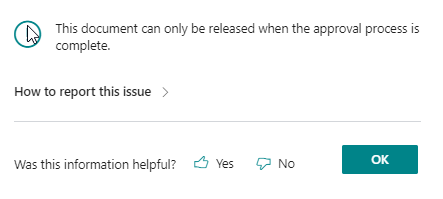
When I go to release a sales order where the order amount does not put them over the credit limit, it gives me this error:
pastedimage1665768161510v1.png

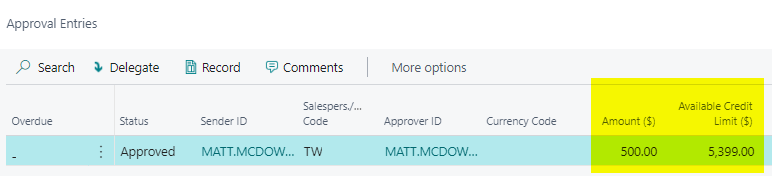
I can sucessfully use "Request approval" and it releases the order. But the behaviour I would expect is that since order amount < available credit, it should allow me to use the release action.

Here is the approval entry created by sending it for approval
pastedimage1665768286355v2.png

I have the same question (1)
  • Amit Profile Picture
    2,559 on at

    Hi,

    Refer the below link-:

    https://learn.microsoft.com/en-us/dynamics365/business-central/across-how-to-create-workflows

    Regards

    Amit Sharma

    www.erpconsultors.com

  • Omar K Profile Picture
    201 on at

    Hi,

    When the workflow was created, did you copy a template or it was created from scratch (I do recommend to use the template) ?

    As it seems there is a missing response to "Remove Record restriction" and "Release the document" (Check that on the screenshot, I copied the default Sales Order Approval)

    pastedimage1665921804550v2.png

  • Suggested answer
    Katrin Kinau Profile Picture
    on at

    Good Morning,

    As soon as you enable a workflow you need to "Request Approval" for every sales order. When the amount it below the limit, it will auto-approve, like in your example.

    As Omar already added you then need to have the responses to "Remove Record restriction" and "Release the document". When the approval request is auto-approved the document then also gets released.

  • MMcdowell Profile Picture
    24 on at

    Hi Omar, yes I did use the template. Which includes both the responses "remove record restriction" and "release the document".

    Using the request approval does work, meaning it automatically sets it to released if the customer still has available credit. For some reason I remember in older versions of NAV that using other work flows- I could use the release action and if the values were less then what's set on the approval user setup, it would either release or tell me that I need to request approval. Maybe I'm remembering incorrectly.

  • MMcdowell Profile Picture
    24 on at
    [quote user="Katrin Kinau"]

    Good Morning,

    As soon as you enable a workflow you need to "Request Approval" for every sales order. When the amount it below the limit, it will auto-approve, like in your example.

    As Omar already added you then need to have the responses to "Remove Record restriction" and "Release the document". When the approval request is auto-approved the document then also gets released.

    [/quote]

    Thanks Katrin. That sucks -  I wish there was a way to get in front of the work flow so that if the customer has available credit you can release it, but if the customer was going to exceed credit with the order it would tell you that you need to iniate the approval process.

  • Alpay Can Profile Picture
    7 on at

    I am getting "Type is not supported " notification right after "Approval Request Sent" notification. Going crazy to find what is causing this error.  Already using Sales Order Credit Limit Approval Workflow template. any ideas?

  • Suggested answer
    Javier santiago From Argentina Profile Picture
    13 on at
    Hi Alpay, MMcdowell, Katrin, Amit and Omar or any helper. 
     
     
    I could read all of your answers on all posts that you did, but I have not gotten the solution of this workflow. 
     
     
    If you have the correct flow or steps or responses, Please, may you help me with this problem
     
    I will be happy because I have been spending a lot time on this. 
     
    Thank you. 

Under review

Thank you for your reply! To ensure a great experience for everyone, your content is awaiting approval by our Community Managers. Please check back later.

Helpful resources

Quick Links

Responsible AI policies

As AI tools become more common, we’re introducing a Responsible AI Use…

Neeraj Kumar – Community Spotlight

We are honored to recognize Neeraj Kumar as our Community Spotlight honoree for…

Leaderboard > Small and medium business | Business Central, NAV, RMS

#1
OussamaSabbouh Profile Picture

OussamaSabbouh 2,468

#2
YUN ZHU Profile Picture

YUN ZHU 923 Super User 2025 Season 2

#3
Sumit Singh Profile Picture

Sumit Singh 607

Last 30 days Overall leaderboard

Featured topics

Product updates

Dynamics 365 release plans
