web
You’re offline. This is a read only version of the page.
close
Skip to main content

Notifications

Announcements

Community site session details

Community site session details

Session Id :
Small and medium business | Business Central, N...
Answered

Calculated Field

(0) ShareShare
ReportReport
Posted on by 417

Hi, has anyone created/added a calculated field to the customer list page, where by you see the 30 Day, 60 Day, 90 Day balance for all customers, instead of having to run the aged debtors/creditors reports

I have the same question (0)
  • YUN ZHU Profile Picture
    97,220 Super User 2025 Season 2 on at

    Hi, I think this can be done. You can create three variables and calculate them based on the current date every time you open the page. But please note that this will slow down the page opening speed (Decrease performance).

  • marley milo Profile Picture
    417 on at

    Thanks, don't suppose you have a formula for this, and where abouts this formula would be entered?

  • YUN ZHU Profile Picture
    97,220 Super User 2025 Season 2 on at

    Unfortunately, this cannot be done simply with a formula. I made a sample for you to refer to.

    Hope it will help.
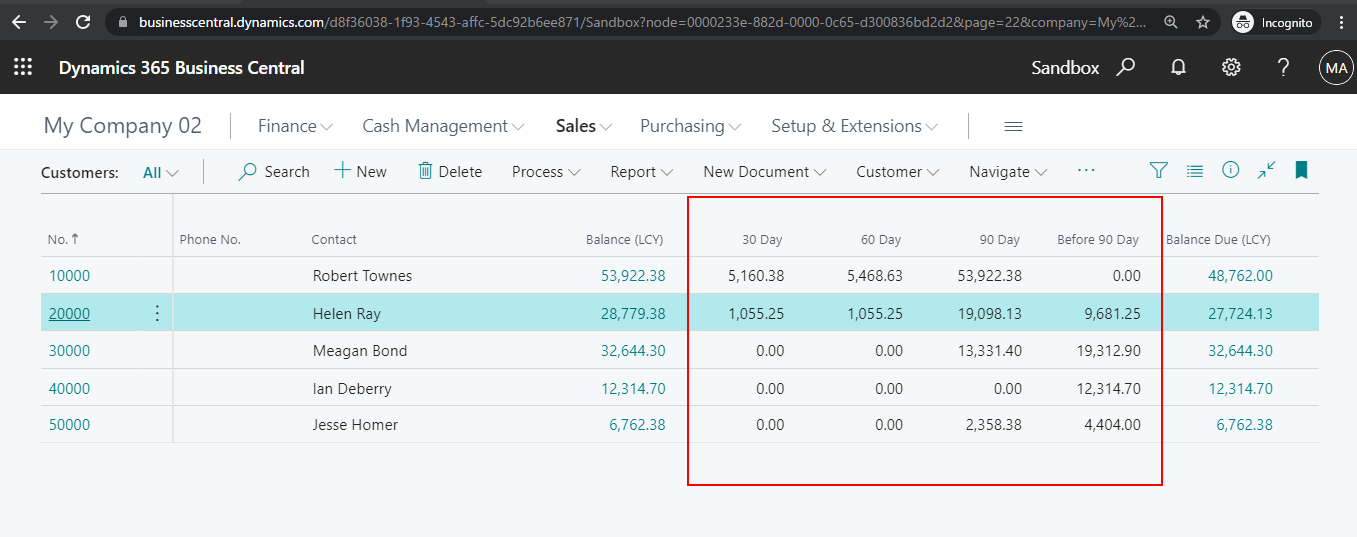
    pastedimage1624513280985v1.png

    pageextension 50112 ZYCustomerListExt extends "Customer List"
    {
        layout
        {
            addafter("Balance (LCY)")
            {
                field(Day_30; Day_30)
                {
                    Caption = '30 Day';
                    ApplicationArea = All;
                }
                field(Day_60; Day_60)
                {
                    Caption = '60 Day';
                    ApplicationArea = All;
                }
                field(Day_90; Day_90)
                {
                    Caption = '90 Day';
                    ApplicationArea = All;
                }
                field(BeforeDay_90; BeforeDay_90)
                {
                    Caption = 'Before 90 Day';
                    ApplicationArea = All;
                }
            }
        }
    
        trigger OnAfterGetRecord()
        begin
            Day_30 := CalCustomerBalance('<-30D>', Today);
            Day_60 := CalCustomerBalance('<-60D>', Today);
            Day_90 := CalCustomerBalance('<-90D>', Today);
            BeforeDay_90 := CalCustomerBalance('<-99Y>', CalcDate('<-90D>', Today));
        end;
    
        var
            Day_30: decimal;
            Day_60: decimal;
            Day_90: decimal;
            BeforeDay_90: decimal;
    
        local procedure CalCustomerBalance(Expr: Text[30]; ToDate: Date): Decimal
        var
            CustLedgerEntries: Record "Cust. Ledger Entry";
            TargetDate: Date;
            TotalAmount: Decimal;
        begin
            CustLedgerEntries.Reset();
            Clear(TargetDate);
            TotalAmount := 0;
            TargetDate := CalcDate(Expr, Today);
            CustLedgerEntries.SetRange("Customer No.", Rec."No.");
            CustLedgerEntries.SetRange("Posting Date", TargetDate, ToDate);
            CustLedgerEntries.SetRange(Open, true);
            CustLedgerEntries.SetAutoCalcFields(Amount);
            if CustLedgerEntries.FindSet() then
                repeat
                    TotalAmount := CustLedgerEntries.Amount   TotalAmount;
                until CustLedgerEntries.Next() = 0;
            exit(TotalAmount);
        end;
    }

  • Verified answer
    marley milo Profile Picture
    417 on at

    Many thanks, I now have this working

  • marley milo Profile Picture
    417 on at

    Hi, if i wanted the date from Today to just being the current month, what expression would i use for this?

  • Suggested answer
    Bilal Haider Profile Picture
    442 on at

    Hi marley you can put the date range in Date filter on customer list and then the fields Balance due, Sales etc will give you the amounts based on the date range. For current you can put like 070721..310721 in datefilter.

  • YUN ZHU Profile Picture
    97,220 Super User 2025 Season 2 on at

    Hi, try this?

    pastedimage1625705760975v1.png

    pastedimage1625705829610v2.png

  • zemorex19 Profile Picture
    on at

    Hi Yun Zhu,

    I attempted your solution for my Customer table, and, for some customers I ended up getting the same value in 60,90 and Before 90 as I have for 30 days, but others worked out just fine. Why would that be? Any help would be appreciated.

    Thx

Under review

Thank you for your reply! To ensure a great experience for everyone, your content is awaiting approval by our Community Managers. Please check back later.

Helpful resources

Quick Links

Responsible AI policies

As AI tools become more common, we’re introducing a Responsible AI Use…

Congratulations to our 2025 Community Spotlights

Thanks to all of our 2025 Community Spotlight stars!

Leaderboard > Small and medium business | Business Central, NAV, RMS

#1
OussamaSabbouh Profile Picture

OussamaSabbouh 2,090 Moderator

#1
OussamaSabbouh Profile Picture

OussamaSabbouh 2,090 Moderator

#3
Dhiren Nagar Profile Picture

Dhiren Nagar 1,277 Moderator

Last 30 days Overall leaderboard

Featured topics

Product updates

Dynamics 365 release plans
