web
You’re offline. This is a read only version of the page.
close
Skip to main content

Notifications

Announcements

No record found.

Community site session details

Community site session details

Session Id :
Microsoft Dynamics 365 | Integration, Dataverse...
Suggested Answer

Choices (picklist) merge result show values, not labels

(0) ShareShare
ReportReport
Posted on by 5

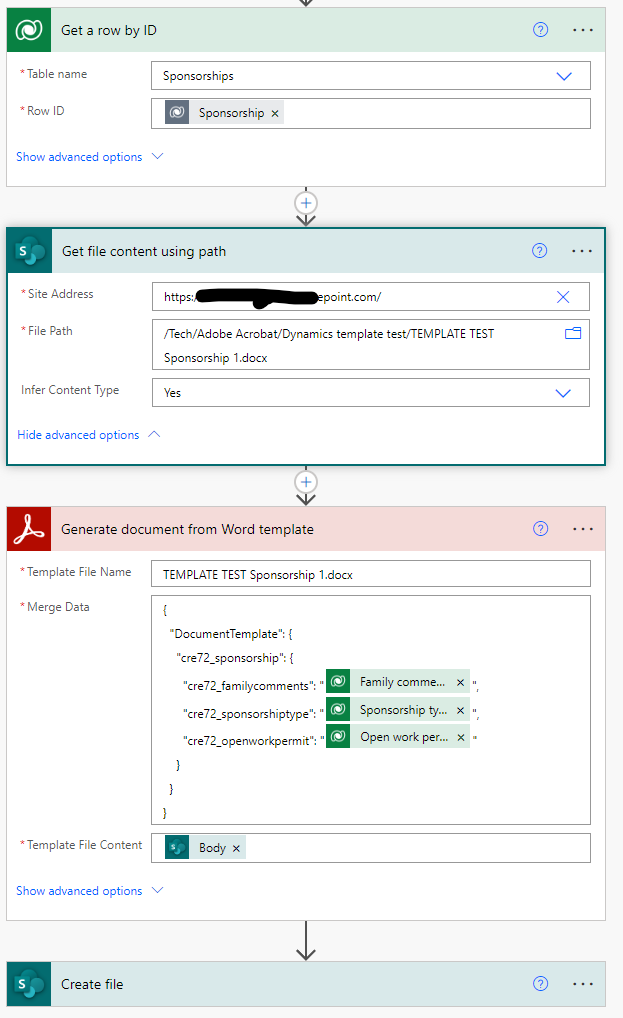
A flow generates a template words document with merged data.

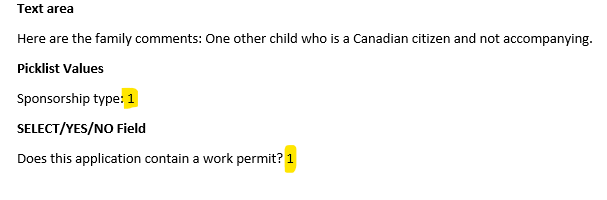
The merged data, for choices (picklists), shows the values (numbers), and not the text labels. I need the text labels to show in the merged document.

  1. What step do I add to the flow to convert the choices values to the choices labels? Or is there another solution?

I'm using Adobe Document Services API and it's pulling the data correctly/merging correctly, except that Dynamics 365 is feeding it the numbered values instead of the choices (picklist) text values.
pastedimage1668588574253v1.pngpastedimage1668588612871v2.png

I have the same question (0)
  • Suggested answer
    Leah Ju Profile Picture
    Microsoft Employee on at

    Hi Partner,

    The label of the Choice is needed in addition to the value, we need to expose the metadata of the Choice column to use throughout the flow. 

    I noticed that there is one 'Get a row by ID' action in your flow, you can check run history of the flow:

    Then you can search the choice in the action:

    It should be: fieldname@OData.Community.Display.V1.FormattedValue

    pastedimage1668650460117v1.png

    Add one 'compose' action after 'Get a row by ID':

    Get dynamic choice value from the 'Get a row by ID', then combine it with @OData.Community.Display.V1.FormattedValue, just like following screenshot:

    pastedimage1668650767297v2.png

    Then you can use the output from the action to populate the word template.

    You can refer the following link for more details:

    https://www.encorebusiness.com/blog/power-automate-get-choice-label-metadata/ 

  • Thinkering Profile Picture
    5 on at

    Thank you Leah,

    This work-around does function correctly. I do have about 100 choice fields I need to do this for in a single flow and if I understand correctly, for each I need to set 3 actions 'Compose, Initialize, and Set'. It's also a lot of work.

    Is there not a way to have an action so that labels are retrieved for the entire table by default in the flow? As opposed to configuring this one value at a time?

    -Daniel

  • Suggested answer
    Leah Ju Profile Picture
    Microsoft Employee on at

    Hi,

    Adding these actions are optional process, it is intended to make it easier for you to understand the expressions of the choice field label.

    In fact, you can use the final expression(outputs('Get_a_row_by_ID')?['body/customertypecode@OData.Community.Display.V1.FormattedValue') directly in the word template.

    My test:

    pastedimage1668671552029v1.png

    You can view that results are same:

    pastedimage1668671716413v2.png

Under review

Thank you for your reply! To ensure a great experience for everyone, your content is awaiting approval by our Community Managers. Please check back later.

Helpful resources

Quick Links

Responsible AI policies

As AI tools become more common, we’re introducing a Responsible AI Use…

Neeraj Kumar – Community Spotlight

We are honored to recognize Neeraj Kumar as our Community Spotlight honoree for…

Leaderboard > Microsoft Dynamics 365 | Integration, Dataverse, and general topics

#1
#ManoVerse Profile Picture

#ManoVerse 101

#2
Siv Sagar Profile Picture

Siv Sagar 93 Super User 2025 Season 2

#3
Martin Dráb Profile Picture

Martin Dráb 62 Most Valuable Professional

Last 30 days Overall leaderboard

Product updates

Dynamics 365 release plans
