web
You’re offline. This is a read only version of the page.
close
Skip to main content

Announcements

No record found.

News and Announcements icon
Community site session details

Community site session details

Session Id :
Small and medium business | Business Central, N...
Answered

Error on user filtering sales line / purchase line on field type to "Charge (Item)"

(0) ShareShare
ReportReport
Posted on by 30

Hello,

we encountered an error if an user filter the field type of the sales line or purchase line to the value "Charge (Item)" in a sales line or purchase line page. The bracket in the caption is unexpected for the filtertext interpreter.
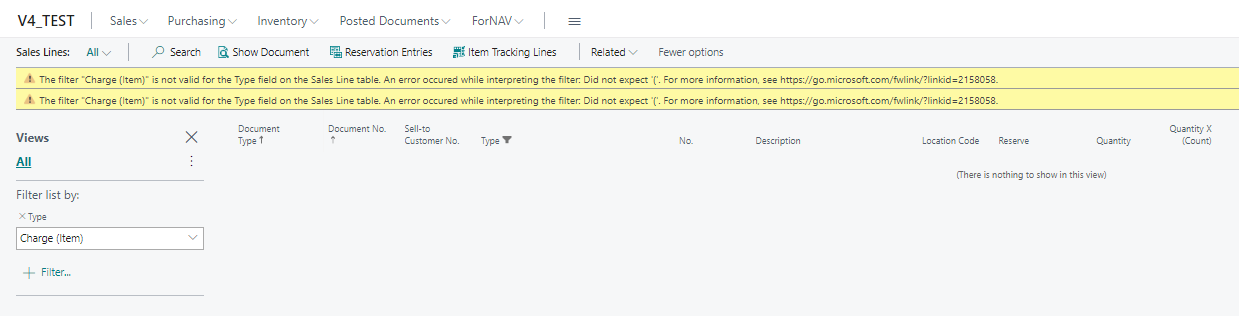
pastedimage1669040182950v1.png

If the user press F5 after it, nevertheless the system filters to the value, but the error is confusing for the user.

In my opinion it can only be fixed on changing the caption (and all translations) of the enum value "Charge (Item)" or on changing the filtertext parser... 

Or is there any other workaround??

Kind regards,

Carsten.

I have the same question (0)
  • Suggested answer
    Marco Mels Profile Picture
    Microsoft Employee on at

    Hello,

    Does this issue happen in an unmodified CRONUS company / demo database?

    Thank you.

  • Suggested answer
    Nitin Verma Profile Picture
    21,812 Moderator on at

    Please check if there is no customization done in the system.

  • TCJ Profile Picture
    4 on at

    I just tested and the error does not occur in an unmodified CRONUS database for the current version.

    No Charge (Item) lines exist in CRONUS so I also modified a sales order to add one just to make sure the filter worked- it did.

  • Verified answer
    Casi Profile Picture
    30 on at

    Hello Marco,

    thanks for the test in a current version. We had it in a BC19 CU7 Database and I wasn't shure if it was solved in a newer version. The database isn't unchanged but not changed at this point. It looked more like a standard problem in this version. But ok, you are right, its an older version and we planed to update anyway, so the problem should be solved then..

    Thanks a lot and kind regards,

    Carsten.

  • Suggested answer
    Marco Mels Profile Picture
    Microsoft Employee on at

    Thank you for sharing this insight with the community.

Under review

Thank you for your reply! To ensure a great experience for everyone, your content is awaiting approval by our Community Managers. Please check back later.

Helpful resources

Quick Links

Introducing the 2026 Season 1 community Super Users

Congratulations to our 2026 Super Stars!

Meet the Microsoft Dynamics 365 Contact Center Champions

We are thrilled to have these Champions in our Community!

Congratulations to the April Top 10 Community Leaders

These are the community rock stars!

Leaderboard > Small and medium business | Business Central, NAV, RMS

#1
OussamaSabbouh Profile Picture

OussamaSabbouh 2,138 Super User 2026 Season 1

#2
YUN ZHU Profile Picture

YUN ZHU 1,279 Super User 2026 Season 1

#3
AndrewThomas81 Profile Picture

AndrewThomas81 1,192

Last 30 days Overall leaderboard

Featured topics

Product updates

Dynamics 365 release plans
