web
You’re offline. This is a read only version of the page.
close
Skip to main content

Announcements

No record found.

News and Announcements icon
Community site session details

Community site session details

Session Id :
Small and medium business | Business Central, N...
Suggested Answer

Microsft Upgrade date scheduling version upgrade from 17 to 18

(0) ShareShare
ReportReport
Posted on by 990

Hi All,

Wanting to know the upgrade could be scheduled for a version upgrade in business central

pastedimage1619466448256v1.png

Regards,

Indira

I have the same question (0)
  • tlhgolfer Profile Picture
    23 on at

    You can absolutely change when your environment is upgraded if that is what you are asking.  You just need to get into the Admin center and you will see the date that it is scheduled.  You can choose this date and change the date using the date picker.  You can also go to the update settings and you can choose the time frame range, but it must be 6 hours.  I just did this yesterday it was simple and today I was upgraded to 18.

    Thanks,

    Tanya

  • Suggested answer
    THE Italian Profile Picture
    Microsoft Employee on at

    Yes you can. More details here docs.microsoft.com/.../update-rollout-timelime

  • Suggested answer
    Community Member Profile Picture
    on at

    Hello,

    Adding to the other replies... After you receive your email from Microsoft (note that you have to be listed on the Admin/Notification Email list, you will see when the updates will start automatically. You can manually update your scheduled Upgrade via the Admin Center as Tanya has noted.

    pastedimage1619528749244v1.png

    Update Date - set the update date

    Define Update Time - define update time window

    Admin Center - Business Central Admin Center

    Hope this help.

    Thanks,

    Steve

  • Indira88 Profile Picture
    990 on at

    Hi ,

    Thank you for the reply All of you, my other query would be is there a need to backup the system?

    Because I hope any role configuration or any data would remain unaltered.

    Regards,

    Indira 

  • Suggested answer
    THE Italian Profile Picture
    Microsoft Employee on at

    Within SaaS backup is always guaranteed.

  • Indira88 Profile Picture
    990 on at

    Hi Duilio,

    Thanks for the update,

    I see a warning coming while I develop extenstions which says I need to mention Rec.columnName of a table while I create fields on the pages

    My question is will this affect the old extensions that we have created and deployed in the production.

    [quote user="Indira88"]

    Hi All,

    Wanting to know the upgrade could be scheduled for a version upgrade in business central
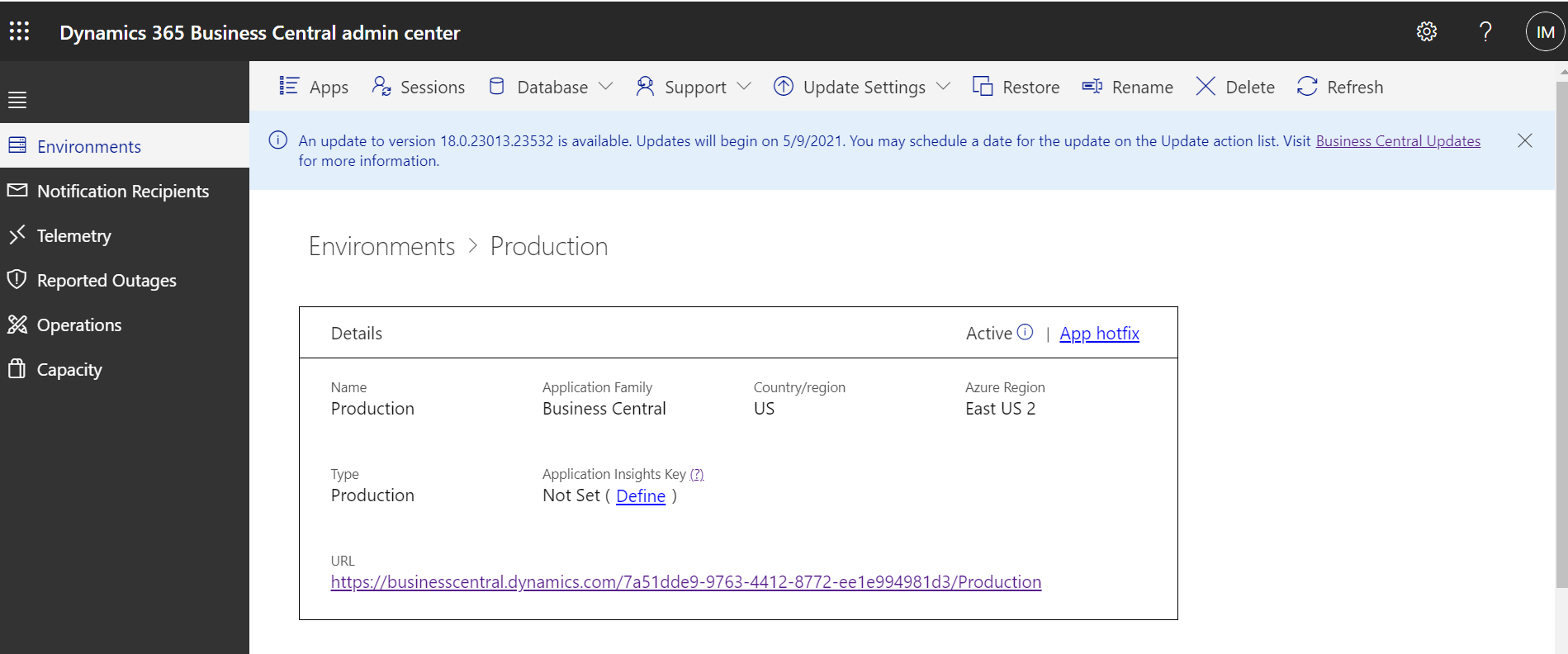
    pastedimage1619466448256v1.png

    Regards,

    Indira

    [/quote]

    [quote user="Indira88"]

    Hi All,

    Wanting to know the upgrade could be scheduled for a version upgrade in business central

    pastedimage1619466448256v1.png

    Regards,

    Indira

    [/quote]

    Because at that point this was not coming as a warning.

Under review

Thank you for your reply! To ensure a great experience for everyone, your content is awaiting approval by our Community Managers. Please check back later.

Helpful resources

Quick Links

Introducing the 2026 Season 1 community Super Users

Congratulations to our 2026 Super Stars!

Congratulations to our 2025 Community Spotlights

Thanks to all of our 2025 Community Spotlight stars!

Leaderboard > Small and medium business | Business Central, NAV, RMS

#1
OussamaSabbouh Profile Picture

OussamaSabbouh 1,926 Super User 2026 Season 1

#2
YUN ZHU Profile Picture

YUN ZHU 1,158 Super User 2026 Season 1

#3
Khushbu Rajvi. Profile Picture

Khushbu Rajvi. 533 Super User 2026 Season 1

Last 30 days Overall leaderboard

Featured topics

Product updates

Dynamics 365 release plans
