web
You’re offline. This is a read only version of the page.
close
Skip to main content

Announcements

No record found.

News and Announcements icon
Community site session details

Community site session details

Session Id :
Microsoft Dynamics CRM (Archived)

Trigger a custom field onChange of any field on form

(0) ShareShare
ReportReport
Posted on by

Hi experts, 

In my case form I have a custom field through javascript web resource which is an active timer. When the user opens a record the timer starts automatically onLoad and the time is saved onSave of form. 
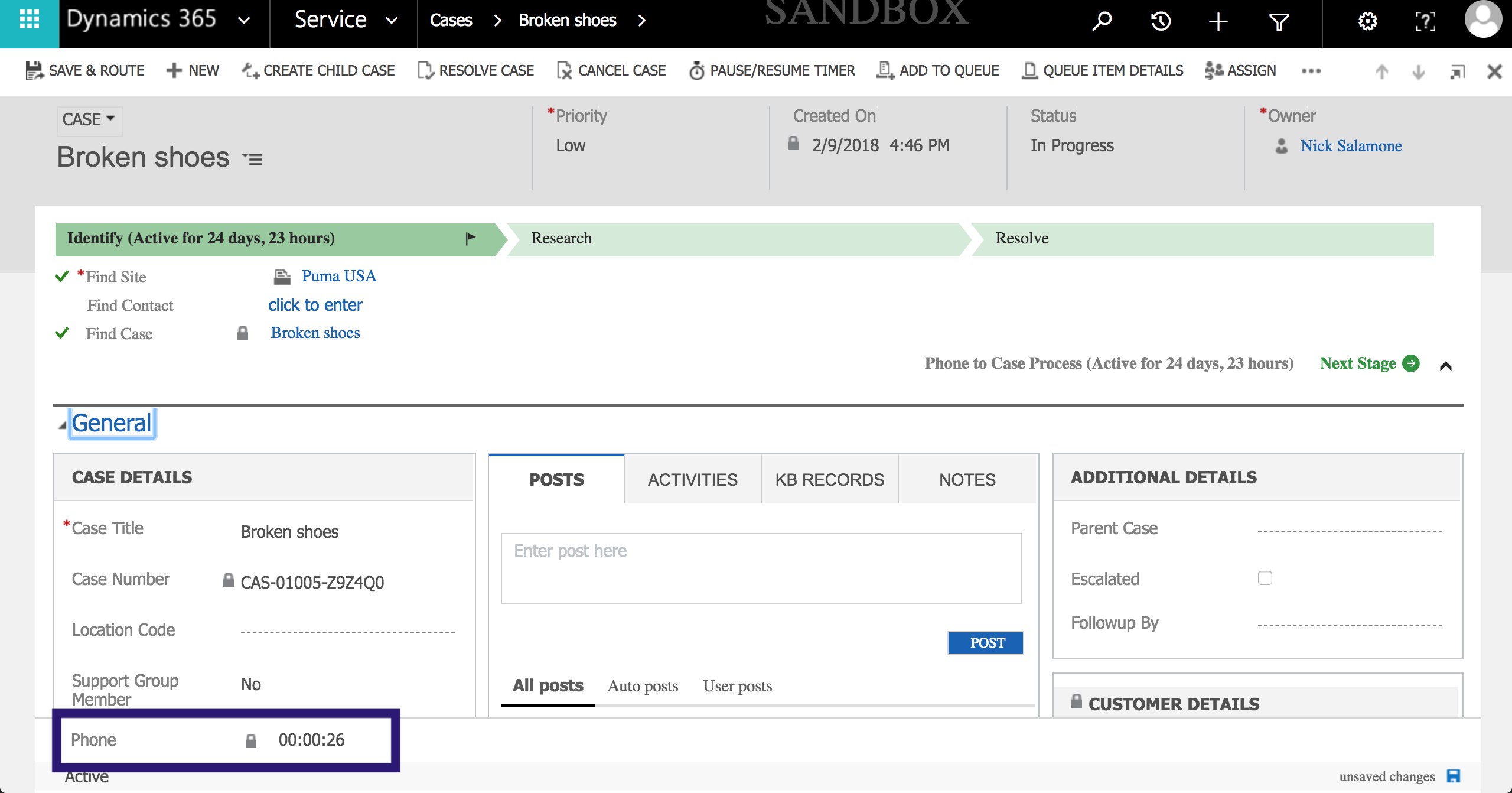
Screen-Shot-2018_2D00_03_2D00_06-at-4.35.55-PM.png

I would like the timer to be triggered onChange of any field on the form. It would be impractical to apply the script onChange of every single field on the form. 

Is there any other way?

Thanks,

Jon

*This post is locked for comments

I have the same question (0)
  • Suggested answer
    Alex Fun Wei Jie Profile Picture
    33,628 on at

    Hi Jon,

    Access all attributes in CRM

    msdn.microsoft.com/.../jj602964.aspx

    if the attributes is exist, apply to addonchange.

    docs.microsoft.com/.../addonchange

  • Verified answer
    Shahbaaz Ansari Profile Picture
    6,211 on at

    Hi John,

    You can use settimeout function on page load and check if any field is changed by isdirty property and if any field is changed you can apply your logic and also you can clear timeout.

    below is the javascript code, keep it on page load.

    var myVar = setInterval(myTimer, 2000);

    function myTimer() {    

    //get list of dirty fields

          var oppAttributes = Xrm.Page.data.entity.attributes.get();

           if (oppAttributes != null) {

               for (var i in oppAttributes) {

                   if (oppAttributes[i].getIsDirty()) {

    // your logic

                      clearTimeout(myVar);

                   }

               }

           }

    }

    hope it helps!!!

    Thanks,

    Shahbaaz

  • Community Member Profile Picture
    on at

    Hi Shahbaaz,

    Thanks for the information.

    I tried using your code, but the timer is still starting when I open the record and not when any fields change.

    //Initialize time attributes
    var seconds = 0, minutes = 0, hours = 0,t;
    function add() 
    {
    	//var flag = Xrm.Page.getAttribute("new_timerstatus").getValue();
    	//if (flag == "1")
    	//{
    	//get list of dirty fields
        var oppAttributes = Xrm.Page.data.entity.attributes.get();
        if (oppAttributes != null) 
        {
            for (var i in oppAttributes) 
            {
                   if (oppAttributes[i].getIsDirty()) 
                   {
    						seconds++;
    				    if (seconds >= 60) 
    				    {
    				        seconds = 0;
    				        minutes++;
    				        if (minutes >= 60) 
    				        {
    				            minutes = 0;
    				            hours++;
    				        }
    				    }
    
                   }


            }
        }


    	//creating time value in hh:mm:ss formate
        var tmp = (hours ? (hours > 9 ? hours : "0" + hours) : "00") + ":" + (minutes ? (minutes > 9 ? minutes : "0" + minutes) : "00") + ":" + (seconds > 9 ? seconds : "0" + seconds);
    	Xrm.Page.getAttribute("new_timer").setValue(tmp);
    
    	//recursively calling timer
    	timer();
        
    }
    
    //main timer method
    function timer() {
        t = setTimeout(add, 1000);
    }


  • Suggested answer
    Shahbaaz Ansari Profile Picture
    6,211 on at

    Hi Jon,

    I tried above code and it is working fine, one more thing you need to do is to stop the auto save functionality with the help of below link :

    msdynamicscrmblog.wordpress.com/.../disable-auto-save-functionality-in-dynamics-crm-2013

    also remove below  2 line code you dont need that

    //recursively calling timer

    timer();

    Thanks,

    Shahbaaz

  • Community Member Profile Picture
    on at

    Hi Shahbaaz,

    If I dont call the timer(); method then the timer wont count the time.

    A set the form to not autosave but still it the timer starts on page load.

    Please guide.

    Thanks,

    Jon

  • Suggested answer
    Shahbaaz Ansari Profile Picture
    6,211 on at

    Hi Jon,

    i have updated my code that you can refer from below link,

    community.dynamics.com/.../771999

    Hope it help!!!

    Thanks,

    Shahbaaz

Under review

Thank you for your reply! To ensure a great experience for everyone, your content is awaiting approval by our Community Managers. Please check back later.

Helpful resources

Quick Links

Introducing the 2026 Season 1 community Super Users

Congratulations to our 2026 Super Stars!

Meet the Microsoft Dynamics 365 Contact Center Champions

We are thrilled to have these Champions in our Community!

Congratulations to the April Top 10 Community Leaders

These are the community rock stars!

Leaderboard > 🔒一 Microsoft Dynamics CRM (Archived)

Last 30 days Overall leaderboard

Featured topics

Product updates

Dynamics 365 release plans
