web
You’re offline. This is a read only version of the page.
close
Skip to main content

Notifications

Announcements

No record found.

Community site session details

Community site session details

Session Id :
Small and medium business | Business Central, N...
Unanswered

How to remove some menu in Gear Settings (removing menu company information, Assisted Setup, Advanced settings)

(0) ShareShare
ReportReport
Posted on by 13

Hi guys, I would like to know how to remove some menu from Gear Settings.

I would like to remove Company Information, Assisted Setup and Advanced Settings... this was able to access by our users/client and I would like to remove it so they won't attempt to click it. Thanks
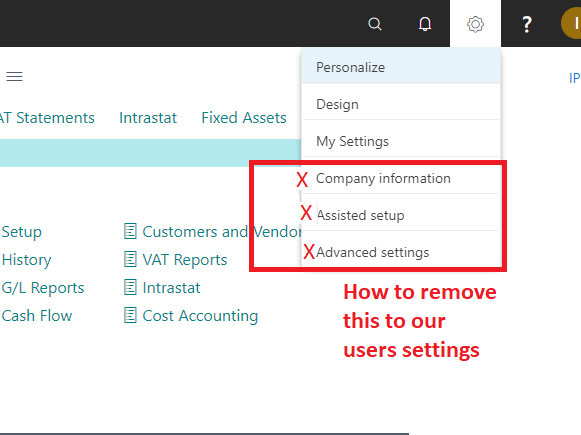
pastedimage1622108349165v1.png

I have the same question (0)
  • Trublu849 Profile Picture
    275 on at

    Curious for the answer on this as I would like to know as well.

    Thanks,

    Thomas

  • YUN ZHU Profile Picture
    95,746 Super User 2025 Season 2 on at

    Hi, you can remove the Design button in the On-Premise by modifying the navsettings.json file directly. But as far as I know, there is no way to remove the above three buttons.
    NAVWebSettings element settings:

    https://docs.microsoft.com/en-us/dynamics365/business-central/dev-itpro/administration/configure-web-server#navwebsettings-element-settings

    Please note that even if these three buttons are removed, users can also use search to access these feature.

    So, I recommend using Permission Set to manage permissions so that users cannot open these pages.

  • Bendcat Profile Picture
    13 on at

    So there are no work-around to remove those menus.

    What are the permissions set to prevent them accessing Company Information, Assisted Setup and Advanced Settings?

Under review

Thank you for your reply! To ensure a great experience for everyone, your content is awaiting approval by our Community Managers. Please check back later.

Helpful resources

Quick Links

Responsible AI policies

As AI tools become more common, we’re introducing a Responsible AI Use…

Neeraj Kumar – Community Spotlight

We are honored to recognize Neeraj Kumar as our Community Spotlight honoree for…

Leaderboard > Small and medium business | Business Central, NAV, RMS

#1
OussamaSabbouh Profile Picture

OussamaSabbouh 2,066

#2
YUN ZHU Profile Picture

YUN ZHU 658 Super User 2025 Season 2

#3
Sumit Singh Profile Picture

Sumit Singh 595

Last 30 days Overall leaderboard

Featured topics

Product updates

Dynamics 365 release plans
