web
You’re offline. This is a read only version of the page.
close
Skip to main content

Notifications

Announcements

Community site session details

Community site session details

Session Id :
Small and medium business | Business Central, N...
Suggested Answer

Strange behaviour in "Costing Method" field of item card window

(0) ShareShare
ReportReport
Posted on by 40

Hello to everyone!

We have focus on a strange behaviour of the "Costing Method" field of item card window.

In the inventory setup the default value of this field is "FIFO" and we keep it with that value.

Now, steps to reproduce the behaviour:

  • Create a new item.
  • Change the "Costing Method" to "Standard" and wait to save. The system should enable the "Standard Cost" field and disabled "Unit Cost".
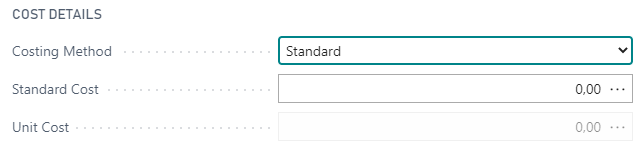
pastedimage1591017999670v1.png

  • Without leave the window select again "FIFO". The window should return the original behaviour. "Standard Cost" field disabled and "Unit Cost" enabled.

pastedimage1591018074779v2.png

  • Close the window.
  • Open again the item from the item list.
  • Check the status of the field "Standard Cost". In theory it should be disabled but it looks enabled.

pastedimage1591018137405v3.png

It is a strange behaviour but can only recover the normal situation if we close the browser.

Finally, we are testing with v16 of Business Central. 16.1 (Platform 16.0.12630.13457 + Application 16.1.12629.12805).

Thank you!

I have the same question (0)
  • DavidES Profile Picture
    40 on at

    Thank you Andy!

    You gave me the hint. I was using Chrome and in that environment I was able to reproduce the problem. Now, I have tried with the new Microsoft Edge and it was working fine.

    I have make again the test in Chrome and it is working now so I focus that Chrome and also BC have been updated. Porbably it was the Chrome update the one that fix the issue.

    Thank you!

  • Suggested answer
    Andy Sather Profile Picture
    on at

    Hello David - I tested on mine and I am not seeing the same behavior.   I have the following questions to help narrow this down.

    1. What type of browser are you using?  Can you switch browsers and see if that makes a difference?

    2. Are there any Extensions installed on the Item Card?  If those are uninstalled do you see the same issue?  You can create a Sandbox of Prod and test with the uninstall of the extension.

    3. Maybe it is an issue with the Item Template.  Can you create a new Template and see if this is the cause of the issue?

    Please let me know if you have any questions.

Under review

Thank you for your reply! To ensure a great experience for everyone, your content is awaiting approval by our Community Managers. Please check back later.

Helpful resources

News and Announcements

Season of Giving Solutions is Here!

Quick Links

Responsible AI policies

As AI tools become more common, we’re introducing a Responsible AI Use…

Neeraj Kumar – Community Spotlight

We are honored to recognize Neeraj Kumar as our Community Spotlight honoree for…

Leaderboard > Small and medium business | Business Central, NAV, RMS

#1
OussamaSabbouh Profile Picture

OussamaSabbouh 1,630

#2
Khushbu Rajvi. Profile Picture

Khushbu Rajvi. 926 Super User 2025 Season 2

#3
Dhiren Nagar Profile Picture

Dhiren Nagar 682

Last 30 days Overall leaderboard

Featured topics

Product updates

Dynamics 365 release plans
