The Business Central administration center API enables administrators to programmatically do administrative tasks for a Business Central tenant. With the API administrators can, for example:
- Query and work with production and sandbox environments for the tenant.
- Set up administrative notifications.
- View telemetry for events on the tenant.
Today I will talk about How we can Copy the environment by API:
Creates a copy environment with a copy of another environment's data.
To create copy environment you will need first
- Setting up OAuth Authentication for Business Central Web Services / APIs
To do that you need to register your APP on Azure Portal:
- Open the Azure portal
- Search for APP Registrations add new APP Registration


- Save the value for the Client Secret

- Now you will need to Get Token in Postman:
To do that please follow the below steps:
- From PostMan Create a new collection
- Then select the type of Authorization to be OAUTH2.0
- Select Edit Token configuration as below
Token-Name: Add any name you want
Grant Type: Authorization Code
Callback URL: https://businesscentral.dynamics.com/
Auth URL: https://login.windows.net/{Add your tenant id}/oauth2/authorize?resource=https://api.businesscentral.dynamics.com
Access Token URL: https://login.windows.net/{Add your tenant id}/oauth2/token?resource=https://api.businesscentral.dynamics.com
Client ID: Client ID on the App Registration

- Client Secret: Client Secret Value, please check the point (e- Save the value for the Client Secret)

- Press on Get New Access Token
- The below screen will appear asking for login

- Then the below msg will appear

Now the Token has been generated
3- Copy environment
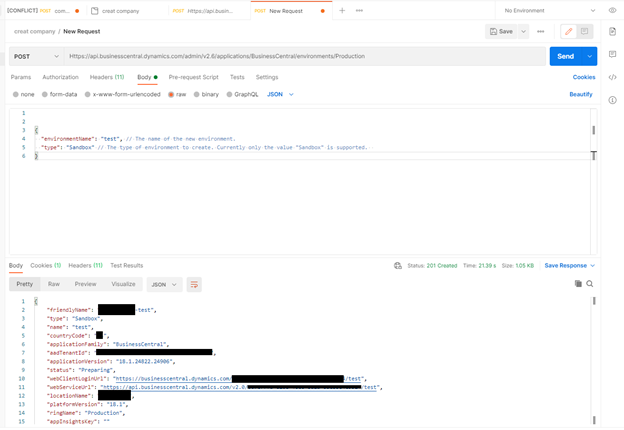
To create a new environment with a copy of another environment's data.run the below request
Content-Type: application/json
Https://api.businesscentral.dynamics.com/admin/v2.6/applications/BusinessCentral/environments/Production
{
"environmentName": "test", // The name of the new environment.
"type": "Sandbox" // The type of environment to create. Currently only the value "Sandbox" is supported.
}

The Reference
https://docs.microsoft.com/en-us/dynamics365/business-central/dev-itpro/administration/administration-center-api#copy-environment
the PDF file:
[View:/cfs-file/__key/communityserver-discussions-components-files/758/5383.The-Business-Central-Administration-Center-API_2800_Copy-environment_2900_.pdf]
Thank you,


