web
You’re offline. This is a read only version of the page.
close
Skip to main content

Announcements

No record found.

News and Announcements icon
Community site session details

Community site session details

Session Id :
Small and medium business | Business Central, N...
Answered

Job Planning lines while creating Sales Invoice from Job planning Lines

(0) ShareShare
ReportReport
Posted on by 990

Hi,

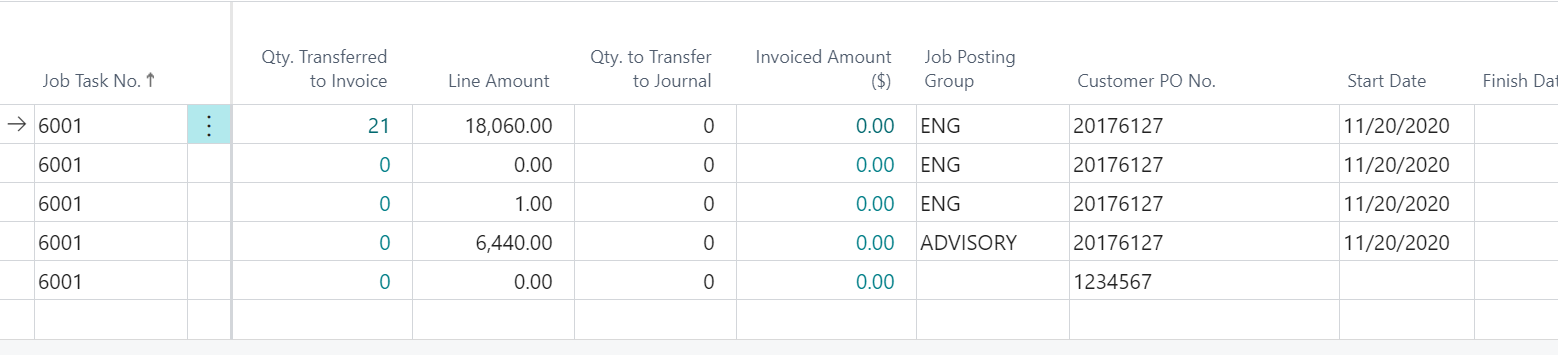
While creating Sales Invoice by transferring lines to Sales invoice from Job Planning Lines The requirement is that There is a custom field Customer PO
pastedimage1610490207476v1.png

while the user will go to transfer a line if the line has a customer Po different from the previous lines there should be an error and not allow to transfer lines.

I have created a procedure based on an event CreateLines

My code is as follows:

[EventSubscriber(ObjectType::CodeUnit1002'OnBeforeCreateSalesInvoiceLines''', false, false)]
    procedure OnBeforeCreateSalesInvoiceLines(var JobPlanningLine: Record "Job Planning Line";
       InvoiceNo: Code[20];
       NewInvoice: Boolean;
       PostingDate: Date;
       CreditMemo: Boolean)

    var
        customerPO: Text[50];
        customerPON: Text[50];
    begin

        JobPlanningLine.Init();
        JobPlanningLine.FindFirst;
        customerPO := JobPlanningLine."WCI Description 2";
        Message('1' + customerPO);


    end;


but the problem is the comparison of the current record value with the previous rows customer Po is not happening.
Please help
Regards,
Indira
I have the same question (0)
  • Suggested answer
    Suresh Kulla Profile Picture
    50,269 Super User 2026 Season 1 on at

    [EventSubscriber(ObjectType::Codeunit, Codeunit::"Job Create-Invoice", 'OnBeforeCreateSalesInvoiceLines', '', true, true)]
        local procedure "Job Create-Invoice_OnBeforeCreateSalesInvoiceLines" (var JobPlanningLine: Record "Job Planning Line"; InvoiceNo: Code[20]; NewInvoice: Boolean;
    		PostingDate: Date; 	CreditMemo: Boolean     )
    
        var 
            JobPlanningLine2: Record "Job Planning Line";   
            CustomerPONo: Code[20];
        begin
            JobPlanningLine2.Copy(JobPlanningLine);
            If JobPlanningLine2.FindSet() then 
                repeat
                    if CustomerPONo = '' then 
                        CustomerPONo := JobPlanningLine2."Customer PO No."
                    else
                        if CustomerPONo <> JobPlanningLine2."Customer PO No." then
                            Error('Customer PO No. is not matching');  
    
                until JobPlanningLine2.Next() = 0
    
        end;
    

    You need to add code something like above.

  • Indira88 Profile Picture
    990 on at

    Dear Kulla,

    Thank you for the help! but the code seems to work when 2 or more lines are being invoiced together when only single line is invoiced the customer po is comparing with itself and hence not going in the condition .I need to compare the current record po with the prev record po to mitigate this how can this b achieved.

    Regards,

    Indira

  • Verified answer
    Suresh Kulla Profile Picture
    50,269 Super User 2026 Season 1 on at

    You don't need to compare with previous records your goal is to have all of the same customer PO no. so you take the first PO no. and then compare the rest if they have the same value or not.

  • Indira88 Profile Picture
    990 on at

    Thanks Kulla,it helped me compare the po s .

Under review

Thank you for your reply! To ensure a great experience for everyone, your content is awaiting approval by our Community Managers. Please check back later.

Helpful resources

Quick Links

Introducing the 2026 Season 1 community Super Users

Congratulations to our 2026 Super Stars!

Congratulations to our 2025 Community Spotlights

Thanks to all of our 2025 Community Spotlight stars!

Leaderboard > Small and medium business | Business Central, NAV, RMS

#1
OussamaSabbouh Profile Picture

OussamaSabbouh 1,821 Super User 2026 Season 1

#2
YUN ZHU Profile Picture

YUN ZHU 1,122 Super User 2026 Season 1

#3
Dhiren Nagar Profile Picture

Dhiren Nagar 959 Super User 2026 Season 1

Last 30 days Overall leaderboard

Featured topics

Product updates

Dynamics 365 release plans
