web
You’re offline. This is a read only version of the page.
close
Skip to main content

Notifications

Announcements

No record found.

Community site session details

Community site session details

Session Id :
Microsoft Dynamics CRM (Archived)

Form white space issue

(0) ShareShare
ReportReport
Posted on by 687

Screenshot 1

183332.1.png

Screenshot 2

7220.2.png

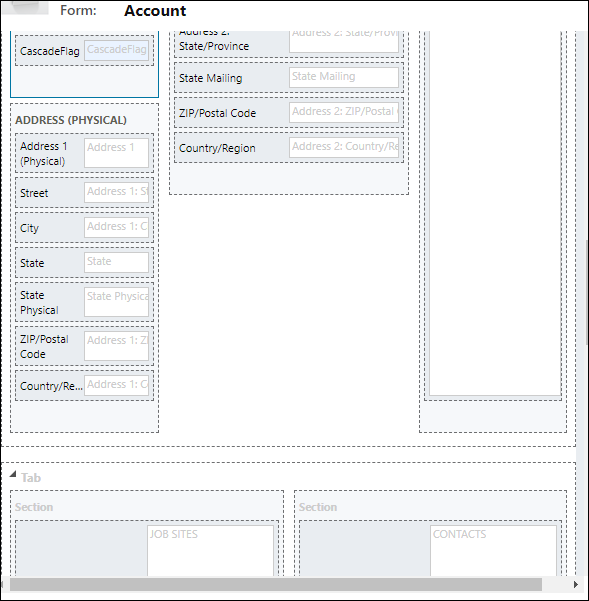
In screenshot 1, there is white space on the form, while I'm navigating to form editor to remove the space there is no space to remove(screenshot 2).

Please suggest the ways to remove the space.

Thanks and Regards,

Hardik Chauhan

*This post is locked for comments

I have the same question (0)
  • ashlega Profile Picture
    34,477 on at

    Hi,

     it seems some fields are hidden(maybe the whole upper section in the left column). Do you have a script that's doing that?

     If yes, maybe try to hide those fields/sections in the designer view, and, then, show them in the script as required (instead of doing it the other way around)

  • chauhanhardik Profile Picture
    687 on at

    Thanks for the quick response Alex,

    there are neither hidden fields on the forms nor a script that's doing that. Please suggest other ways.

    Thanks,

    Harry

  • Suggested answer
    gdas Profile Picture
    50,091 Moderator on at

    Hi Hardik ,

    Second screenshot all the sections are not aligned which means there is something in the above which got hidden and making the  all section aligned in the form view .  Could you please put here full sreenshot of the form , I am guessing the right side section and left side top  section are causes the problem.

    Try to align in the form editor so that they all are showing without space in below .

  • chauhanhardik Profile Picture
    687 on at

    Hi Goutam,

    There's nothing hidden on form. Refer below screesnshot:

    7384.3.png

  • gdas Profile Picture
    50,091 Moderator on at

    Hello Hardik ,

    Could you please try to move HTML web resource in another section or tab and test . In addition try to check  is there any height , width set for the HTML web resource.

  • Suggested answer
    chauhanhardik Profile Picture
    687 on at

    Hi Goutam,

    Thanks for the help.

    I've tried to adjust height of section and I'm able to fill in the gaps.

    Thanks,

    Hardik

Under review

Thank you for your reply! To ensure a great experience for everyone, your content is awaiting approval by our Community Managers. Please check back later.

Helpful resources

Quick Links

Responsible AI policies

As AI tools become more common, we’re introducing a Responsible AI Use…

Neeraj Kumar – Community Spotlight

We are honored to recognize Neeraj Kumar as our Community Spotlight honoree for…

Leaderboard > 🔒一 Microsoft Dynamics CRM (Archived)

#1
SA-08121319-0 Profile Picture

SA-08121319-0 4

#1
Calum MacFarlane Profile Picture

Calum MacFarlane 4

#3
Alex Fun Wei Jie Profile Picture

Alex Fun Wei Jie 2

Last 30 days Overall leaderboard

Featured topics

Product updates

Dynamics 365 release plans