web
You’re offline. This is a read only version of the page.
close
Skip to main content

Announcements

No record found.

News and Announcements icon
Community site session details

Community site session details

Session Id :
Small and medium business | Business Central, N...
Suggested Answer

Posted sales order help

(0) ShareShare
ReportReport
Posted on by 65

The the original posted sales order was missing the $8 fee. I went to correct it and it canceled out the original posted sales order but I don't think I did this right. The total posted sales order should have been $984. What did i do wrong and how can I fix this?

Screen-Shot-2021_2D00_04_2D00_28-at-11.10.43-AM.png

I have the same question (0)
  • Suggested answer
    Community Member Profile Picture
    on at

    Lanai,

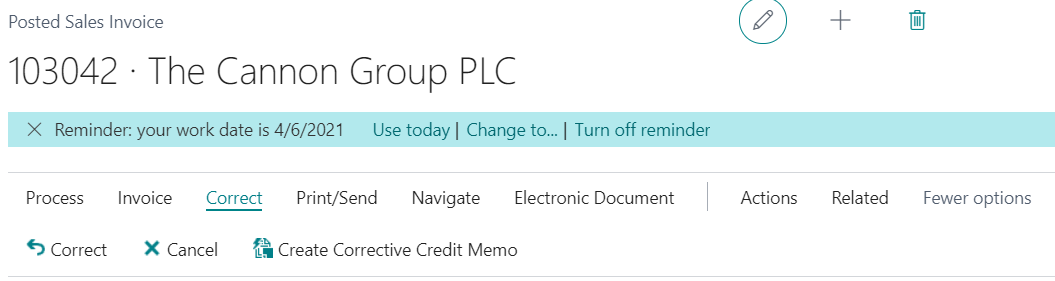
    When you went to the Posted Sales Invoice to correct, on the Customer Ledger Entry, did you click:

    Correct or Cancel or Create Corrective Credit Memo
    pastedimage1619626812972v1.png

    It sounds like you click Correct and created a new Sales Order but it only had the $8.00 on the Order. To resolve this, click the Correct choice for the $8.00 posted invoice and then use the Copy Function to copy the old Posted Sales Invoice with the other Sales Lines and add the $8.00 line that was missing in the first place.

    Definition wise:

    Correct - Reverse this posted invoice. A credit memo will be created and matched with the invoice, and the invoice will be cancelled. Shipments for the invoice will be reversed. To create a new invoice with the same information, us the Copy Function. When you copy an invoice, remember to post shipment for the new invoice.

    Cancel - Create and post a sales credit memo that reverses this posted sales invoice. This posted sales invoice will be cancelled.

    Create Corrective Credit Memo - Create a credit memo for this posted invoice that you complete and post manually to reverse the posted invoice.

    Hope this helps.

    Thanks,

    Steve

  • Lanai Norris Profile Picture
    65 on at

    Steve,

    You are correct. But it looks like I canceled both Posted sales invoices and now I can't figure out to repost the original. Says there's nothing to post. should I re-create a SO and try again?

  • Suggested answer
    Community Member Profile Picture
    on at

    Lanai,

    When you say there is nothing to Post are you on a Sales Order trying to Post with Item lines that have no inventory? Make sure the document you are trying to Post has ample inventory for the Item. If the Location and Qty. you entered is not available, you have nothing to post. Check this out. The correction you did put the inventory back in the location you invoiced from.

    Thanks,

    Steve

Under review

Thank you for your reply! To ensure a great experience for everyone, your content is awaiting approval by our Community Managers. Please check back later.

Helpful resources

Quick Links

Introducing the 2026 Season 1 community Super Users

Congratulations to our 2026 Super Stars!

Congratulations to our 2025 Community Spotlights

Thanks to all of our 2025 Community Spotlight stars!

Leaderboard > Small and medium business | Business Central, NAV, RMS

#1
OussamaSabbouh Profile Picture

OussamaSabbouh 2,161 Super User 2026 Season 1

#2
YUN ZHU Profile Picture

YUN ZHU 1,046 Super User 2026 Season 1

#3
Dhiren Nagar Profile Picture

Dhiren Nagar 932 Super User 2026 Season 1

Last 30 days Overall leaderboard

Featured topics

Product updates

Dynamics 365 release plans
