web
You’re offline. This is a read only version of the page.
close
Skip to main content

Notifications

Announcements

Community site session details

Community site session details

Session Id :
Small and medium business | Business Central, N...
Suggested Answer

There are no Warehouse Receipt Lines created

(0) ShareShare
ReportReport
Posted on by 50

I was trying to create warehouse receipt for PO but I get "There are no Warehouse Receipt Lines created"

tried to google and find solution but could not find solution for my issue.

warehouse setup

0830.pastedimage1612309918139v1.png

location card setup

37048.png

please help

I have the same question (1)
  • KasparsSemjonovs Profile Picture
    4,800 Super User 2025 Season 2 on at

    Hi,

    Create Warehouse receipt is used with advanced warehousing in BC. Are You sure You are using that?

    Otherwise Receipt is created just by providing quantity to receive in the PO lines, and doing the Posting (with just the Receipt option).

    If You need a warehouse document for the placing of the items to specific zone/bin, then You would need to create Inventory Pick/Put-away.

  • happydz Profile Picture
    20 on at

    hi Suresh,

    i have same question with your answer; if purchase order with job no which generated by order planning from job card. when create warehouse receipt ,show "There are no Warehouse Receipt Lines created" message, but when i directly post it on purchase order , checked posted result, i found there are two entries in item ledger entry, one is purchase receipt with positive quantity , one is negative adjustment with negatinve quantity ,  total inventory is equal 0, do you know why like this? what is logic about purchase order with job no?

  • Suggested answer
    Community Member Profile Picture
    on at

    Hello,

    Since when you create a Warehouse Receipt it will include the total Quantity. So 10 in my example. If I want to segment the Receipt you do a partial Warehouse Receipt like this:

    1. 1st Receipt Container #5555 of 5 pieces

    pastedimage1612476582430v1.png

    2. 2nd Receipt of the other 5

    pastedimage1612476807313v2.png

    2 Posted Receipts 

    pastedimage1612476882280v3.png with Container# pastedimage1612476903955v4.png

    Hope this helps.

    Thanks,

    Steve

  • jyoon0619 Profile Picture
    50 on at

    @Steven Chinsky yes that is correct

  • Suggested answer
    Community Member Profile Picture
    on at

    Hello,

    In your example, the Item (call it X), has a quantity of 10 (my number). I create the Whse Receipt for 10. Are you trying to Receive by Carton from the Vendor, which is why you want another Whse Receipt? So you receive 5 for Carton 5858 and 5 for Carton XXXX?

    Thanks,

    Steve

  • jyoon0619 Profile Picture
    50 on at

    Scenario is this

    PO#: A1111

    Carton #: 5858

    let say I have created warehouse receipt with above PO and Whse receipt no. is REC0001.

    However, I want to create another warehouse receipt with same PO# but different carton number and it doesn't allow me to create warehouse receipt line.

    is it not possible to create another warehouse receipt with same PO but different carton #?

  • jerome77 Profile Picture
    on at

    Hi

    Would you be able to share more information around your scenario, maybe to use Steven's example and show us the setup and steps used to get the error?

    Thanks

  • jyoon0619 Profile Picture
    50 on at

    yes number there is number series for PO

  • jyoon0619 Profile Picture
    50 on at

    No, purchase line does not have Job No.

  • Suggested answer
    Community Member Profile Picture
    on at

    Hello,

    Adding to the other replies... Few things to check:

    Location Card - I see the setup shows Require Receive checked.
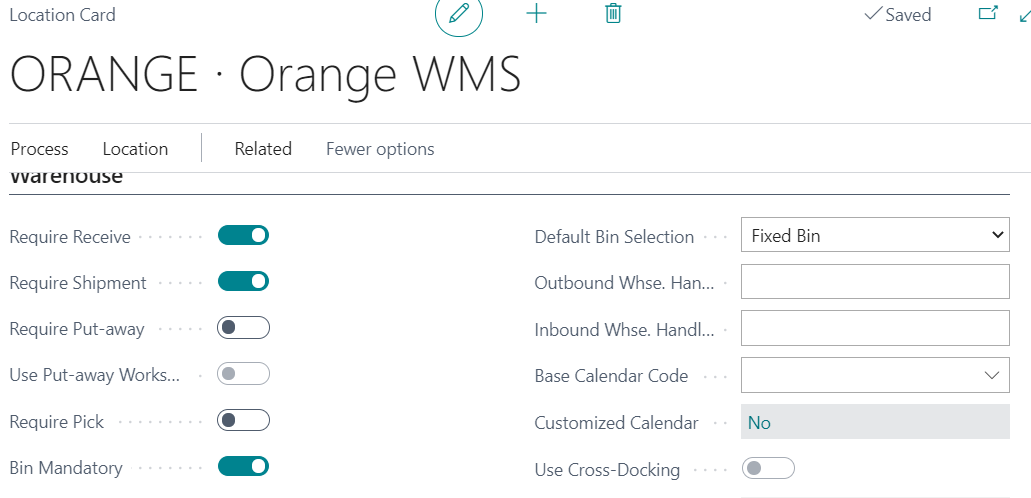
    pastedimage1612394434881v1.png

    Note that my Location will allow me to create Warehouse Receipt and Warehouse Shipment and a Bin Code is mandatory. Now lets create a Purchase Order. 
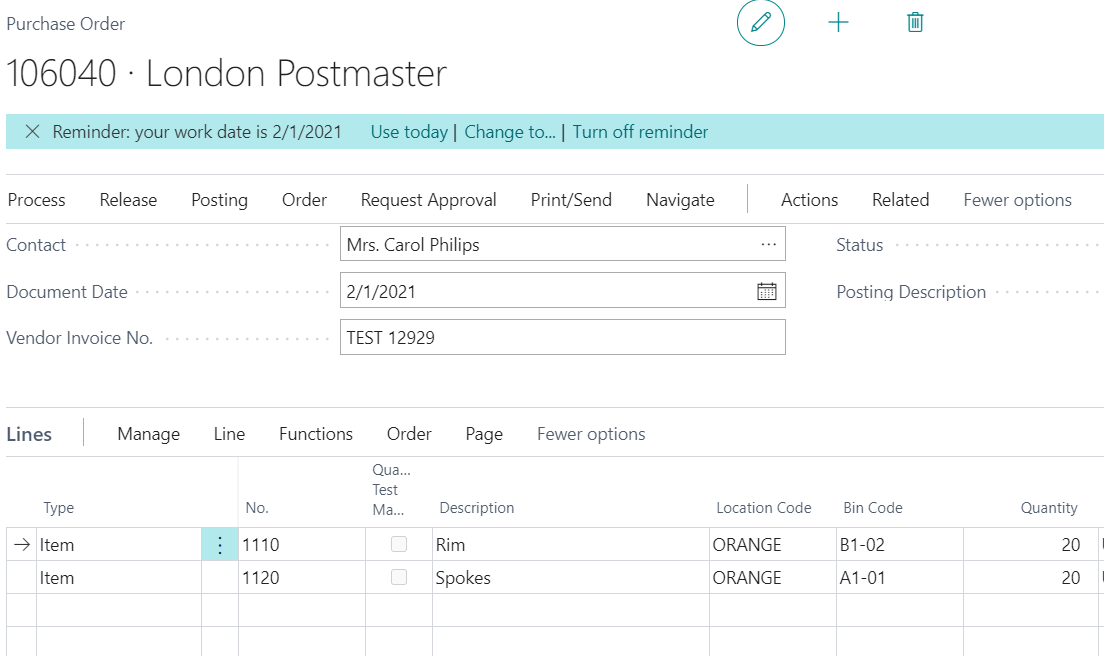
    pastedimage1612394623203v2.png

    The Qty to Receive is blank, since Require Receive is set to Orange Location. I click Actions/Warehouse/Create Whse. Receipt

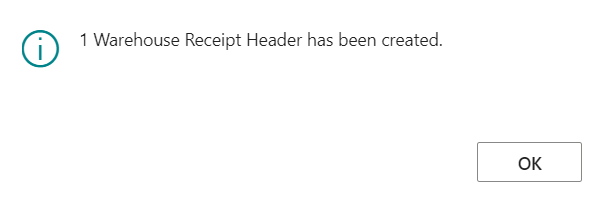
    pastedimage1612394687662v3.png pastedimage1612394715704v4.png

    Under Warehouse Setup, make sure your Number Series is setup. The Require X come from the Location so no need to set this.
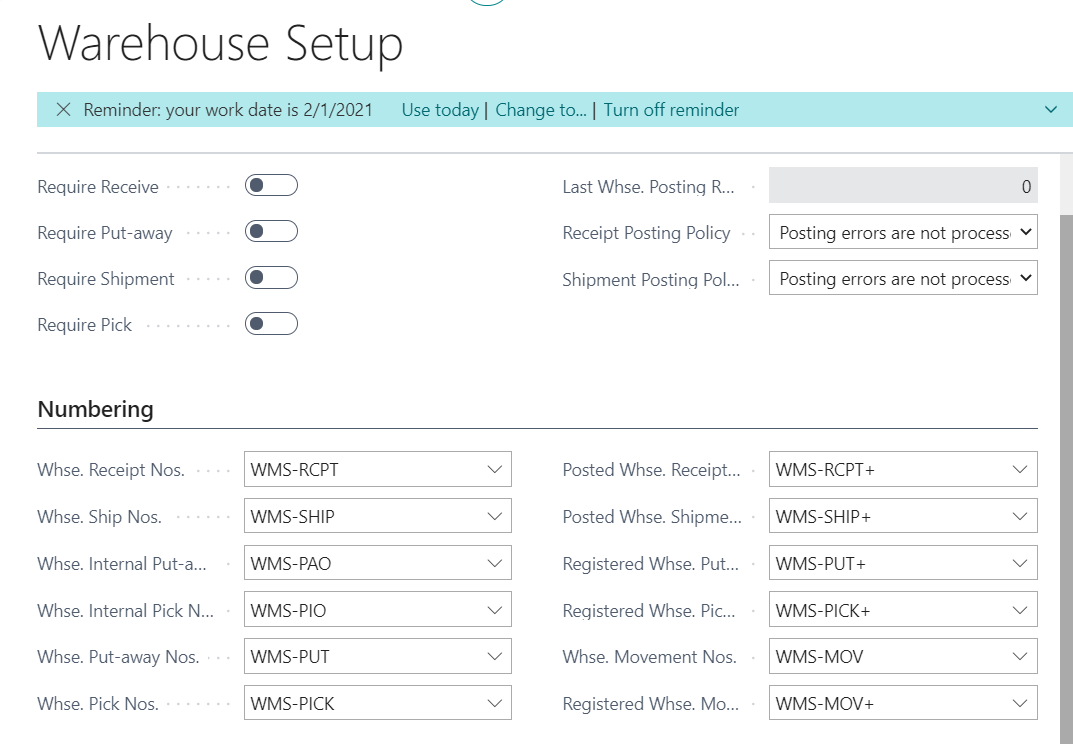
    pastedimage1612394805490v5.png

    Check my settings with yours and test again.

    Hope this helps.

    Thanks.

    Steve

Under review

Thank you for your reply! To ensure a great experience for everyone, your content is awaiting approval by our Community Managers. Please check back later.

Helpful resources

News and Announcements

Season of Giving Solutions is Here!

Quick Links

Responsible AI policies

As AI tools become more common, we’re introducing a Responsible AI Use…

Neeraj Kumar – Community Spotlight

We are honored to recognize Neeraj Kumar as our Community Spotlight honoree for…

Leaderboard > Small and medium business | Business Central, NAV, RMS

#1
OussamaSabbouh Profile Picture

OussamaSabbouh 1,472

#2
Khushbu Rajvi. Profile Picture

Khushbu Rajvi. 742 Super User 2025 Season 2

#3
YUN ZHU Profile Picture

YUN ZHU 684 Super User 2025 Season 2

Last 30 days Overall leaderboard

Featured topics

Product updates

Dynamics 365 release plans
