web
You’re offline. This is a read only version of the page.
close
Skip to main content

Notifications

Announcements

Community site session details

Community site session details

Session Id :
Microsoft Dynamics GP (Archived)

How to remove ability to post to the General Ledger in GP 2013

(0) ShareShare
ReportReport
Posted on by

Hello Friends,

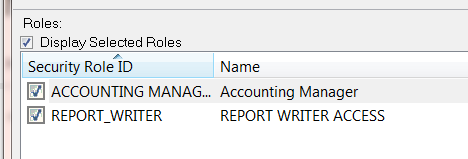
I need to remove access from user to post to GL account and give him view only access in company.
Below is the screen shot for that user currently have access in GP.
1777.Capture.PNG

Please let me know what role ID I need to check/uncheck to remove GL post access.

Any help will appreciated greatly!

Thanks In advance!

Jay

*This post is locked for comments

I have the same question (0)
  • Verified answer
    Tom Cruse Profile Picture
    1,477 on at

    GL CARD INQUIRY should be fine if all you need is to view GL Account info and nothing else.

  • Verified answer
    Rosemary Profile Picture
    10 on at

    Hi,

    I do not use the default roles that came with GP. I use it as a guide for what I need, I test as I add and remove functionality to ensure the user can work properly.

    With 'accounting manager' you can remove the 'post financial series option'.  But, rather than change the default, create one of your own.

Under review

Thank you for your reply! To ensure a great experience for everyone, your content is awaiting approval by our Community Managers. Please check back later.

Helpful resources

News and Announcements

Season of Giving Solutions is Here!

Quick Links

Responsible AI policies

As AI tools become more common, we’re introducing a Responsible AI Use…

Neeraj Kumar – Community Spotlight

We are honored to recognize Neeraj Kumar as our Community Spotlight honoree for…

Leaderboard > 🔒一 Microsoft Dynamics GP (Archived)

Last 30 days Overall leaderboard

Featured topics

Product updates

Dynamics 365 release plans
