web
You’re offline. This is a read only version of the page.
close
Skip to main content

Announcements

No record found.

News and Announcements icon
Community site session details

Community site session details

Session Id :
Microsoft Dynamics CRM (Archived)

CRM-Cases Status=waiting and Timer supposed to stop

(0) ShareShare
ReportReport
Posted on by 5,514

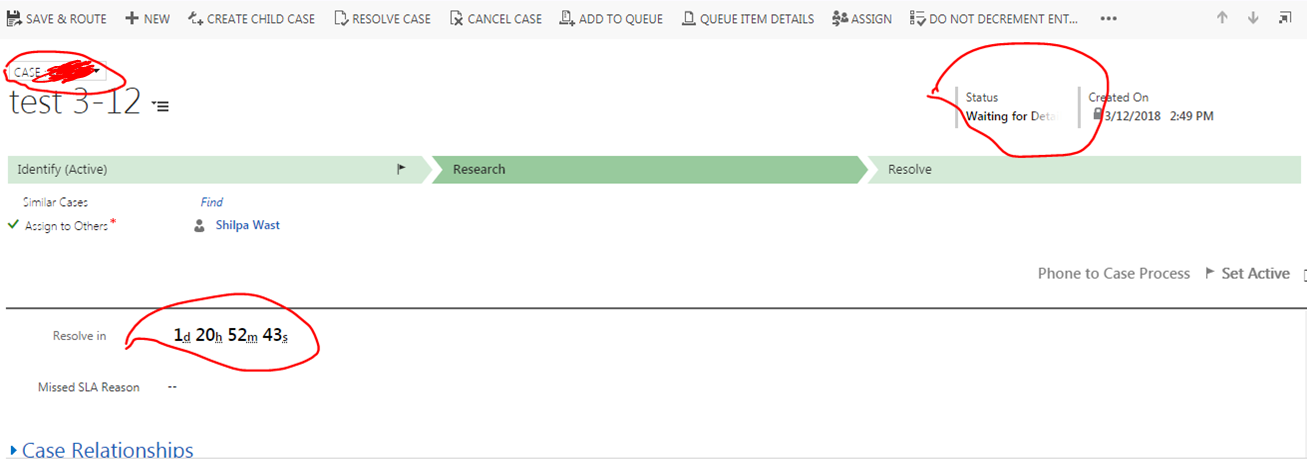
In test CRM I  has created a couple of case forms and created new business process flows but they are not working. 

Currently if I change the status to waiting, the timer is supposed to stop.
3_2D00_13.PNG

*This post is locked for comments

I have the same question (0)
  • Verified answer
    Shahbaaz Ansari Profile Picture
    6,211 on at

    Hi, 

    Timer getting stop because in your timer control you might have set the condition, Please check below screenshot.

    2086.Timer-control.PNG

    If you find it helpful, Please mark my answer verfied.

    Best Regards,

    Shahbaaz

  • Verified answer
    gdas Profile Picture
    50,091 Moderator on at

    Hi ,

    Can you please elaborate your issue  as there are multiple reason which can make timer stop. Also is there any SLA implemented in case?

  • Suggested answer
    Michel van den Brink Profile Picture
    4,697 on at
  • sandeepc Profile Picture
    5,514 on at

    @goutam if i change the status from in progress to waiting for details . the timer supposed to stop aslo when i go to next stage i am getting an error

  • sandeepc Profile Picture
    5,514 on at

    any other possibibalities

  • sandeepc Profile Picture
    5,514 on at

    bf.JPG

  • sandeepc Profile Picture
    5,514 on at

    now the status is in progress state and the resolve in time showing 1 day 2 h 50 m 40 s..so if i change the status to waiting for details then the resolved in should stop to. but it is not showing

  • sandeepc Profile Picture
    5,514 on at

    getting unexpected error

    Unhandled Exception: System.ServiceModel.FaultException`1[[Microsoft.Xrm.Sdk.OrganizationServiceFault, Microsoft.Xrm.Sdk, Version=8.0.0.0, Culture=neutral, PublicKeyToken=31bf3856ad364e35]]: An unexpected error occurred.Detail:
    <OrganizationServiceFault xmlns:i="www.w3.org/.../XMLSchema-instance" xmlns="schemas.microsoft.com/.../Contracts">
    <ActivityId>7def436e-783f-4c93-bac8-d098eaba8073</ActivityId>
    <ErrorCode>-2147220970</ErrorCode>
    <ErrorDetails xmlns:d2p1="schemas.datacontract.org/.../System.Collections.Generic" />
    <Message>An unexpected error occurred.</Message>
    <Timestamp>2018-03-13T14:44:28.8352974Z</Timestamp>
    <ExceptionRetriable>false</ExceptionRetriable>
    <ExceptionSource i:nil="true" />
    <InnerFault i:nil="true" />
    <OriginalException i:nil="true" />
    <TraceText>

    [Microsoft.Crm.ObjectModel: Microsoft.Crm.ObjectModel.GlobalActiveStagePlugin]
    [bb48066e-f22f-412f-a530-91f72e4b859b: GlobalActiveStagePlugin]


    </TraceText>
    </OrganizationServiceFault>

  • Verified answer
    gdas Profile Picture
    50,091 Moderator on at

    Hi,

    Could you please check event viewer log as well as the system jobs log.

    And also restart server ,iis,async services and try once.

  • sandeepc Profile Picture
    5,514 on at

    event viewer log? y should restart server could you pls give more infor

Under review

Thank you for your reply! To ensure a great experience for everyone, your content is awaiting approval by our Community Managers. Please check back later.

Helpful resources

Quick Links

Introducing the 2026 Season 1 community Super Users

Congratulations to our 2026 Super Stars!

Meet the Microsoft Dynamics 365 Contact Center Champions

We are thrilled to have these Champions in our Community!

Congratulations to the April Top 10 Community Leaders

These are the community rock stars!

Leaderboard > 🔒一 Microsoft Dynamics CRM (Archived)

#1
ScottDurow Profile Picture

ScottDurow 2

#2
GJones Profile Picture

GJones 1

Last 30 days Overall leaderboard

Featured topics

Product updates

Dynamics 365 release plans
