web
You’re offline. This is a read only version of the page.
close
Skip to main content

Announcements

No record found.

News and Announcements icon
Community site session details

Community site session details

Session Id :
Small and medium business | Business Central, N...
Answered

In Marketing Setup, May I know what is Bus. Relation Code and how to set it up in Navision 2018

(0) ShareShare
ReportReport
Posted on by 4,999

Hi,

I would like to set up contacts in Navision, but realize that its bit complicated.

I have set up the Contact number series, but how do I set up Bus. Relation Code? Is there a best practice?

In Marketing Setup, May I know what is Bus. Relation Code and how to set it up in Navision 2018?
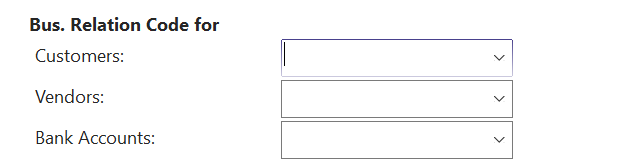
pastedimage1636442164328v1.png

thank you!

I have the same question (0)
  • Suggested answer
    Nitin Verma Profile Picture
    21,788 Moderator on at

    Please put the same no. series of each master here, its required to create customer/contact relation

  • Verified answer
    Marco Mels Profile Picture
    Microsoft Employee on at

    Hello,

    This doc may help:

    docs.microsoft.com/.../marketing-business-relations

    Thanks.

  • joshtechsolutions Profile Picture
    4,999 on at

    Hi  Nitin,

    I have put Contact as the Contact no.

    pastedimage1636528564689v1.png

    And the same as my Customer and Vendor, just wondering won't this arrangement overlap?

    May I ask what is the next thing I should be looking at to configure so that my contacts can work on my Sales Order and Purchase Order?

    pastedimage1636528591656v2.png

    Thank you!

  • Verified answer
    Community Member Profile Picture
    on at

    Josh,

    Here is a Marketing/Relationship Management manual you can use for all the Functionality.

    Thanks,

    Steve

    NA2009-Relationship-Mgmt.rar

Under review

Thank you for your reply! To ensure a great experience for everyone, your content is awaiting approval by our Community Managers. Please check back later.

Helpful resources

Quick Links

Introducing the 2026 Season 1 community Super Users

Congratulations to our 2026 Super Stars!

Congratulations to our 2025 Community Spotlights

Thanks to all of our 2025 Community Spotlight stars!

Leaderboard > Small and medium business | Business Central, NAV, RMS

#1
OussamaSabbouh Profile Picture

OussamaSabbouh 1,986 Super User 2026 Season 1

#2
YUN ZHU Profile Picture

YUN ZHU 1,071 Super User 2026 Season 1

#3
Dhiren Nagar Profile Picture

Dhiren Nagar 975 Super User 2026 Season 1

Last 30 days Overall leaderboard

Featured topics

Product updates

Dynamics 365 release plans
