web
You’re offline. This is a read only version of the page.
close
Skip to main content

Announcements

No record found.

News and Announcements icon
Community site session details

Community site session details

Session Id :
Small and medium business | Business Central, N...
Suggested Answer

Workflows: avoid approval when Sales Order paid

(0) ShareShare
ReportReport
Posted on by 120

We have a workflow set up so that it sends approval requests for Sales Orders above a certain value ($100k). These Sales Orders are normally for multiple units and have an associated pre-payment invoice. The issue is, after the pre-payment invoice is paid we can start shipping. This is done in batches through the Sales Order. However, whenever the shipping team open/release for a new batch shipment, it sends the Sales Order off for re-approval. What kind of filter might we put on the Workflow or amendment so that once it has been approved once, it doesn't keep ending re-approval?

The current trigger looks like this:
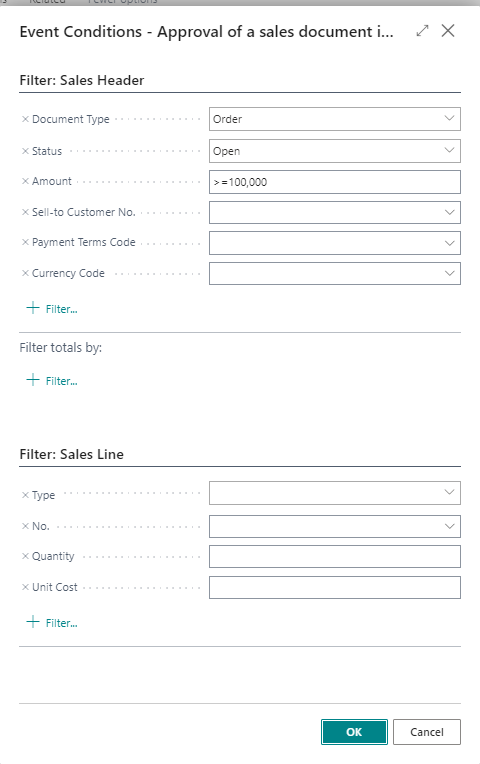
pastedimage1646212295665v1.png

I have the same question (0)
  • Suggested answer
    JAngle Profile Picture
    157 on at

    Once a prepayment has been posted the field "Last Prepayment No." is populated. Perhaps your filter could be as simple as "Last Prepayment No." = ''

  • JasonW Profile Picture
    120 on at

    We tested this but it seems to cancel the approval workflow in its entirety.

  • Dallefeld Profile Picture
    229 User Group Leader on at

    Are you saying that nothing goes through approval now?

    What filter did you add?

  • JasonW Profile Picture
    120 on at

    This filter was used:
    pastedimage1647322111745v1.png

  • Suggested answer
    JAngle Profile Picture
    157 on at

    Filter for blank is ‘’

  • JasonW Profile Picture
    120 on at

    We tried this:

    Screenshot.jpg

    This cancelled the need for an approval

Under review

Thank you for your reply! To ensure a great experience for everyone, your content is awaiting approval by our Community Managers. Please check back later.

Helpful resources

Quick Links

Introducing the 2026 Season 1 community Super Users

Congratulations to our 2026 Super Stars!

Meet the Microsoft Dynamics 365 Contact Center Champions

We are thrilled to have these Champions in our Community!

Congratulations to the March Top 10 Community Leaders

These are the community rock stars!

Leaderboard > Small and medium business | Business Central, NAV, RMS

#1
OussamaSabbouh Profile Picture

OussamaSabbouh 2,021 Super User 2026 Season 1

#2
YUN ZHU Profile Picture

YUN ZHU 1,083 Super User 2026 Season 1

#3
Teagen Boll Profile Picture

Teagen Boll 731 Super User 2026 Season 1

Last 30 days Overall leaderboard

Featured topics

Product updates

Dynamics 365 release plans
