web
You’re offline. This is a read only version of the page.
close
Skip to main content

Announcements

No record found.

News and Announcements icon
Community site session details

Community site session details

Session Id :
Microsoft Dynamics GP (Archived)

Unable to void a payable transaction

(0) ShareShare
ReportReport
Posted on by 617

Hi All,

We are using GP 10.0. One of the user created a manual payment transaction of type Check. Now, when the user tried to void the payable document from 'Void Open Payable Transaction' window, it is giving the following error;
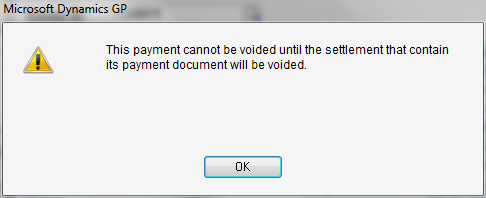
When I tried to view the Manual Payment created earlier, it is saying that I cannot edit posted payment. I tried to void this posted payment through 'Void Historical Transactions', but this payment was not listed there.

What should I do to void this payable transaction ?

Thanks

*This post is locked for comments

I have the same question (0)
  • Frank Hamelly | MVP, MCP, CSA Profile Picture
    46,631 Moderator on at

    Did you check to make sure it's not sitting in Void Open Transactions?

  • Community Member Profile Picture
    on at

    Hello Frank

    I am trying to Void Historical Payable Transactions in Dynamic GP 2013. When I click a Document to Void it gives me an error as "There is no default Accounts Payables account configured". I have not mapped any Accounts to any Vendor through Vendor Maintenance. Basically I don't want to Map an Accounts. I have tested this case in Demo version i.e. on Fabricam Inc and it is working there perfectly. I have checked the Payable Set up and kept the set up same like Fabricam but still I am getting same error.

    Please let me know if any resolution you have.

    Thanks & regards,

    Sanjay Parab.

  • Suggested answer
    Frank Hamelly | MVP, MCP, CSA Profile Picture
    46,631 Moderator on at

    Check Posting Accounts in Administration>>Setup>>Posting>>Posting Accounts Sanjay.  The error looks like there is no default Accounts Payable account set there.

  • Community Member Profile Picture
    on at

    Thank you Frank It works!

  • Robyn Profile Picture
    1,753 on at

    We have this same error on 2 clients.  Prior to GP 2013 upgrades they could void without having to have a default posting account.  One of these clients is quite adamant that this be resolved as they don't want a default posting account as it then defaults to the Transaction Entry - Distribution screen.  They require that this be manually entered due to account setup.  How can we resolve this conflict?

    Thanks for your help.

  • Community Member Profile Picture
    on at

    If multiple accounts payable accounts are used for this same vendor, is there another way to void the check without entering a default accounts payable account for the vendor? If the single payable transaction went to multiple A/P accounts, the void would not use the right distribution codes if you can only use the A/P account entered on the vendor.

Under review

Thank you for your reply! To ensure a great experience for everyone, your content is awaiting approval by our Community Managers. Please check back later.

Helpful resources

Quick Links

Introducing the 2026 Season 1 community Super Users

Congratulations to our 2026 Super Stars!

Meet the Microsoft Dynamics 365 Contact Center Champions

We are thrilled to have these Champions in our Community!

Congratulations to the April Top 10 Community Leaders

These are the community rock stars!

Leaderboard > 🔒一 Microsoft Dynamics GP (Archived)

#1
Shravan Attelli Profile Picture

Shravan Attelli 1

Last 30 days Overall leaderboard

Featured topics

Product updates

Dynamics 365 release plans
