web
You’re offline. This is a read only version of the page.
close
Skip to main content

Notifications

Announcements

No record found.

Community site session details

Community site session details

Session Id :
Small and medium business | Business Central, N...
Suggested Answer

Item attributes in business central

(0) ShareShare
ReportReport
Posted on by 215

When an inventory item has several item attributes, how can you get each attribute to be posted to a different general ledger account.

I have the same question (0)
  • Suggested answer
    Community Member Profile Picture
    on at

    John,

    The Item Attributes are more for defining an Item further beyond Item Category, Product Group. If you want attributes to be posted to General Ledger Accounts or have an effect on a posted entry, you are talking more about Dimensions. You can see the Dimension entries on the General Ledger and sub-ledgers. Item Attributes also help Users filter to find a specific Item by the Attribute Categories.

    Most of my customers use Dimensions for Product Lines or Brand.

    Hope this helps and Happy New Year.

    Steve

  • John P Profile Picture
    215 on at

    Thanks Steve,. What would be the best way to post the following scenario to Income statement Revenue accounts?  Client sells T shirts that are packaged in quantities of 1 and 5. and each package can have a different color such as red or white.

  • John P Profile Picture
    215 on at

    Thanks Steve,. What would be the best way to post the following scenario to Income statement Revenue accounts?  Client sells T shirts that are packaged in quantities of 1 and 5. and each package can have a different color such as red or white.

  • Suggested answer
    Community Member Profile Picture
    on at

    John,

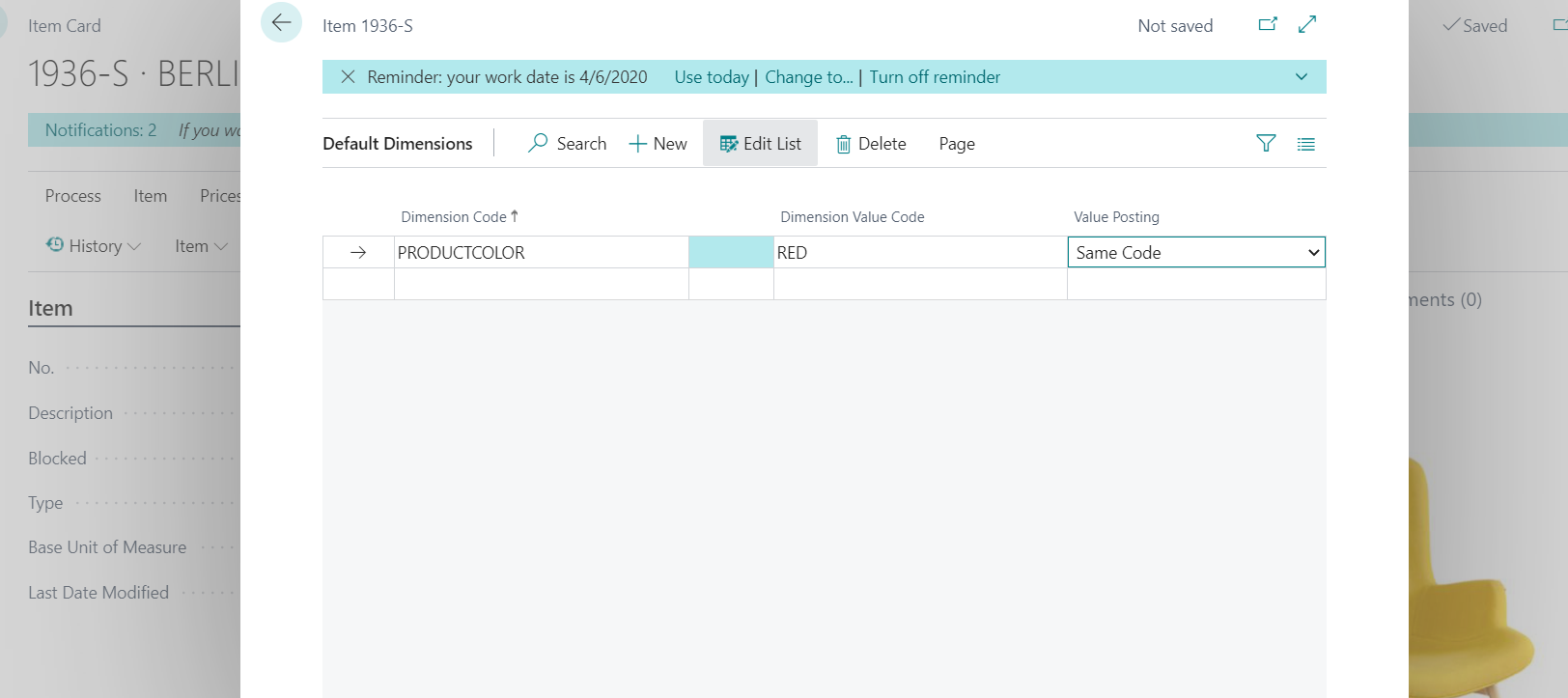
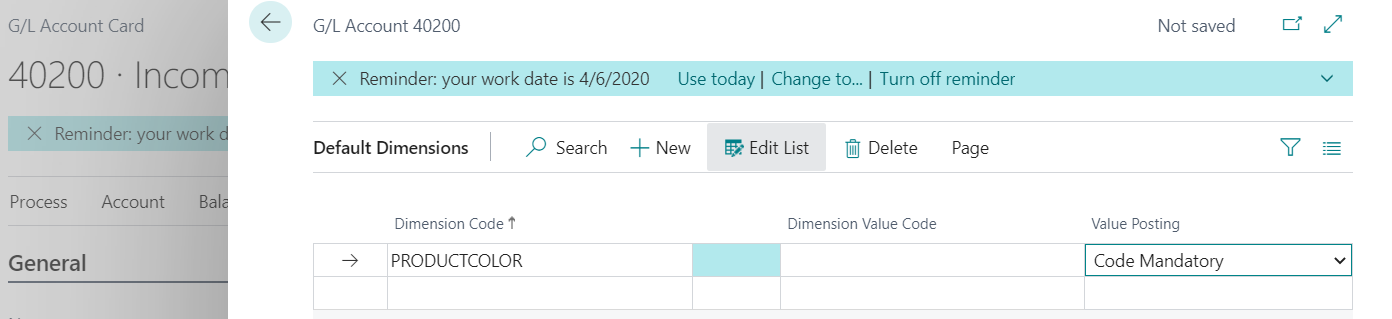
    Based on your scenario, you want to know the color red or white. I am guessing these are NOT separate Items. If not, if I wanted to know the Color, I would create a dimension for Product Color and have values like Red, White, Mixed, etc.... You would set the Dimension Code Mandatory for the Dimension Product Color, on the Revenue Account(s). On each Item, setup the Dimension Product Color, Code Mandatory and leave value Blank so the User can enter the Color on the Sales Order.

    Now, if you do have separate Items by Color, then you can setup the Item Dimension value with the correct Color and the User will not need to enter anything.

    I hope you follow the setup but here are a few screen shots:
    pastedimage1609453314780v1.png

    pastedimage1609453366510v2.png

    My pic above is using a specific Item to a specific color. If I left value blank, then switch Value Posting to Code Mandatory and user selects in Sales Order. Note that by setting everything up like this any entry involving the Items will require this Dimension to be filled in. If you leave the Item Dimension off, then only Posting to the GL Account example will require the Dimension to be filled in.

    Hope this gives you direction and resolution.

    Thanks,

    Steve

  • Suggested answer
    JAngle Profile Picture
    133 on at

    What’s been described is common in fashion/apparel solutions. In Pebblestone fashion for example you can state a different general product posting group on the variant level. This is what will actually which g/l account is used. The dimension suggestion would be a lame user experience I feel because you have to get setups correct right through the process flow. Short term workaround perhaps but a long term robust solution would involve a modification.

    The solution I’ve mentioned is on appsource. Worth a trial perhaps.

  • Suggested answer
    Community Member Profile Picture
    on at

    John,

    Josh brings up a good point. Not knowing your industry you could use the Pebblestone Fashion Matrix. Check to see if you country version is available for Cloud solution. I know they were building for NA and some other countries in 2020. If administration of Dimensions is too costly, people time, then you could follow the customization path to reflect the Color attribute on the GL Entry table during posting. You might consider using a Variant to show the Color and you will still need a customization to show Variant on the GL Entry Table.

    Last thought for the beginning of 2021 :)  You might want to consider using Variant to designate the Color, for a single Item No. and use Power BI or Jet Reports to show Revenue Sales, By Item, By Variant Color. This might a solution and no customization and dimension administration.

    Hope this give you some things to think about.

    Thanks,

    Steve

Under review

Thank you for your reply! To ensure a great experience for everyone, your content is awaiting approval by our Community Managers. Please check back later.

Helpful resources

Quick Links

Responsible AI policies

As AI tools become more common, we’re introducing a Responsible AI Use…

Neeraj Kumar – Community Spotlight

We are honored to recognize Neeraj Kumar as our Community Spotlight honoree for…

Leaderboard > Small and medium business | Business Central, NAV, RMS

#1
OussamaSabbouh Profile Picture

OussamaSabbouh 2,135

#2
YUN ZHU Profile Picture

YUN ZHU 733 Super User 2025 Season 2

#3
Sumit Singh Profile Picture

Sumit Singh 612

Last 30 days Overall leaderboard

Featured topics

Product updates

Dynamics 365 release plans