web
You’re offline. This is a read only version of the page.
close
Skip to main content

Notifications

Announcements

No record found.

Community site session details

Community site session details

Session Id :
Microsoft Dynamics CRM (Archived)

Duplicates Detected vs Duplicate warning

(0) ShareShare
ReportReport
Posted on by 2 User Group Leader

Hi, 
I have noticed that there are 2 types of Duplicate check pop-ups: Duplicates detected (where it actually says what is duplicate) and Duplicate warning (which is completely empty). 

Why is there 2? What is the purpose of the Duplicate Warning pop-up if it is just empty? 
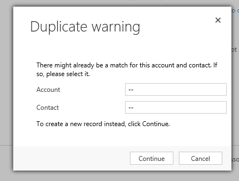
Capture-_2D00_-Duplicate-warning.PNG

*This post is locked for comments

I have the same question (0)
  • Verified answer
    ashlega Profile Picture
    34,477 on at

    Hi,

     I think the second one occurs on lead qualification, and, it seems, it's been there for a while:

    community.dynamics.com/.../211769

     There is a reference to a plugin there that may help with this:

    ashwaniashwin.wordpress.com/.../modify-lead-qualification-process-in-microsoft-dynamics-crm-2013

  • Inogic Profile Picture
    682 on at
    Hi,
    I understand your confusion about the two different duplicate check pop-ups in Dynamics 365. While the system offers both "Duplicates detected" and "Duplicate warning" messages, they serve distinct purposes.
    • Duplicates detected: This pop-up appears when the system identifies potential duplicate records based on pre-defined rules. It provides details about the specific fields that caused the match, allowing you to make an informed decision about merging or keeping the records separate.
    • Duplicate warning: This pop-up, however, doesn't provide specific details about potential duplicates. It acts as a general alert, flagging the possibility of duplicates without concrete evidence. This can occur when the rules are configured to check for duplicates based on limited criteria, leading to a warning without pinpointing the exact matches.
    To address potential duplicates effectively, you should explore DeDupeD App by Inogic.
    DeDupeD is a data deduplication app by Inogic. It enables you to detect, prevent, and merge duplicate records of any and all entities, be they (OOB or Custom). With DeDupeD, you can:

    Detect Duplicates: The app shows Form Notification to inform users about existing duplicates for a record.  Additionally, by clicking on the “Show Duplicates” button, users can view duplicate records from any corner of the CRM.
    Prevent Duplicates:  The app displays a duplicate prevention pop up with all the existing duplicates of a record to prevent duplicates from entering the CRM system.
    Merge Duplicates: Identify and merge the duplicates directly from the record forms. You can establish a master record and merge all subordinate records into it.
    Mass Merge Historical Duplicate Records: With DeDupeD’s Windows-based tool, users can merge up to “N” number of history duplicate records in Bulk. This ensures a clean and accurate data environment.
    There is much more to DeDupeD’s amazing features.

    To try this app for your crm data cleaning needs, download your 15-day free trial from our website or Microsoft AppSource.
     
    Thanks!

Under review

Thank you for your reply! To ensure a great experience for everyone, your content is awaiting approval by our Community Managers. Please check back later.

Helpful resources

Quick Links

Responsible AI policies

As AI tools become more common, we’re introducing a Responsible AI Use…

Neeraj Kumar – Community Spotlight

We are honored to recognize Neeraj Kumar as our Community Spotlight honoree for…

Leaderboard > 🔒一 Microsoft Dynamics CRM (Archived)

#1
SA-08121319-0 Profile Picture

SA-08121319-0 4

#1
Calum MacFarlane Profile Picture

Calum MacFarlane 4

#3
Alex Fun Wei Jie Profile Picture

Alex Fun Wei Jie 2

Last 30 days Overall leaderboard

Featured topics

Product updates

Dynamics 365 release plans
